Pack201 | Operator Interface | Section 4
EN | 10
© Bosch Packaging Technology, Inc.
All rights reserved 2012
4.6 HMI Screens
4.6.1 Description
The HMI screens are shown on the following pages
with a brief description of each screen�
4.6.2 Main Screen
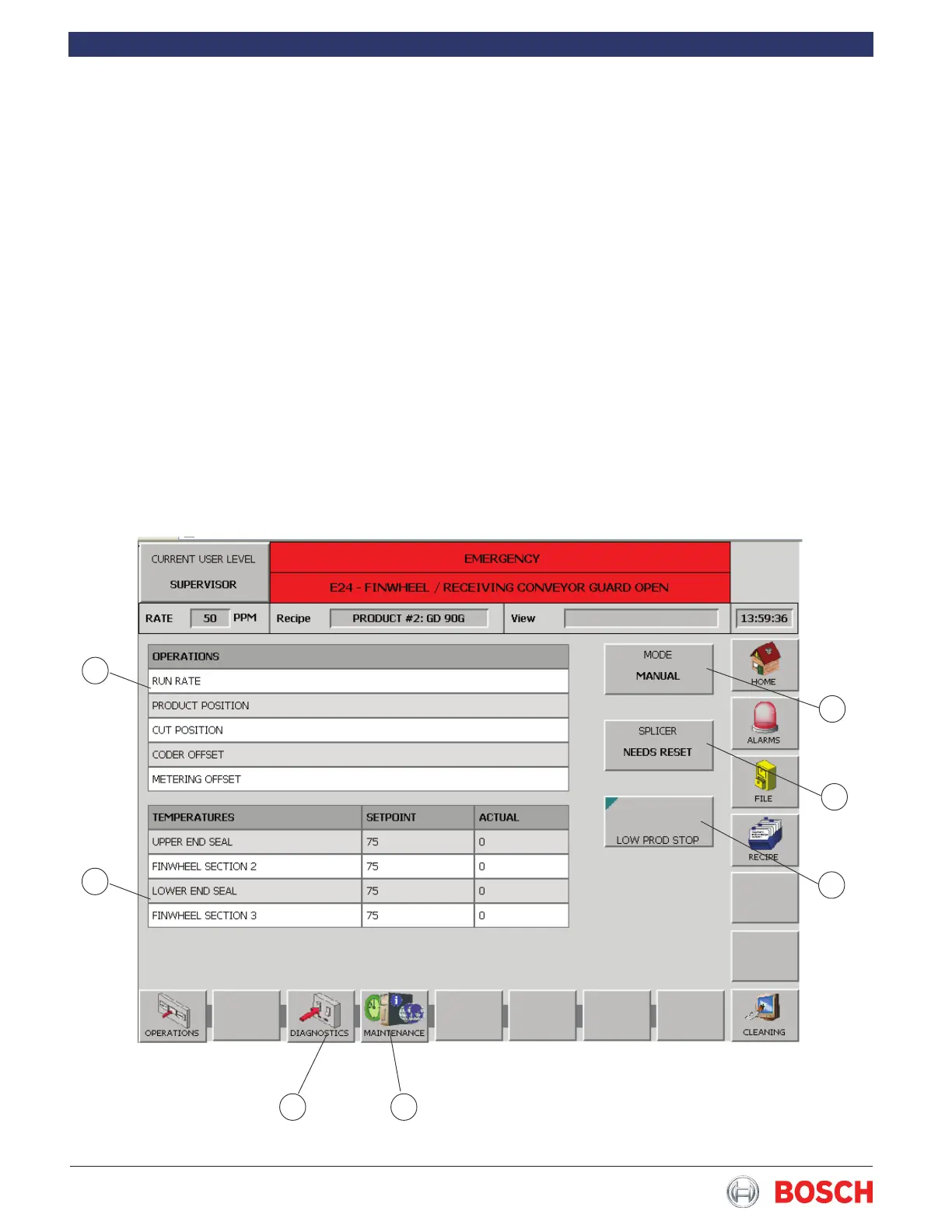
• The Main screen allows the operator to change the
Run Rate or Product Position (1 Figure 7)�
• The Temperature Setpoints for any heated devices,
(2 Figure 7)�
• Allows access to the Diagnostics (3 Figure 7)�
• Allows access to the Maintenance screen (4 Figure
7)�
1
2
3 4
5
6
7
• Allows the operator to select the splicer knife (5
Figure 7)�
• Allows the operator to reset the splicer knife (6
Figure 7)�
• Allows the operator to change the machine operat-
ing mode (7 Figure 7)�
Figure 7


 To Next Page