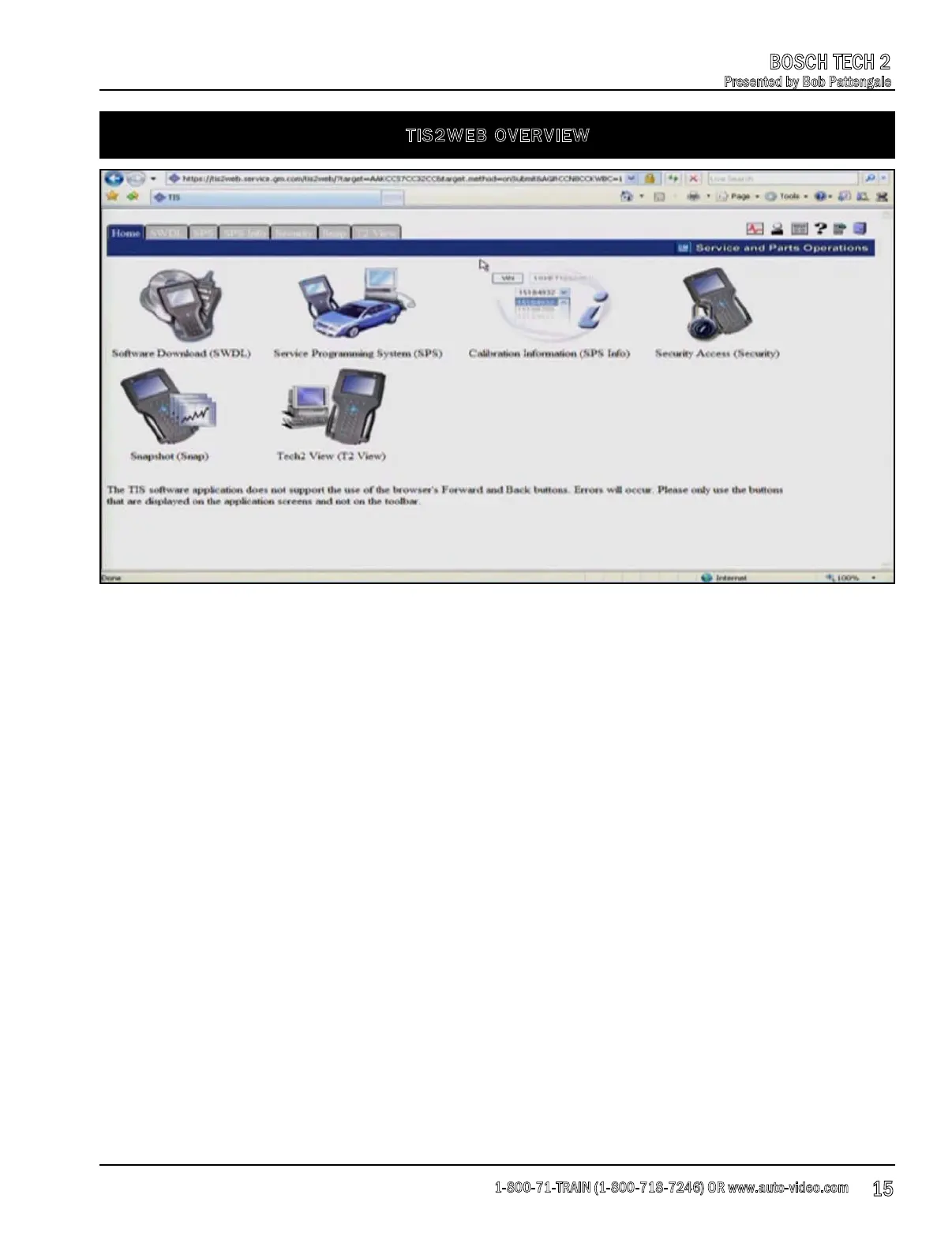
TIS2WEB OVERVIEW
Once you have your TIS2 Web account set up, you will need to know what functions and options
are available. Below is a brief overview of each option that you will have available to you.
1. Software Download (SWDL): This option gives you the ability to download the most current
software update for your Tech 2.
2. Service Programming System (SPS): The service programming system (SPS) option allows you
to re
flash control modules in the GM vehicles that you will be working on.
3. Calibration Information (SPS Info): This option is very similar to the corresponding option on
the free side of the website. This option allows you to enter the VIN of the vehicle that you are
working on and give you a list of flashes that are available for that vehicle.
4. Security Access (Security): Newer GM vehicles are going
to start having PIN numbers. This PIN
will be required to initialize the security within the keys. Currently, all that needs to be done is to
use the Pass Lock System and match the keys up to the modules.
5. Snapshot (Snap): This is where you will be extracting information from the Tech 2 that you
have saved.
6. Tech2 View (T2 View): This option allows you to view the Tech2 on a PC as well as on the
screen of the tool.
1-800-71-TRAIN (1-800-718-7246) OR www.auto-video.com
BOSCH TECH 2
Presented by Bob Pattengale
15











 To Next Page