Home
Bosch
Diagnostic Equipment
TECH 2
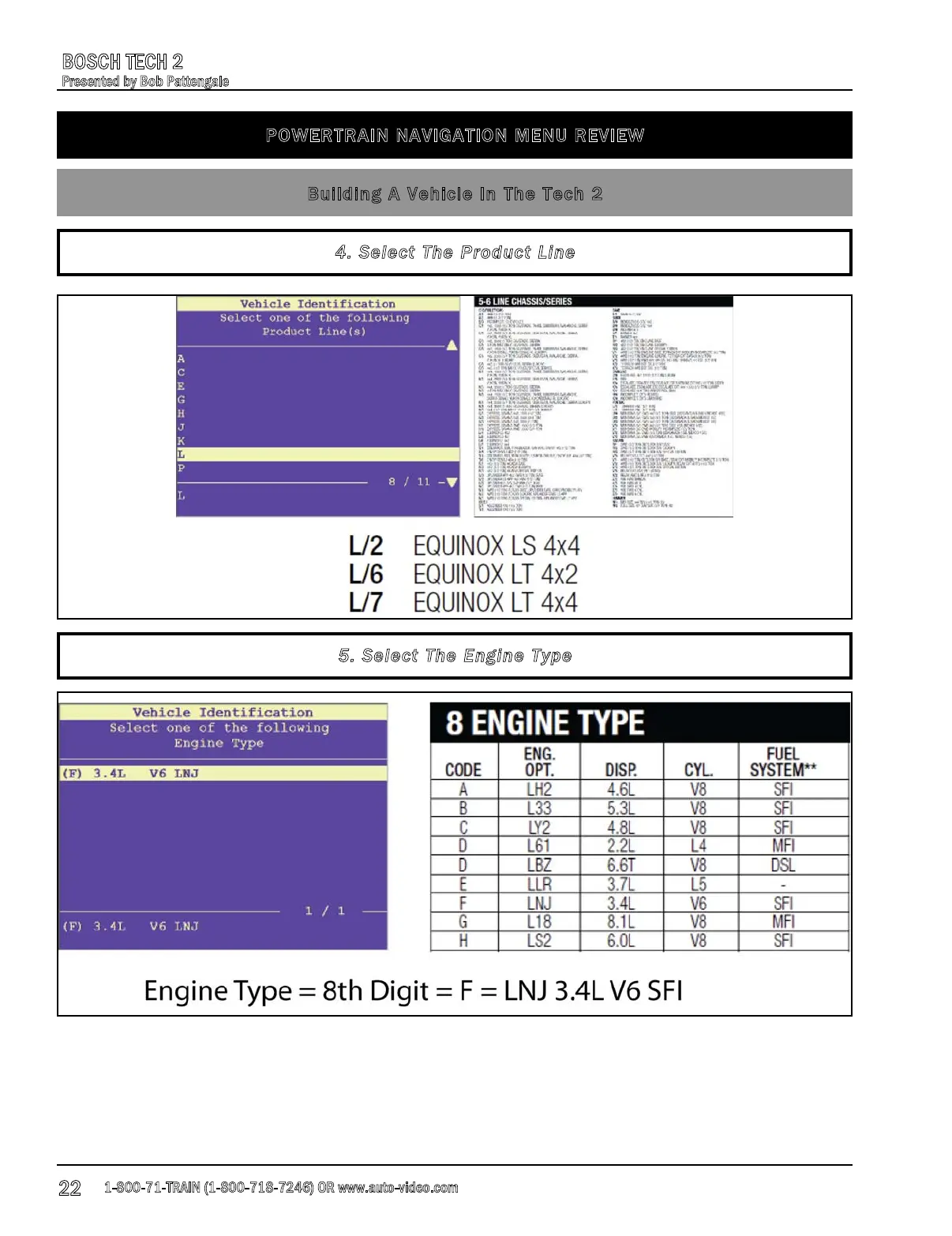
Page 22 (Select the Product Line)
Bosch TECH 2 - Select the Product Line; Select the Engine Type
68 pages
Manual
Save Page as PDF
To Next Page
To Next Page
To Previous Page
To Previous Page
Loading...
P
O
W
E
R
T
R
A
I
N
N
A
V
I
G
A
T
I
O
N
M
E
N
U
R
E
V
I
E
W
B
u
i
l
d
i
n
g
A
V
e
h
i
c
l
e
I
n
T
h
e
T
e
c
h
2
4
.
S
e
l
e
c
t
T
h
e
P
r
o
d
u
c
t
L
i
n
e
5
.
S
e
l
e
c
t
T
h
e
E
n
g
i
n
e
T
y
p
e
1-800-71-TRAIN
(1
-
8
0
0-718-7246
)
O
R
www.auto-video.com
BOSCH TE
C
H
2
Presented by B
ob Pattengale
22
21
23
Table of Contents
Main Page
Table of Contents
1
Overview
2
Common Connectors and Components
4
Getting Started
4
Setting up the Tech 2
5
Power up and Display
5
How to Find the Online Manuals
6
Updating the Software Version
7
Tech 2 Update Procedures
8
National Automotive Service Task Force (Nastf)
11
Registering an Account with Tis2Web
13
Tis2Web Overview
15
Setting up Tech2 View (T2 View)
16
Main Menu Navigation
17
Powertrain Navigation Menu
18
Building a Vehicle in the Tech 2
18
Select the Year of the Vehicle
20
Select the Vehicle Type
21
Select the Vehicle Make
21
Select the Product Line
22
Select the Engine Type
22
Powertrain Navigation Menu Review
23
Diagnostic Menu
23
Diagnostic Trouble Codes (Dtcs)
24
Data Display
26
Special Functions
27
Using the Candi Module
29
Clearing Diagnostic Trouble Codes (Dtcs)
31
Vehicle Control Systems
32
BCM Data
32
Quick Snapshot
34
Recording Data
34
Powertrain Navigation
35
Power Steering Control Module
35
Data Display
36
Tech 2 View
38
Special Functions
38
Module ID Information
38
Special Functions
39
Body Control Module
39
Instrument Panel Cluster
41
Lighting Systems
42
EVAP Systems
43
Basic Component Tests
44
Diagnostic Trouble Codes (Dtcs)
44
Reprogramming
45
Getting Prepared
45
Vehicle Setup
45
Performing the Reprogram
47
Reprogramming Calibration Information
50
Tech 2 View
52
Oil Life Monitor Reset
52
Evap Service Bay Testing
54
Setting up
54
Checking for Leaks
55
EVAP Testing Using a Smoke Machine and the Tech 2
55
Gm MDI Interface
56
Overview
56
Online Information
58
What Is Included in the Kit
59
Gm MDI Vs the Mastertech VCI
60
What Is the Difference
60
Gm MDI Software
60
Setting up the GDS Software and GM MDI Manager
60
Gds Software
61
Basic Navigation
61
Data Display
66
Vehicle & Module Diagnosis
67
Review
68
MDI Tool and GDS Software
68
Related product manuals
Bosch Vetronix Tech 2
20 pages
Bosch TPA 200
196 pages
Mac Tools Mentor Touch ET750
24 pages
Bosch KTS 515
220 pages
Bosch FSA 760
200 pages
Bosch DCI 700
186 pages
Bosch MTS 6531
632 pages
Bosch MTS 6535
18 pages
Bosch MTS 6534
18 pages
Bosch SAIC GRADE-X
72 pages
Bosch MTS 6520 VCI
310 pages
Bosch Diesel Set 3.1
230 pages











 To Next Page