A write-protected slide mechanism is on the top edge of the card under a white plastic CPA-type
device. The correct position is to the middle of the card (unlocked). If the write protect is in the
locked position, Snapshots and Capture Info. cannot be stored, and Service Programming does
not work.
UPDATING THE SOFTWARE VERSION
Tech 2 Update Procedures
The Software Download function of TIS 2000 allows updating of the Tech 2 with the latest
service information. The Software Download function transfer (downloads) updates scan tool
software from the terminal to the scan tool. There are two download modes: Standard and
Custom.
Standard Update
To perform a Standard Tech 2 update:
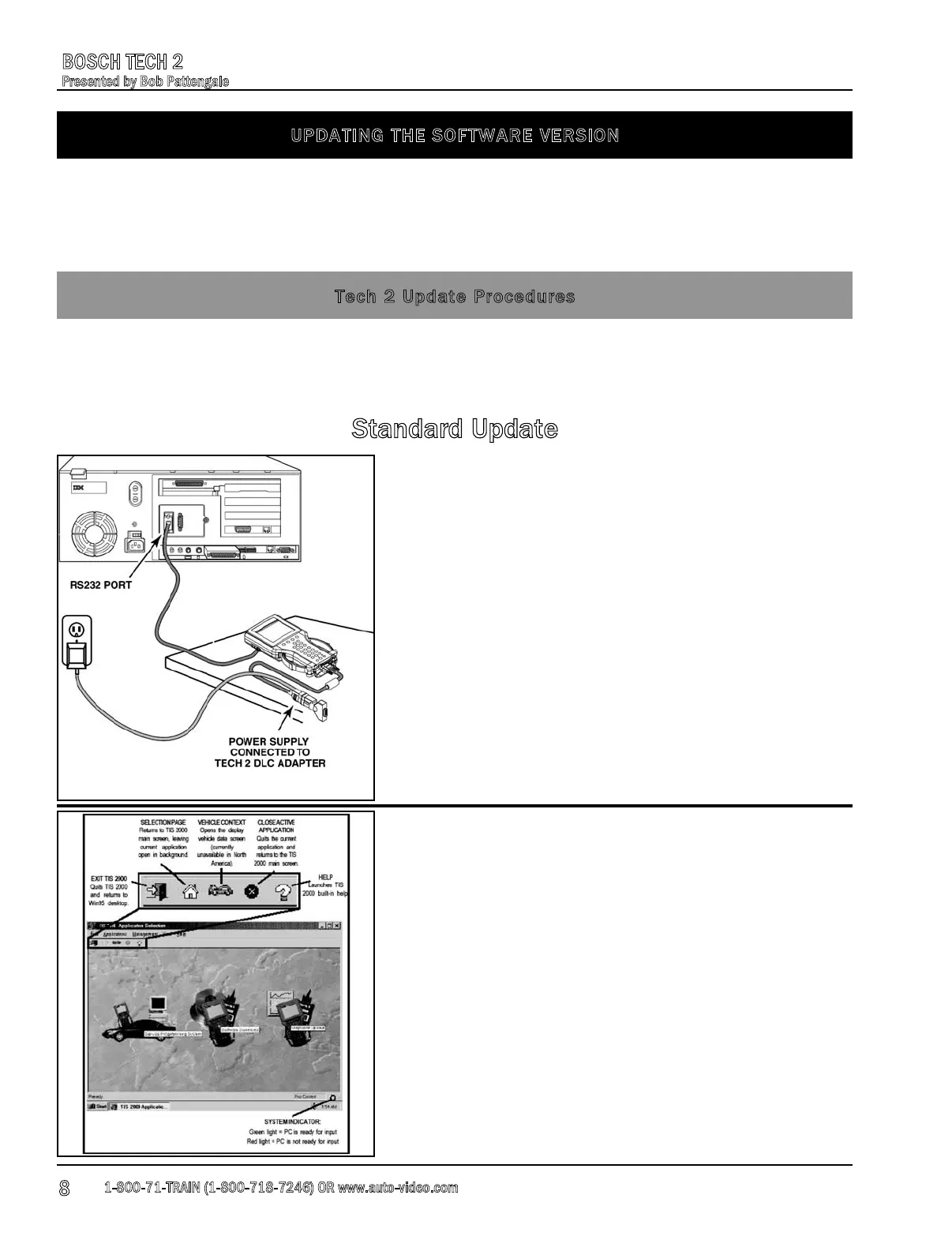
1. Connect the scan tool to the terminal using the RS-
232 cable Fig.1.
2. Power up the scan tool using the AC power supply that
came with the tool Fig.1.
3. At the terminal, start TIS 2000.
4. From the TIS 2000 main screen, select the Software
Download icon Fig. 2.
Fig. 1
Fig. 2
1-800-71-TRAIN (1-800-718-7246) OR www.auto-video.com
BOSCH TECH 2
Presented by Bob Pattengale
8











 To Next Page