MAIN MENU NAVIGATION
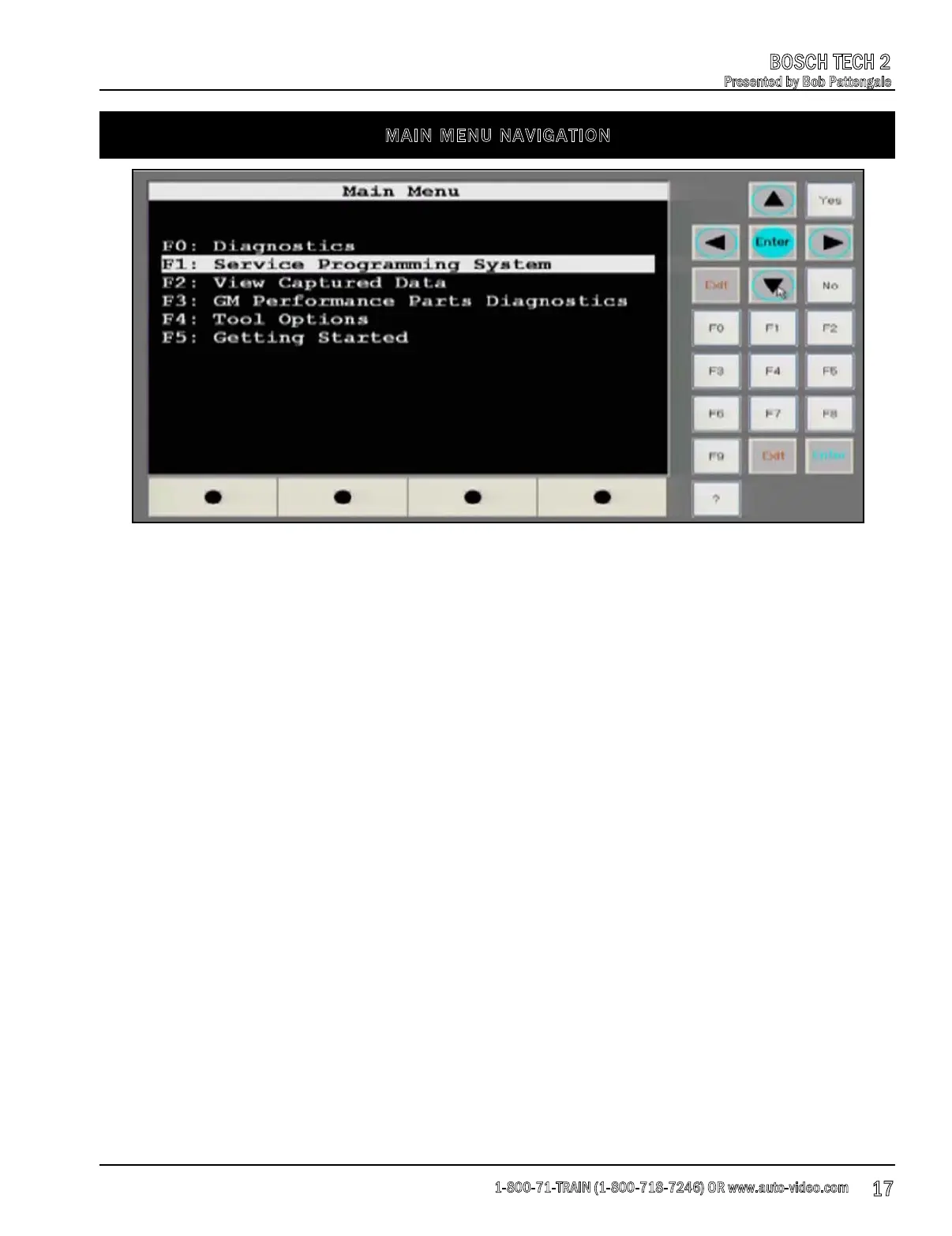
Pictured above is a screen shot of the main navigation menu of the Tech 2 as it is viewed on a
PC using Tech2 View. Below is a brief overview of each option available. Later in the presentation
we will cover each option in more detail.
F0: Diagnostics - This option is where we will begin to diagnose vehicles.
F1: Service Programming System - This function allows you to do “Pass Thru” reprogramming of
modu
les in the vehicle.
F2: View Captured Data - From this menu option we can view screen captures that we have
saved during the diagnostic process.
F3: GM Performance Parts Diagnostics - This is a new menu for the Tech 2 and when you select
it, you will notice that it is only applicable to certain 2010 model year vehicles. The GM
performance division would direct you here if there was a unique reflash ava
ilable for the vehicle
that you are working on.
F4: Tool Options - This option allows you to set up options for your tool such as setting the clock,
screen contrast, units of measurements, language etc.
F5: Getting Started - Using this function is a great way to practice using your Tech 2 at home
without having to connect to a live vehicle. This option contains example data that you can use to
practice navigating the Diagnostics menu of the tool.
1-800-71-TRAIN (1-800-718-7246) OR www.auto-video.com
BOSCH TECH 2
Presented by Bob Pattengale
17











 To Next Page