28
Presented by Bob Pattengale
BOSCH TECH 2
1-800-71-TRAIN (1-800-718-7246) OR www.auto-video.com
SETTING UP DIAGNOSTICS VEHICLE CONTROL SYSTEMS
Diagnostics Menu
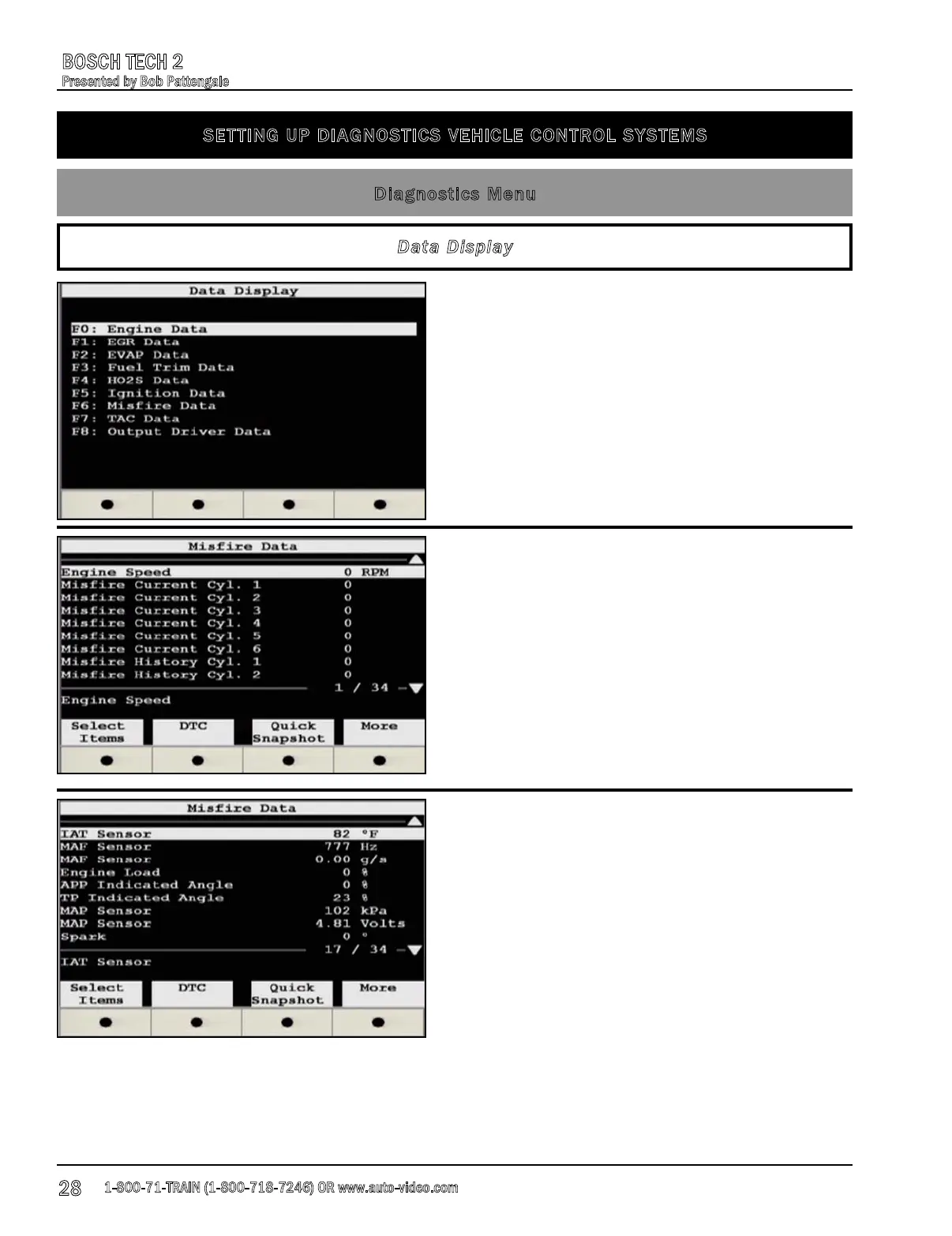
The Data Display function is where we can look at
the individual parameter identifications (PIDs)
such as EGR, EVAP, Fuel Trim, HO2S, Ignition,
Misfire, TAC, and Output Driver Data.
Data Display
Pictured left you can see that we have entered the
Misfire Data option and that there are no current
misfires for our subject vehicle.
Also note that at the bottom right of the capture
we have 1 of 34 data PIDs available to view. To
view the next page of parameters, all you need to
do is to use the arrow keys on the pad of the tool.
You can see in the scren capture to the left that
we have scrolled down to page 17 of the 34 data
PIDSs that are available.











 To Next Page