VideoJet XF E Configuration using a Web browser | en 85
Bosch Sicherheitssysteme GmbH Installation and Operating Manual DOC | V5.51 | 2012.03
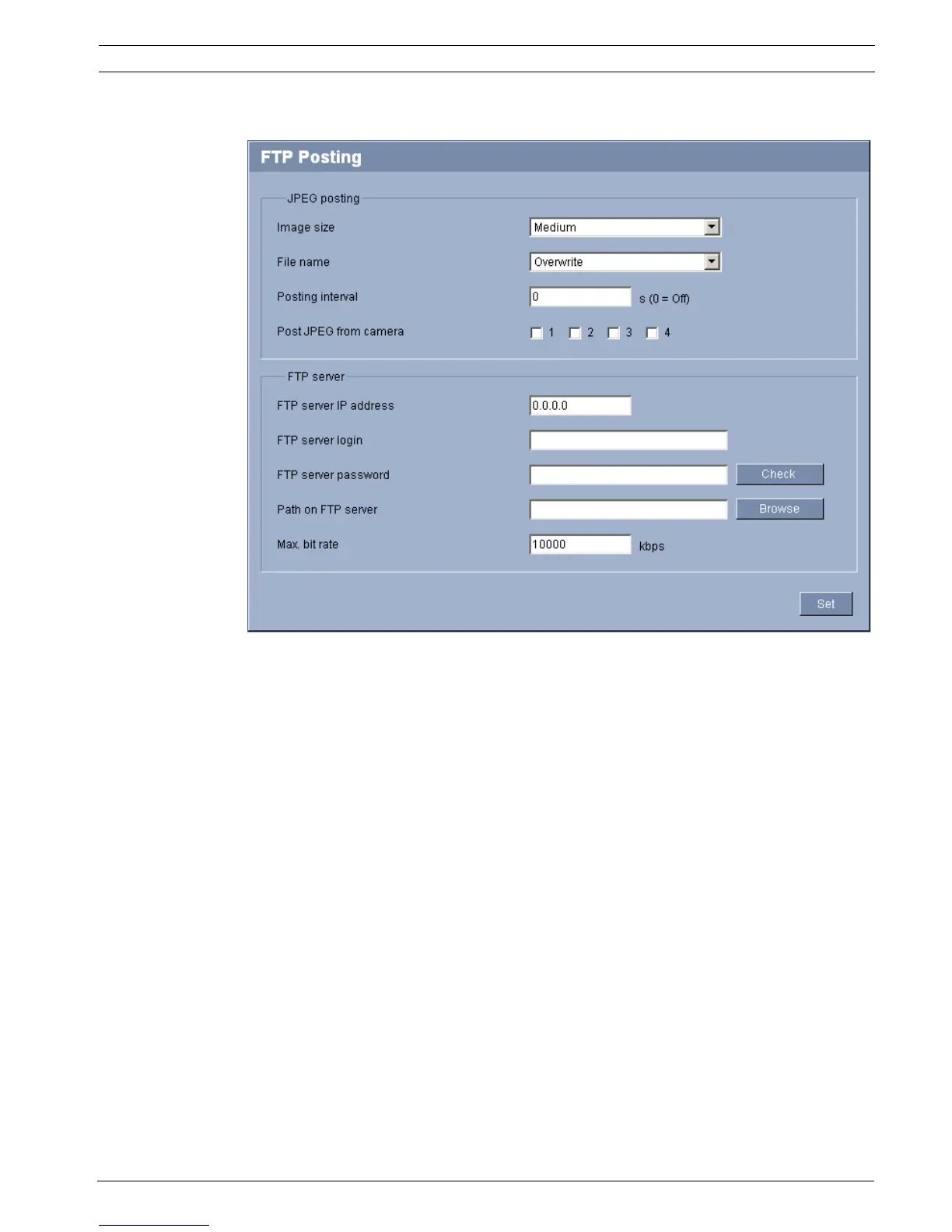
5.44 Advanced Mode: FTP Posting
You can save individual JPEG images on an FTP server at specific intervals. You can then
retrieve these images at a later date to reconstruct alarm events if required. The resolution
corresponds to the highest setting from the two data streams.
Furthermore, you can export selected recordings manually from the RECORDINGS page or
activate the automatic export of alarm recordings on the Recording Profiles settings page.
Image size
Select the resolution you wish the JPEG images to have:
– Medium
352 × 288/240 pixels (CIF)
– Large
704 × 576/480 pixels (4CIF)
File name
You can select how file names will be created for the individual images that are transmitted.
– Overwrite
The same file name is always used and any existing file will be overwritten with the
current file.
– Increment
A number from 000 to 255 is added to the file name and automatically incremented by 1.
When it reaches 255 it starts again from 000.
– Date/time suffix
The date and time are automatically added to the file name. When setting this parameter,


 To Next Page
 Loading...