EasyManua.ls Logo

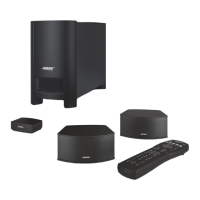
Bose CineMateSERIES II - User Manual

Bose CineMateSERIES II
38 pages
Print Icon
To Next Page IconTo Next Page
Loading...
CINEMATE
®
SERIES II
CINEMATE
®
GS SERIES II
DIGITAL HOME THEATER SPEAKER SYSTEM
Owner’s Guide | Guía de usuario | Notice d’utilisation | Guia dos proprietários
©2014 Bose Corporation, The Mountain,
Framingham, MA 01701-9168 USA
AM350497 Rev.01
CINEMATE
®
SERIES II AND CINEMATE
®
GS SERIES II DIGITAL HOME THEATER SPEAKER SYSTEM
CineMate Series II_AST_Cover.fm Page 1 Wednesday, July 13, 2011 9:27 AM

Questions and Answers

  • J
    Jenny GonzalesAug 13, 2025
    How to fix no sound on Bose Speaker System?
    • L
      Lindsay CostaAug 13, 2025
      If you're not getting any sound from your Bose Speaker System, first, ensure the CineMate® system is turned on—the green LED on the interface module should be lit. Increase the volume. If you have a CineMate GS series II, make sure you've pressed the correct remote button for your desired source. Check that the interface module and speaker cables are firmly connected to the Acoustimass module, and verify connections on the back of the speakers. If using a device other than the TV, ensure it is powered on and playing.
  • S
    Sylvia HumphreyAug 17, 2025
    What to do if Bose Speaker System has no sound when TV is connected to the interface module?
    • R
      rjamesAug 17, 2025
      If your TV is connected to the interface module and there is no sound from your Bose Speaker System, check the connection between the TV and the interface module, ensuring any optical cable is fully inserted. Verify connections from source devices to the TV and ensure the TV isn't muted. Enable the TV's audio output, setting it to FIXED if possible. If the TV audio output is VARIABLE, turn off the TV's internal speakers and increase the TV volume. Ensure audio settings on your source devices are correct. If using optical cable, try a stereo audio cable instead, as your TV may not pass digital audio from source devices through its optical connection.
  • E
    epayneAug 20, 2025
    What to do if Bose CineMateSERIES II Speaker System sound is distorted?
    • E
      Elijah PeckAug 20, 2025
      If your Bose Speaker System is producing distorted sound, ensure that the speaker cables are undamaged and securely connected. Additionally, try reducing the audio output level from the TV connected to the interface module.
  • G
    garnoldAug 25, 2025
    How to stop sound coming from TV when using Bose CineMateSERIES II Speaker System?
    • R
      Ryan FrancoAug 25, 2025
      If you are getting sound from the TV instead of your Bose Speaker System, turn off the TV's internal speakers or reduce the TV volume.
  • B
    Bradley ZavalaAug 28, 2025
    What to do if Bose CineMateSERIES II has no sound when TV is not connected to the interface module?
    • A
      Ann MillerAug 28, 2025
      If your TV is not connected to the interface module and there is no sound from your Bose Speaker System, ensure your source device is on and playing. If you're using an optical cable, make sure it's fully inserted into the interface module. Turn the TV volume all the way down or set it to mute if the TV's internal speakers are not turned off. Also, verify that the audio settings on your source device are correct.
  • W
    Willie MarshSep 1, 2025
    How to troubleshoot a Bose CineMateSERIES II with no power?
    • D
      davidlarrySep 1, 2025
      If your Bose Speaker System has no power, unplug the Acoustimass® module power cord from the AC wall outlet for one minute. Ensure the power cord is securely inserted into the Acoustimass module and reconnect it firmly into an operating AC wall outlet—the green LED should flash 10 times then extinguish. Verify that the interface module is properly plugged into the Acoustimass module. Finally, use the remote control to power on the system.
  • K
    Kristy WalkerSep 5, 2025
    Why is my Bose Speaker System remote control inconsistent?
    • D
      Douglas SteinSep 5, 2025
      If your Bose Speaker System remote control is not working consistently, ensure the battery is correctly installed. Point the remote at the interface module, ensuring a clear line of sight without obstructions. Remove any protective film from the interface module's lens. For CineMate® GS series II remotes, check if the source button flashes when pressed. Also, see if the green LED on the interface module flashes when pressing power, volume, or mute. If issues persist, try programming another device code from the Universal Device Codes book for improved functionality.
  • H
    Hannah WongSep 8, 2025
    Why does my Bose CineMateSERIES II Speaker System have sound but no picture?
    • D
      Dawn WhiteSep 8, 2025
      If your Bose Speaker System has sound but no picture, first, ensure the TV is turned on. Then, check that the correct TV/Video input is selected.

Summary

Safety Information

Additional Safety Information

Important safety instructions and warnings for product use.

System Setup

Connect Speakers to Acoustimass Module

Steps for connecting the left and right speakers to the Acoustimass module.

Connect the Interface Module

Instructions for connecting the interface module to the Acoustimass module.

Connect TV or Audio;Video Source

How to connect your TV or other devices to the CineMate system.

Single Source Device Connection

Connecting a single audio/video device for the best audio quality.

Connect TV Audio Output

Connecting audio from your TV to the CineMate system.

Set TV Audio Properly

Configuring TV settings for optimal sound output to CineMate.

Connect to Power Outlet

Steps for connecting the Acoustimass module to a power source.

Controls and Indicators

Control CineMate System with Remote

How to use the remote to operate the CineMate system's power and volume.

Program Remote for TV and Devices

Steps to set up the remote to control other home theater devices.

Operate TV with Remote

Using the remote to turn on the TV and select channels.

CineMate GS II Remote Functions

Detailed explanation of the CineMate GS II remote's buttons and functions.

Care and Maintenance

Troubleshooting Common Issues

Solutions for problems like no power, no sound, and remote issues.

Bose CineMateSERIES II Specifications

General IconGeneral
ConnectivityWired
Remote ControlYes
Subwoofer Weight23.3 lbs
Wireless ConnectivityNo
Speaker Type2.1
Components2 satellite speakers
CompatibilityTV
Subwoofer Dimensions8.8 x 14.5 x 19.1 inches
Satellite Speakers Dimensions3.3 x 3.3 x 4.2 inches
InputsAnalog Stereo

Related product manuals