EditingMasteringUsing USBConvenient
Functions
Appendixes Quick StartGetting Ready
to Record
Recording/
Playback
Using
Effects
Using
Rhythm
115
Using Mastering in Creating a Song
1
Press the [MENU] button.
2
Use the CURSOR [ ] [ ] buttons to move the
cursor to “MASTERING,” and press the [ENTER]
button.
3
Use the dial to turn MASTERING “ON.”
You’re now in Mastering mode.
4
Press the [EXIT] button a number of times.
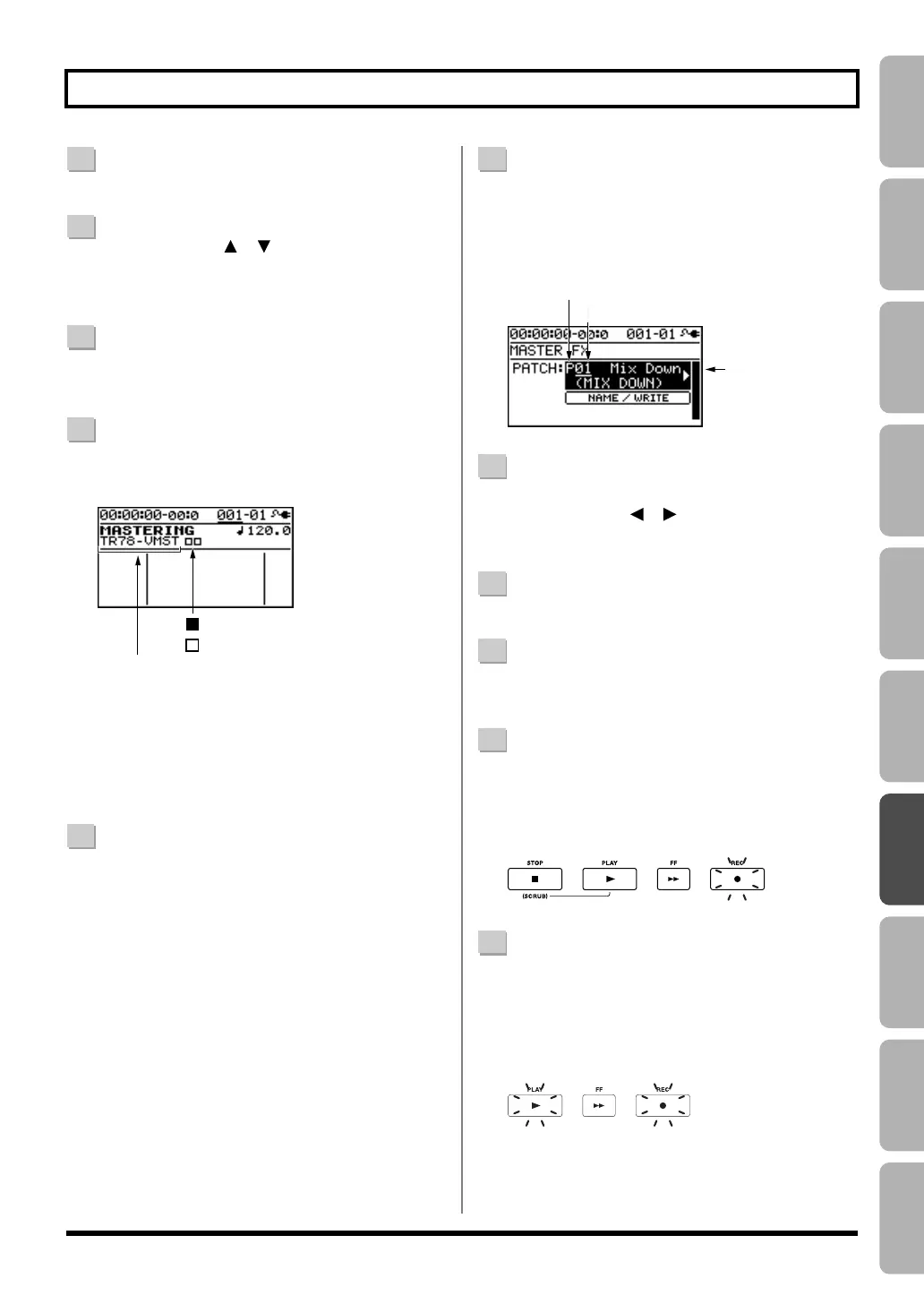
The MASTERING screen will appear.
Mastering-e.eps
As the recording destination, track 7/8 VMST will be
selected as the V-tracks for mastering.
If you want to record onto other tracks, use the
CURSOR buttons and the dial to select the desired
recording-destination tracks.
5
Play back your song, and use the track faders to
adjust the volume balance.
Use the [MASTER] fader to adjust the overall volume.
You should raise the volume as far as possible without
causing the sound to distort.
If there are any tracks that you don’t want to appear in
the mix, lower their faders.
* If you want to record the rhythm as part of the mix, raise the
[RHYTHM] fader.
6
Press the [MASTER FX] button.
The [MASTER FX] button will light, and the mastering
effect will turn on.
The MASTER FX screen will appear.
MasteringFX-e.eps
7
Choose a mastering effect.
Use the CURSOR [ ] [ ] buttons and the dial to
select preset/song/user and the desired number.
8
Press the [EXIT] button to return to the play screen.
9
Press the [ZERO] button to return to time location
00:00:00-00:0.
10
Press the [REC] button.
The [REC] button will blink red, and the BR-800 will
enter recording-standby mode.
fig.Rec03-e.eps
11
Press the [PLAY] button.
Recording will begin.
The [PLAY] button will light green, and the [REC]
button will light red.
fig.Rec04-e.eps
:
V-tracks that contain data
:
V-tracks that do not contain data
Recording-destination tracks
P: preset / S: song / U: user
Patch name
Number
Blinking
LitLit
BR800_e.book 115 ページ 2011年6月6日 月曜日 午後2時14分


 To Next Page