14
Panel Descriptions
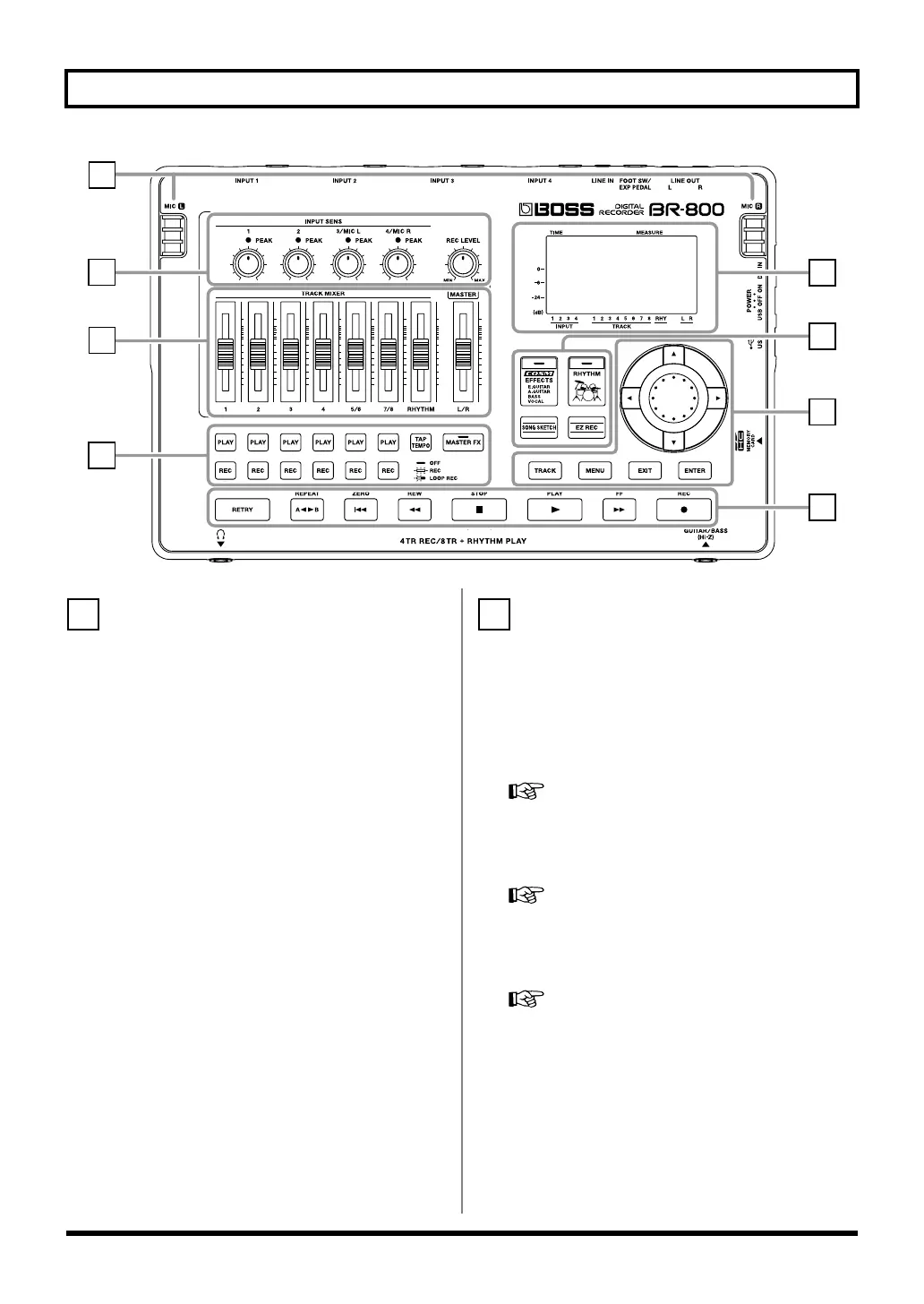
fig.TopPanel.eps
[TRACK] button
This button allows you to adjust each track’s tone quality or
edit the track (p. 105).
[MENU] button
This button accesses various functions, such as settings for
the entire BR-800.
[EXIT] button
This button returns you to the previous screen, or cancels an
operation.
[ENTER] button
This button confirms a selection or finalizes an entry.
Dial
Use this to move the current location of the song (fast-
forward or rewind). When making settings for various
functions, this dial is used to edit values.
CURSOR buttons
These buttons move the cursor.
[EFFECTS] button
This button accesses a screen in which you can turn the
insert effect (p. 54) on/off and edit its settings.
[RHYTHM] button
This button accesses a screen in which you can turn the
rhythm on/off and edit its settings.
“Overview of the Rhythm Section” (p. 88)
[SONG SKETCH] button
This button takes you to Song Sketch mode.
“Simple Recording (SONG SKETCH)” (p. 50)
[EZ REC] (EZ recording) button
This button enters EZ Recording mode.
“Recording with the EZ Recording Function” (p. 26)
4
2
1
3
7
8
6
5
6
BR800_e.book 14 ページ 2011年6月6日 月曜日 午後2時14分



 To Next Page