52
Chapter 4 Introduction to Effects and Parameters
LOOP
(External Effects Loop)
1/2
This allows you to connect an external effects device to the
LOOP 1/2 SEND and RETURN jacks and use it as part of the
GT-PRO’s effects.
You can get “stereo” effects by using two sets of SEND/
RETURN jacks. This is particularly effective when you are
connecting spatial effects.
* You cannot set LOOP 1 and LOOP 2 separately to different
positions in Effect Chain (p. 22).
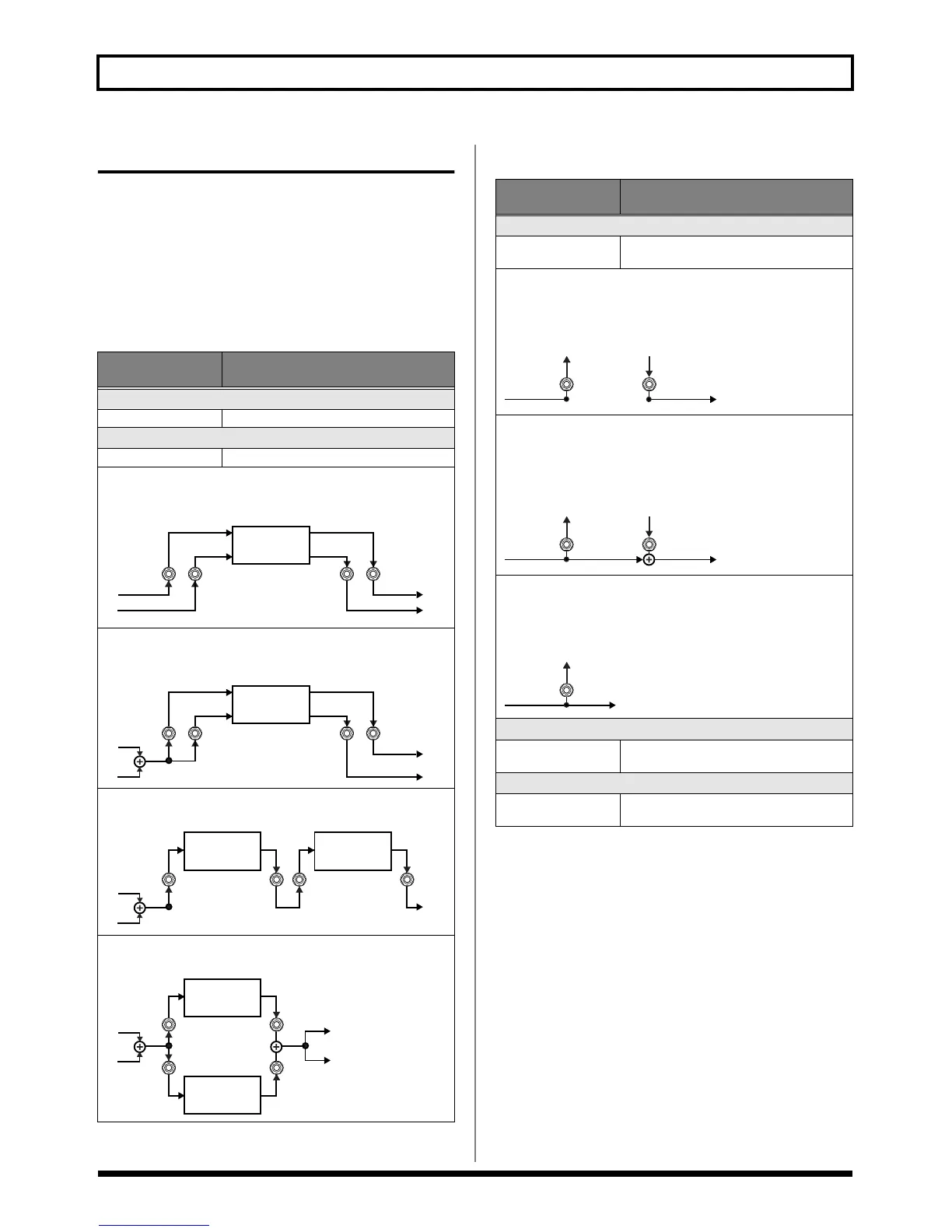
When Type is Set to Stereo 1 or Stereo 2
Parameter/
Range
Explanation
On/Off
Off, On Switches the LOOP 1/2 on/off.
Type
see below Switches the LOOP 1/2 type.
Stereo 1
Signals are output in stereo from the SEND 1/2 jacks and input in
stereo to the RETURN 1/2 jacks.
fig.04-0120
Stereo 2
Signals are output in mono from the SEND 1/2 jacks and input in
stereo to the RETURN 1/2 jacks.
fig.04-0130
S/R1→S/R2
SEND/RETURN 1 and SEND/RETURN 2 are connected in series.
fig.04-0140
S/R1&S/R2
SEND/RETURN 1 and SEND/RETURN 2 are connected in parallel.
fig.04-0150
SEND 1 SEND 2
RETURN
2
RETURN
1
External
Effects
Processor
L
R
SEND 1 SEND 2
RETURN
2
RETURN
1
L
R
External
Effects
Processor
SEND 1
RETURN
1 SEND 2
RETURN
2
L
R
External
Effects
Processor
External
Effects
Processor
SEND 1
RETURN
1
L
R
SEND 2
RETURN
2
External
Effects
Processor
External
Effects
Processor
Parameter/
Range
Explanation
Mode
Normal, Direct Mix,
Branch Out
Switches the LOOP mode.
Normal
Outputs the input to LOOP to the SEND 1/2 jacks and the input
from the RETURN 1/2 jacks to the circuit post-LOOP.
Use this when you want to connect an external effects device serially
in the GT-PRO’s effects chain.
fig.04-0160
Direct Mix
Outputs the input to LOOP to the SEND 1/2 jacks, mixes the input
from the RETURN 1/2 jacks with the input to LOOP (the direct
sound), then outputs this to the circuit post-LOOP. Use this when
you want to mix the GT-PRO’s effects sounds together with the
sound with the external effects device applied to it.
fig.04-0170
Branch Out
outputs the input to LOOP to the SEND 1/2 jacks. The input from the
RETURN 1/2 jacks is disregarded. For example, using this with the
GT-PRO’s reverb and delay immediately ahead of the loop allows
you to use the SEND 1/2 jacks as a direct out.
fig.04-0180
Send Level
0–200
Adjusts the volume of the output to the ex-
ternal effects device.
Return Level
0–200
Adjusts the volume of the input from the ex-
ternal effects device.
SEND RETURN
SEND RETURN
SEND


 To Next Page