73
Chapter 7 Using the GT-PRO with External MIDI Devices Connected
Chapter 7
Notes Regarding the MIDI Messages That
Can Be Transmitted and Received
The MIDI messages that the GT-PRO can transmit and
receive differ depending on whether the GT-PRO is
connected via MIDI to an external MIDI device, or is
connected to a computer through a USB connection.
● When Connecting Via MIDI
The GT-PRO transmits and receives all applicable MIDI
messages through the MIDI OUT and MIDI IN connectors.
When FC-200 Mode (p. 81) is switched on, however, only
messages used for setting the FC-200 are transmitted from
the MIDI OUT connector.
* All MIDI messages received at the MIDI IN connector are
transmitted from the MIDI THRU connector.
● When Connecting Through USB
The GT-PRO transmits and receives all applicable MIDI
messages to and from the USB-connected computer (except
for messages used for setting the FC-200).
Program Change messages and Control Change messages
are received through the MIDI IN connector.
In addition, nothing is normally output from the MIDI OUT
connector, but only in FC-200 mode, messages used for
setting the FC-200 are transmitted from the MIDI OUT
connector.
* MIDI messages arriving at the MIDI IN connector cannot be
routed on to a USB-connected computer. Likewise, messages
originating on a USB-connected computer cannot be passed
through and output from the MIDI OUT connector.
* All MIDI messages received at the MIDI IN connector are
transmitted from the MIDI THRU connector.
Making the Settings for MIDI Functions
Here is a description of the GT-PRO’s MIDI functions. Set
them as needed, depending on the intended use.
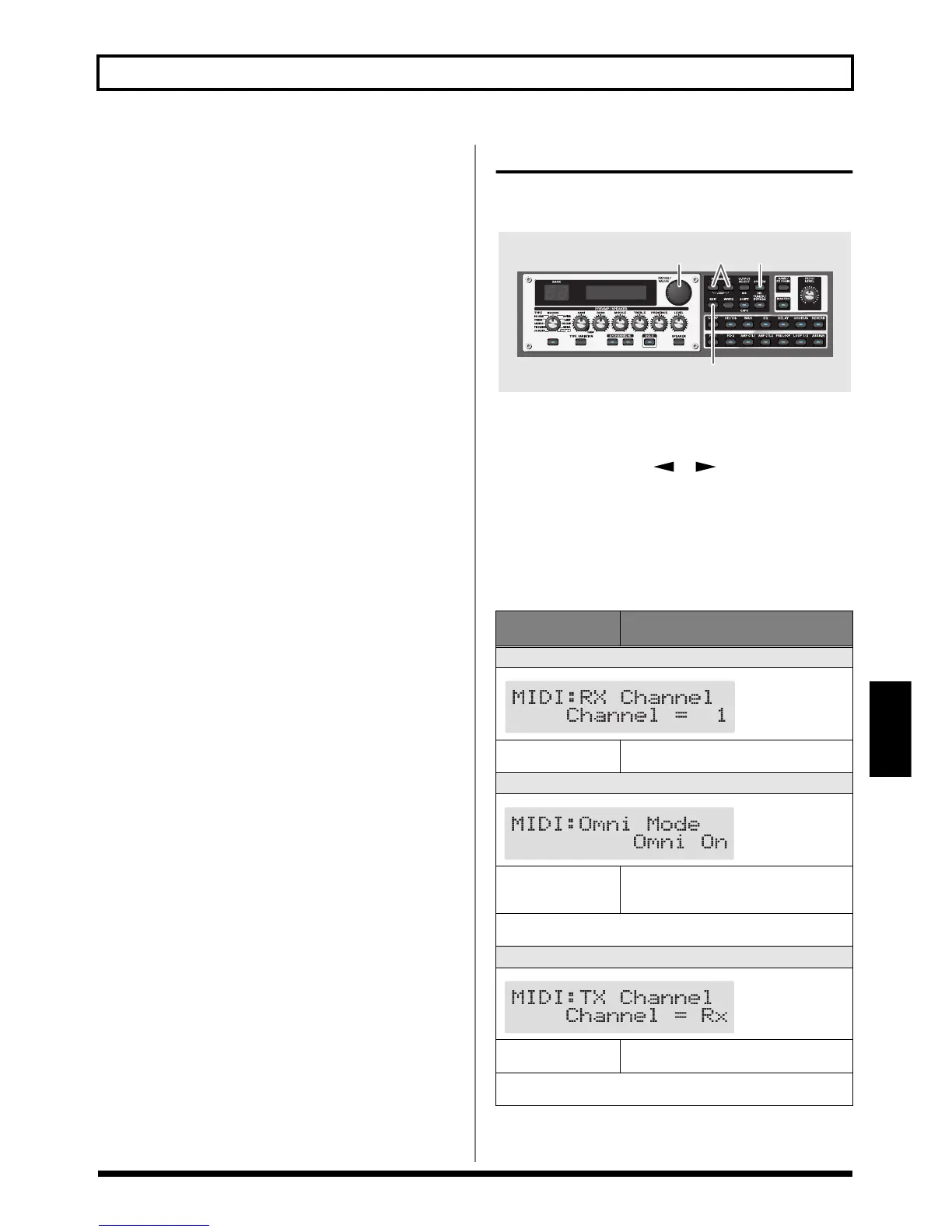
fig.07-0030
1. Press [SYSTEM] several times to display the MIDI
setting screen.
2. Press PARAMETER [ ] [ ] so that the
parameter that you want to set appears in the display.
3. Rotate the PATCH/VALUE dial to change the setting’s
value.
4. Repeat Steps 2 and 3 as needed.
5. Press [EXIT] to return to the Play screen.
Parameter/
Range
Explanation
MIDI RX Channel (MIDI Receive Channel)
fig.07-0040d
1–16
This sets the MIDI channel used for receiv-
ing MIDI messages.
MIDI Omni Mode
fig.07-0050d
Omni Off, Omni On
When set to “Omni On,” messages are re-
ceived on all channels, regardless of the
MIDI channel settings.
Even when Omni Mode is set to ON, the only Exclusive messages re-
ceived are for Device ID data set with “Device ID.”
MIDI TX Channel (MIDI Transmit Channel)
fig.07-0060d
1–16, Rx
This sets the MIDI Transmit channel used
for transmitting MIDI messages.
When set to “Rx,” this MIDI channel is same as the MIDI Receive
channel.
132
5


 To Next Page