95
Chapter 10 Other Features
Chapter 10
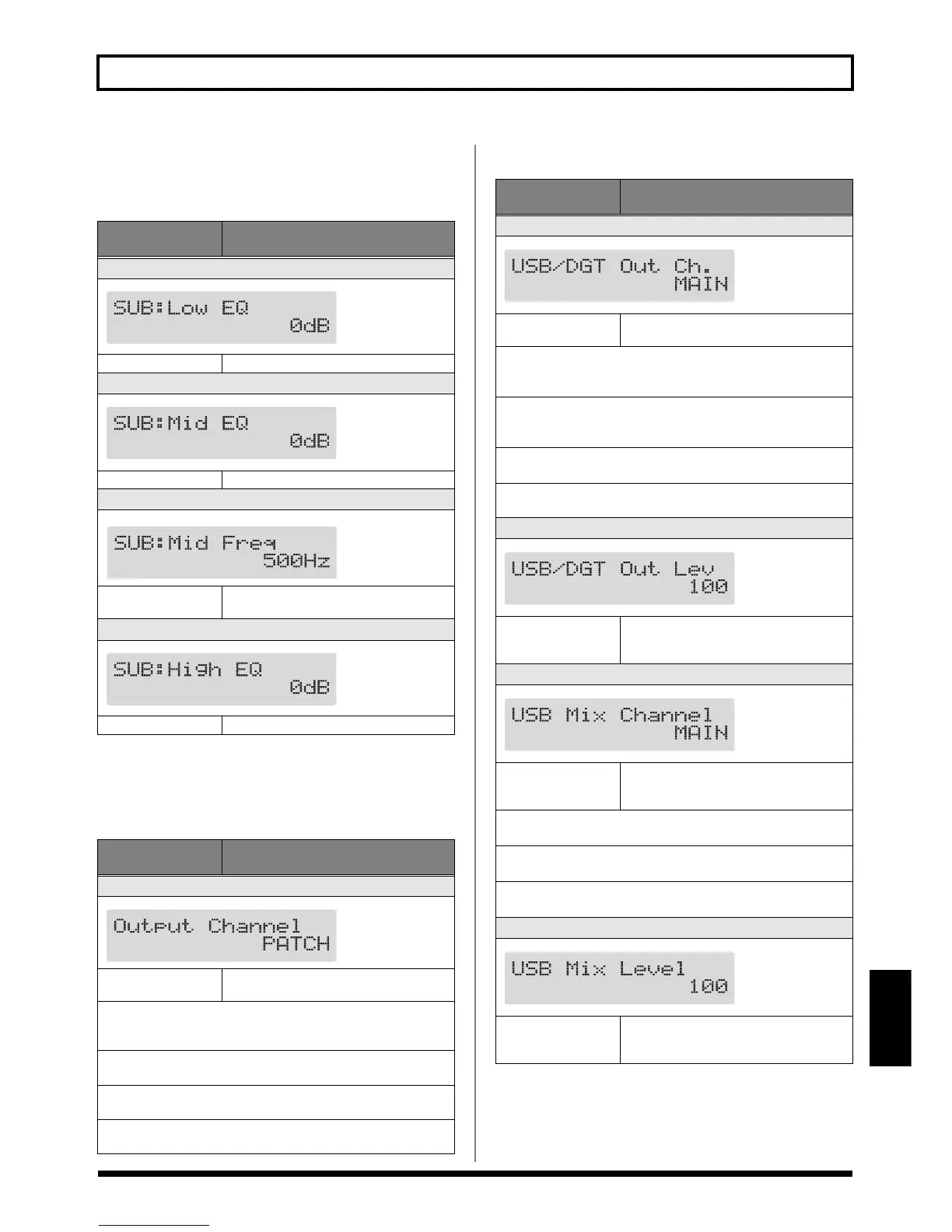
Sub Global EQ
This adjusts the tone of the SUB OUT regardless of the
equalizer on/off settings of individual patches.
Setting the Output Destination
Output Channel
USB/Digital Out
Parameter/
Range
Explanation
Sub Low EQ
fig.10-0180d
-20 dB–+20 dB Adjusts the tone in the low frequencies.
Sub Mid EQ (Middle EQ)
fig.10-0190d
-20 dB–+20 dB Adjusts the tone in the middle frequencies.
Sub Mid Freq (Middle Frequency)
fig.10-0200d
20 Hz–10.0 kHz
Specify the center of the frequency range
that will be adjusted by the “Mid EQ.”
Sub High EQ
fig.10-0210d
-20 dB–+20 dB Adjusts the tone in the high frequencies.
Parameter/
Range
Explanation
Output Channel
fig.10-0220d
PATCH, MAIN, SUB,
MAIN+SUB
This procedure selects the jacks from which
signals are output.
PATCH
The output selected in the patch’s Master Output setting (p. 55) is
used.
MAIN
Signals are output from the MAIN OUT jacks.
SUB
Signals are output from the SUB OUT jacks.
MAIN+SUB
Signals are output from both the MAIN OUT and SUB OUT jacks.
Parameter/
Range
Explanation
USB/DGT Out Ch. (USB/Digital Out Channel)
fig.09-0060d
MAIN, SUB,
MAIN+SUB
Selects the signals output from the USB and
DIGITAL OUT connectors.
MAIN
Outputs the same signals as those output from MAIN OUT.
The tone adjustments made with Main Global EQ (p. 94) are enabled.
SUB
Outputs the same signals as those output from SUB OUT.
The tone adjustments made with Sub Global EQ (p. 95) are enabled.
MAIN+SUB
Outputs a mix of the signals output from MAIN OUT and SUB OUT.
* This is enabled only when effects chain (p. 22) settings ending in
“DGT” (DIGITAL/USB OUT) are selected.
USB/DGT Out Lev (USB/Digital Out Level)
fig.09-0070d
0–200
Adjusts the volume level of the digital audio
signals output to the USB and DIGITAL
OUT connectors.
USB Mix Channel
fig.09-0080d
MAIN, SUB,
MAIN+SUB
Sets the output jacks used in mixing the dig-
ital audio signals from USB when Input Se-
lect (see right) is set to “Guitar In.”
MAIN
Mixed at MAIN OUT.
SUB
Mixed at SUB OUT.
MAIN+SUB
Mixed at MAIN OUT and SUB OUT.
USB Mix Level
fig.09-0090d
0–200
Sets the volume level of the mixed digital
audio signals from USB when Input Select
(see right) is set to “Guitar In.”


 To Next Page