92
Chapter 10 Other Features
Controlling Various Parameters
Through the Guitar Volume
The GT-PRO includes a function to control effect parameters
with the guitar dynamics as the instrument is played. This is
not limited to touch wah, but provides tonal changes in real
time as the guitar is played.
Switching Preamp Channels A and B
Dynamically with the Guitar Volume
The GT-PRO’s Preamp/Speaker feature includes a “Dynamic
Mode” (p. 28) setting, which switches the two preamps in
response to the guitar volume.
During a performance, for example, you can use the guitar
volume to switch between a crunch sound and a lead sound,
even without switching patches or adjusting any knobs.
* You will hear the sound of Channel A when the guitar volume
is low, and Channel B when the volume is high.
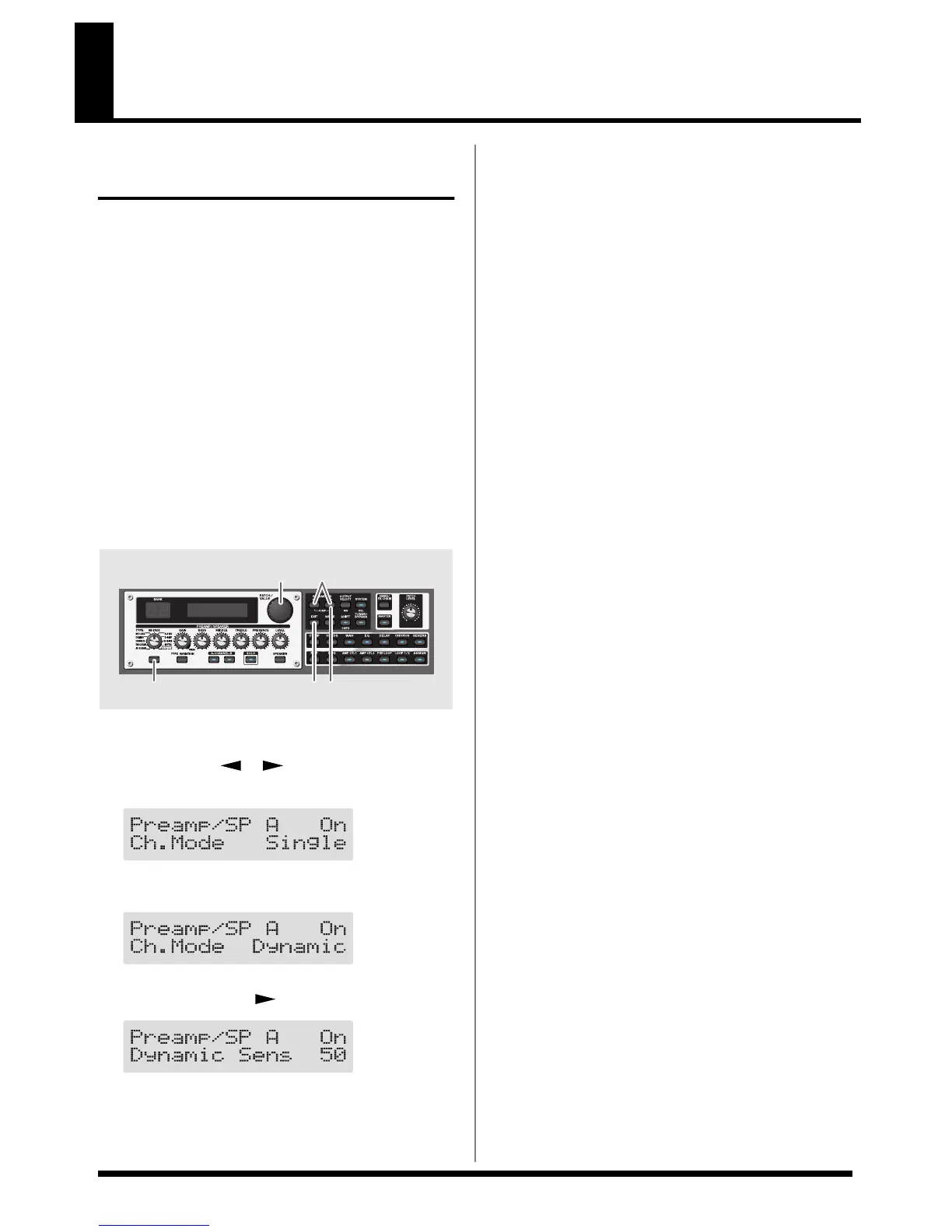
fig.10-0010
1. Press PREAMP/SPEAKER On/Off switch, then press
PARAMETER [ ] [ ] so that “Ch.Mode” is
displayed.
fig.10-0020d
2. Rotate the PATCH/VALUE dial to select “Dynamic.”
fig.10-0030d
3. Press PARAMETER [ ] to display “Dynamic Sens.”
fig.10-0040d
4. Rotate the PATCH/VALUE dial to change the setting’s
value.
As the guitar volume changes during the performance,
Dynamic Sens is adjusted in response to the volume
when the preamps are switched.
5. Press [EXIT] to return to the Play screen.
2,4 1
5
31


 To Next Page