18
System Settings (MENU)
For details on the parameters, refer to “Parameter Guide” (PDF).
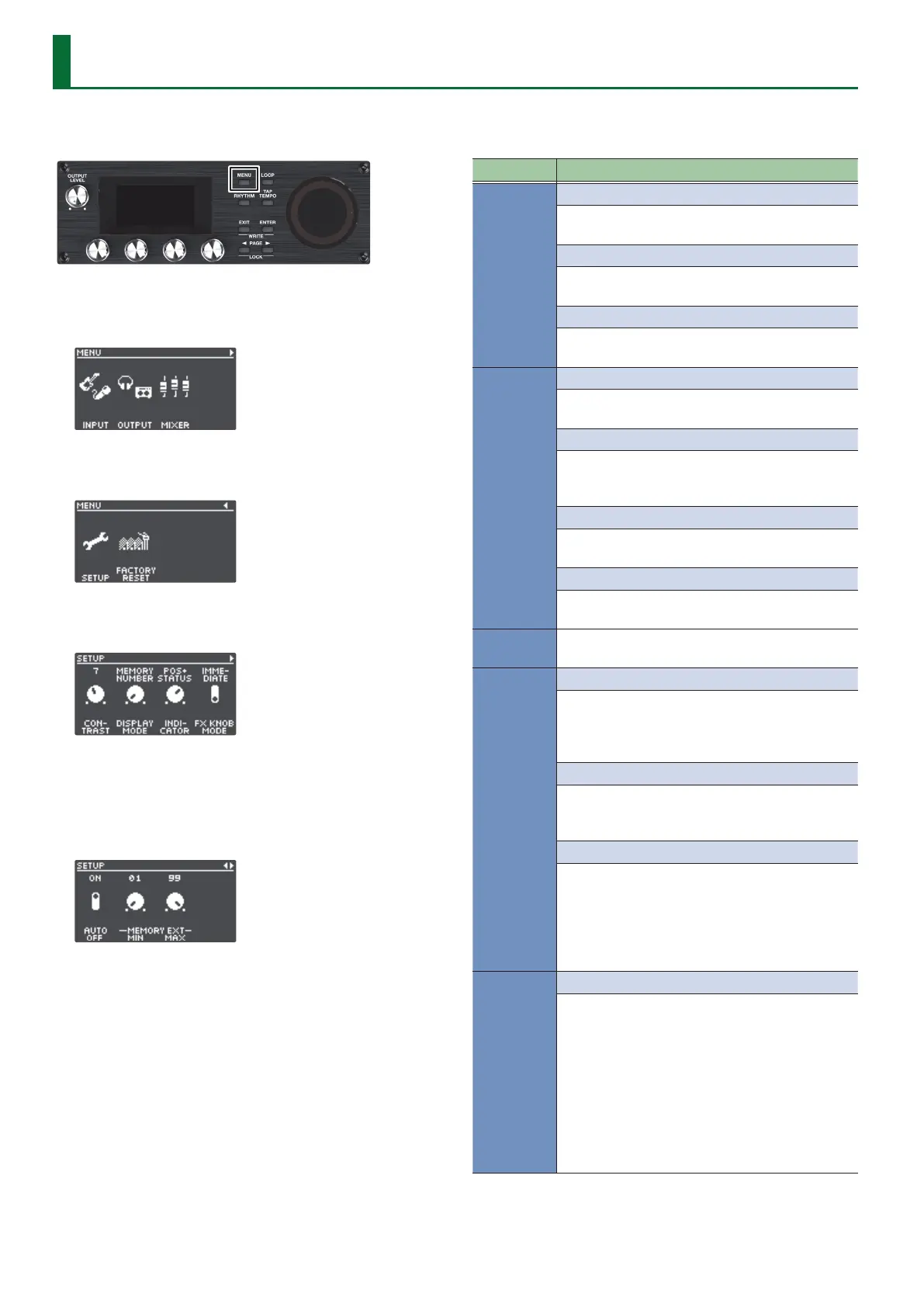
1. Press the [MENU] button.
The MENU screen appears.
2. Use the [K] [J] buttons to switch to the page
containing the item you want to edit.
3. Press the [1]–[4] knobs to select the item that you want
to edit.
4. If you see another screen with items to select, repeat
steps 2 and 3.
5. Use the [K] [J] buttons to switch to the page
containing the parameter you want to edit.
6. Turn the [1]–[4] knobs to change the value.
7. Press the [EXIT] button a number of times to return to
the play screen.
Item Parameter/Explanation
INPUT
SETUP
Settings related to the input and output jacks,
such as phantom power on/o.
EQ
Settings for applying an equalizer eect to the
input sound for each connector/jack.
DYNAMICS
Settings for applying a compressor or noise
suppressor to the input sound.
OUTPUT
SETUP
Settings related to the output jacks, such as stereo
link.
ROUTING
Settings for assigning the playback sound from
tracks 1–6 and the input/rhythm sound from each
input jack/connector to the output jacks.
EQ
Settings for applying an equalizer eect to the
output sound, congured for each output jack.
MASTER FX
Settings for the compressor and reverb eects
that are applied to the output sound.
MIXER
Sets the input/output levels for each jack and
connector (p. 8).
CTL FUNC
PANEL MODE 1–3
Settings for assigning functions to the [REC/PLAY]
switches x 3, the [STOP] switches x 3, the [TRACK
SELECT] switch, the [UNDO/REDO] switch and the
[ALL START/STOP] switch.
CTL/EXP
Settings for assigning functions to a footswitch or
expression pedal connected to the CTL 1, 2/EXP 1
jack or the CTL 3, 4/EXP 2 jack.
PREFERENCE
Selects whether to switch the PANEL MODE 1–3
and CTL/EXP settings to either the settings for
each memory or to the system settings.
* When switching to the settings for each
memory, use the write operation to save the
settings to memory.
ASSIGN
ASSIGN 1–16
Settings for the ASSIGN section.
By using the assign settings, you can control other
parameters at the same time as the specied
functions that are executed when you operate this
unit’s buttons/knobs, or a footswitch/expression
pedal connected to the CTL 1, 2/EXP 1 jack or CTL
3, 4/EXP 2 jack.
You can also congure this unit to be controlled
from an external MIDI device.
There are 16 dierent assign settings.


 To Next Page