7
Getting Ready
Turning the Power On/O
Before turning the unit on/o, always be sure to turn the volume
down. Even with the volume turned down, you might hear some
sound when switching the unit on/o. However, this is normal and
does not indicate a malfunction.
Turning the Power On
Turn on the power in the following order: this unit ([POWER]
switch: ON) 0 connected devices 0 amplier.
Turning the Power O
Turn o the power in the following order: amplier 0 connected
devices 0 this unit ([POWER] switch: OFF).
The power to this unit will be turned o automatically after
a predetermined amount of time has passed since it was last
used for playing music, or its buttons or controls were operated
(AUTO OFF function).
If you do not want the power to be turned o automatically,
disengage the AUTO OFF function (p. 19).
5 Unsaved data is lost when the power turns o. Before turning
the power o, save the data that you want to keep (p. 13).
5 To restore power, turn the power on again.
Phantom Power Settings
If you’re using a condenser mic that requires phantom power, use
the settings below to turn on this unit’s phantom power.
1. Press the [MENU] button.
2. Press the [1] (INPUT) knob.
3. Press the [1] (SETUP) knob.
4. Turn the [1] (MIC1)/[2] (MIC2) knobs to set PHANTOM
to “ON.”
5. Press the [EXIT] button to return to the play screen
(p. 8).
NOTE
Always turn the phantom power o when connecting any device
other than condenser microphones that require phantom power.
Rear Panel (Connecting Your Equipment)
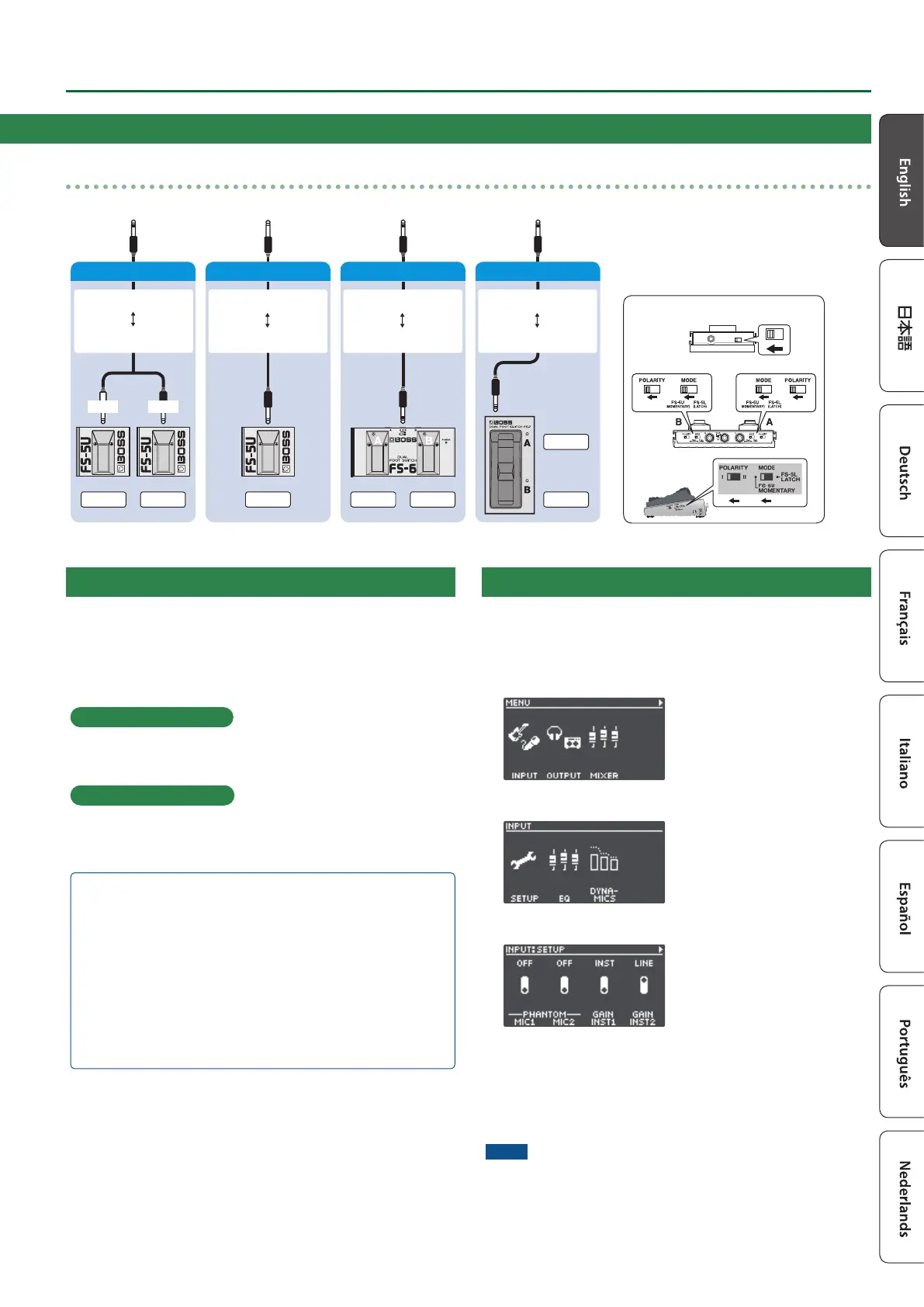
Connecting footswitches
Connect one or more footswitches and set their mode/polarity switches by referring to the illustrations below.
FS-6
FS-7
CTL 2
FS-5U x 1
FS-5U
FS-6
Mode/Polarity switch
FS-7
1/4” phone type
1/4” phone type
Stereo 1/4” phone type
Stereo 1/4” phone type
Stereo 1/4” phone type
Stereo 1/4” phone type
CTL 1CTL 2 CTL 1CTL 1
RINGTIP
Stereo 1/4” phone type
1/4” phone type x 2
CTL 1 CTL 2
FS-5U x 2


 To Next Page