14
Editing the Sound (Top Screen)
Editing procedure in the top screen
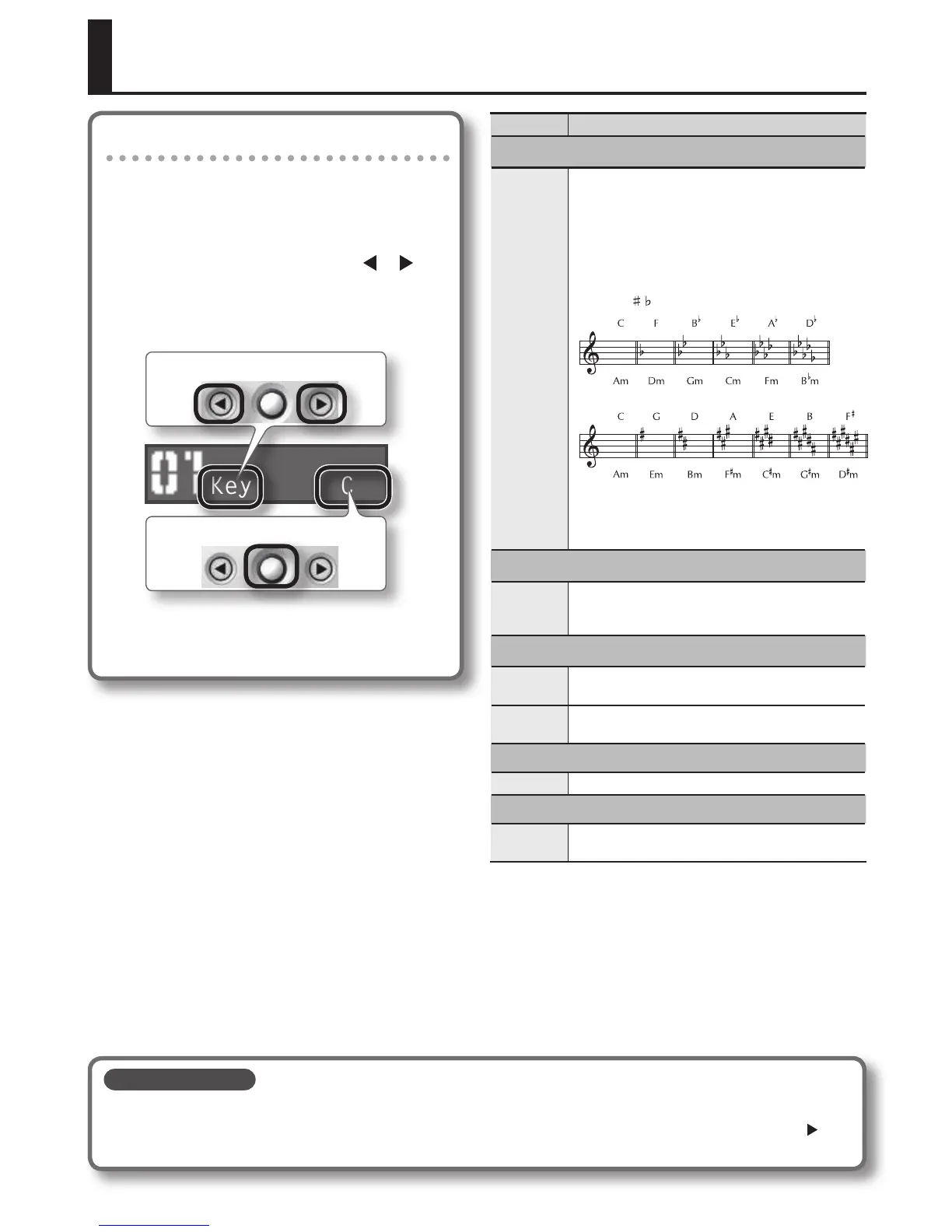
In the top screen you can make quick edits to the key
of the harmony and to the depth of the delay/reverb.
The same procedure is used for all edits in the top
screen.
1. In the top screen, use the [ ] [ ]
buttons to select a parameter, and
turn the [SOUND] knob to edit the
value of that parameter.
Key C
Edit the value
Select a parameter
2. Press the [EXIT] button to return to
the top screen.
Parameter Explanation
Matching the Harmony to the Key of Your Song
Key
Specify the key of the song you’re singing. For
example, choose “C” if the song is in C-major, or “Am” if
the song is in A-minor.
The notes generated by harmony or pitch correction
(p. 16) will be based on the key you specify here, so be
sure to specify the correct key.
How the key of the song corresponds with the key
signature (
, )
Major
Major
Minor
Minor
The key you specify here will be the common value
for the eects in the sound (harmony and pitch
correction).
Adjusting the Volume of the Harmony
HrmLevel
The VE-5 lets you layer a harmony part onto your
own voice. Here’s how to adjust the volume of the
harmony part.
Adjusting the Level of the Delay/Reverb Eect
DlyLevel
Adjusts the level of the delay eect. If you want to
turn o the delay eect, set to 0.
RevLevel
Adjusts the level of the reverb eect. If you want to
turn o the reverb eect, set to 0.
Adjusting the Volume of the Sound
MstLevel Adjusts the volume of the sound.
Adjusting the Volume of the Output
Volume
Displays the value of the [VOLUME] dial.
This value can also be change with the [SOUND] knob.
Saving the sound
The sound settings will automatically be saved when you press the [EXIT] button to return to the top screen.
If you don’t want to save the changes you made (i.e., if you want to revert to the original sound), hold down the [
]
button and press the [EXIT] button.


 To Next Page