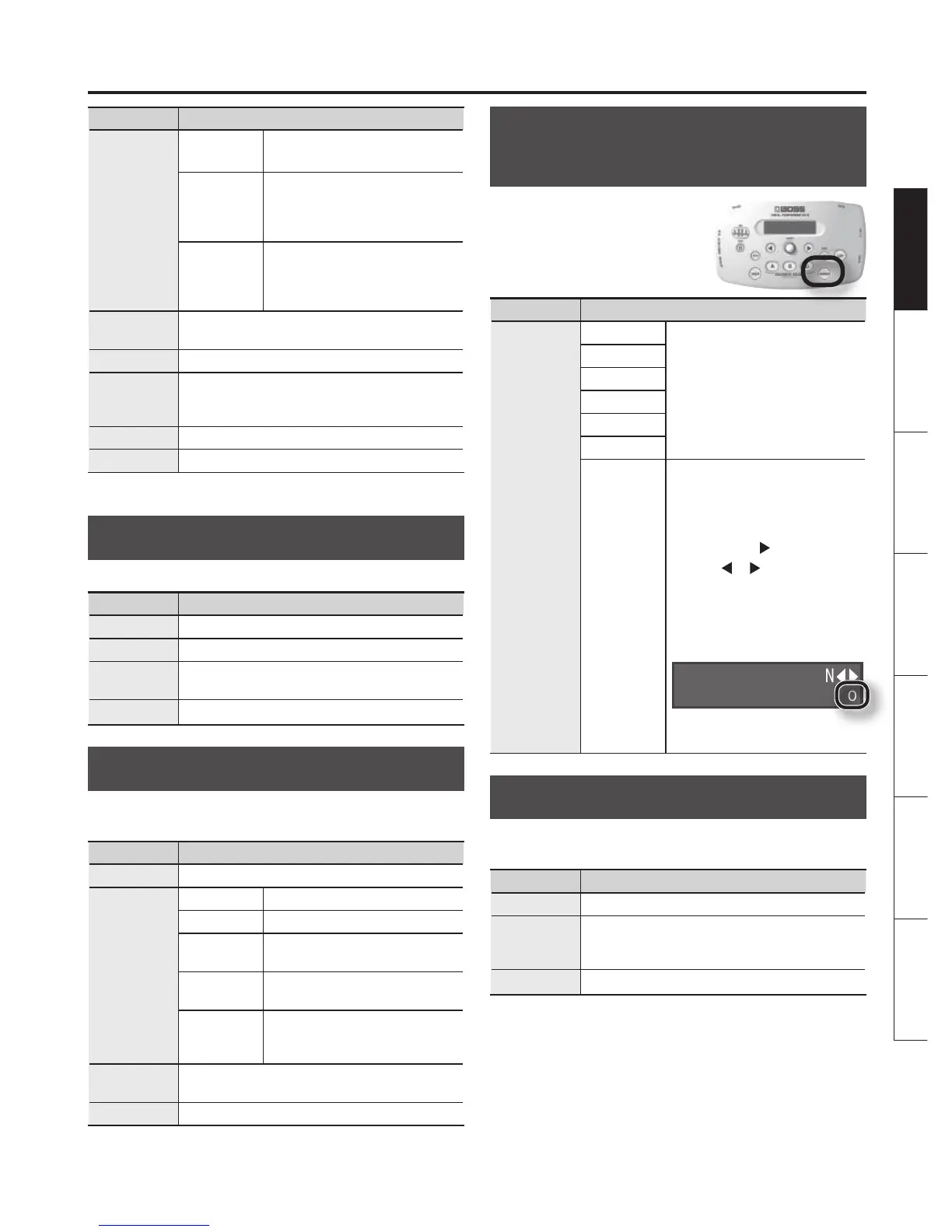
Parameter Explanation
Type
Double Produces a double-tracking eect.
-1– +1 oct
If you’ve specied the key of your
song (p. 14), harmony that is suitable
for that key will be added at the
interval you specify here.
Unison
By changing the vocal character,
this produces the impression that
another person is singing the same
melody along with you.
Double
Adjusts the intensity of the Double eect in three
levels (Light/Normal/Deep).
HrmLevel *1
Adjusts the volume of the harmony part.
Gender *1
Negative (–) settings give the voice a more
masculine character, while positive (+) settings
make the voice more feminine.
Key *1 Species the key of the song you’re singing (p. 14).
DirectLevel *1 Adjusts the volume of the sound of the mic.
*1 Available if Type is set to -1 to +1 oct or Unison.
DELAY
Produces an echo-like eect.
Parameter Explanation
On/O Switches DELAY on/o.
Time Adjusts the delay time (1–4000 ms).
Feedback
Adjusts the amount of delayed sound that is
repeated.
DelayLevel Adjusts the volume of the delayed sound.
REVERB
Produces the spacious reverberation that is typical of a
performance in a room or hall.
Parameter Explanation
On/O Switches REVERB on/o.
Type
Ambience Produces a sense of spatial depth.
Room Produces warm reverberation.
Hall 1
Produces clear and spacious
reverberation.
Hall 2
Produces mild and understated
reverberation.
Plate
Produces metallic-sounding
reverberation with an extended
high range.
Size
Adjusts the size of the room (space) to vary the
reverb time.
RevLevel Adjusts the volume of the reverberation.
HARMONY BUTTON (Setting of
the [HARMONY] Button)
You can use the [HARMONY]
button to turn on/o eects
other than Harmony.
Parameter Explanation
Type
DBL/HRM
The [HARMONY] button will turn
the specied eect on/o.
DELAY
PITCH
TONE/SFX
REVERB
DYNAMICS
CUSTOM
The [HARMONY] button will turn
the multiple specied eects
on/o.
1. With CUSTOM selected,
press the [
] button.
2. Use [
] [ ] button to
select the eect that you
want to turn on/o.
3. Turn the [SOUND] knob to
choose the “o” setting.
HARMONY BUTTON
DYNAMICS o
Repeat steps 2–3 for each eect
that you want to turn on/o.
MASTER (Settings of the Sound)
Here you can make settings for the volume of the sound and
the key of the song.
Parameter Explanation
Level Species the volume of the sound.
NoiseThres
Adjust this according to the noise level. Set this to
a larger value if the noise level is high, or to a lower
value if the noise level is low.
Key Species the key of the song you’re singing (p. 14).


 To Next Page