2-6
MRI Scan Procedure Protocol
1. Programming the Pulse Generator for a Scan
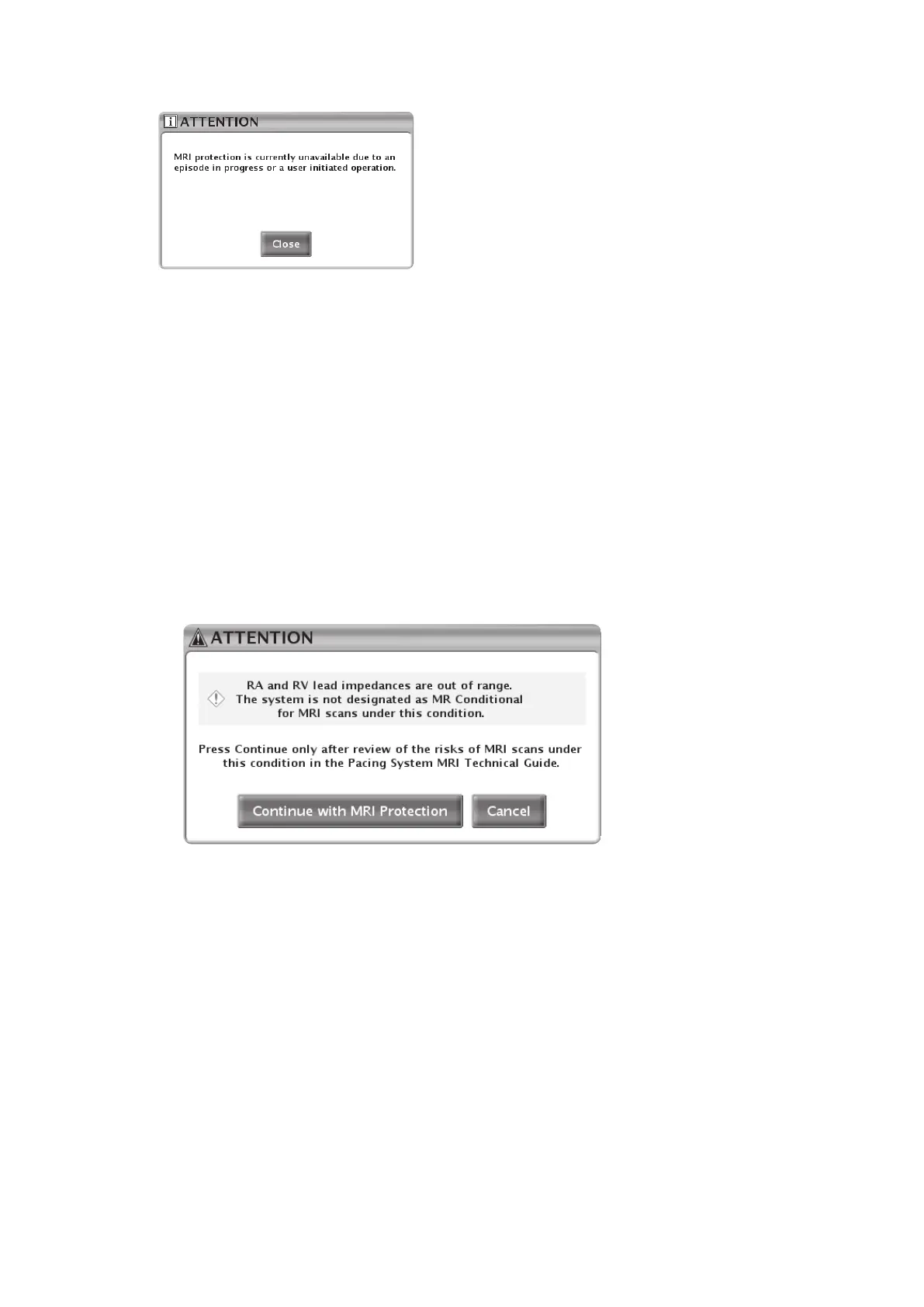
Figure 2–2. Episode in progress attention message
In addition to the above-listed conditions that prevent entry into MRI Protection Mode, two other
conditions of use are assessed by the PRM upon a request to enter MRI Protection Mode: lead
impedance and time since implant.
• Lead Impedance
A user request to enter the MRI Protection Mode triggers a lead impedance test in all
chambers. If the lead impedance values obtained from this testing are outside the
programmed normal range, the PRM provides a dialog box recommending a review of the
associated risks if the user chooses to proceed (see Table 1–4 Cardiology Conditions/Patient
Conditions on page 1-6). The dialog provides the option of activating MRI Protection Mode in
the presence of these conditions, or cancelling entry into MRI Protection Mode. The dialog
box that appears in the case of an out-of-range lead impedance value is shown in Figure 2–3
Lead impedance out of range attention message on page 2-6.
Figure 2–3. Lead impedance out of range attention message
• Time Since Implant
The PRM also determines the time since implant, calculated based on the date at which the
pulse generator was taken out of Storage Mode.
NOTE: If the PRM clock is not set to the correct time and date, this determination may not
be accurate.
If the calculated time since exit from Storage Mode is less than 6 weeks, the PRM provides a
dialog box recommending a review of the associated risks if the user chooses to proceed
(see Table 1–4 Cardiology Conditions/Patient Conditions on page 1-6). The dialog provides
the option of activating MRI Protection Mode in the presence of these conditions, or
cancelling entry into MRI Protection Mode.
Upon continuing with entry into MRI Protection Mode, the MRI Protection Checklist screen is
displayed (Figure 2–4 MRI Protection Checklist on page 2-7). The Checklist summarizes the
conditions that must be met at the time of scanning in order for a patient to be eligible for an MR



 To Next Page