MRI Scan Procedure Protocol
1. Programming the Pulse Generator for a Scan
2-7
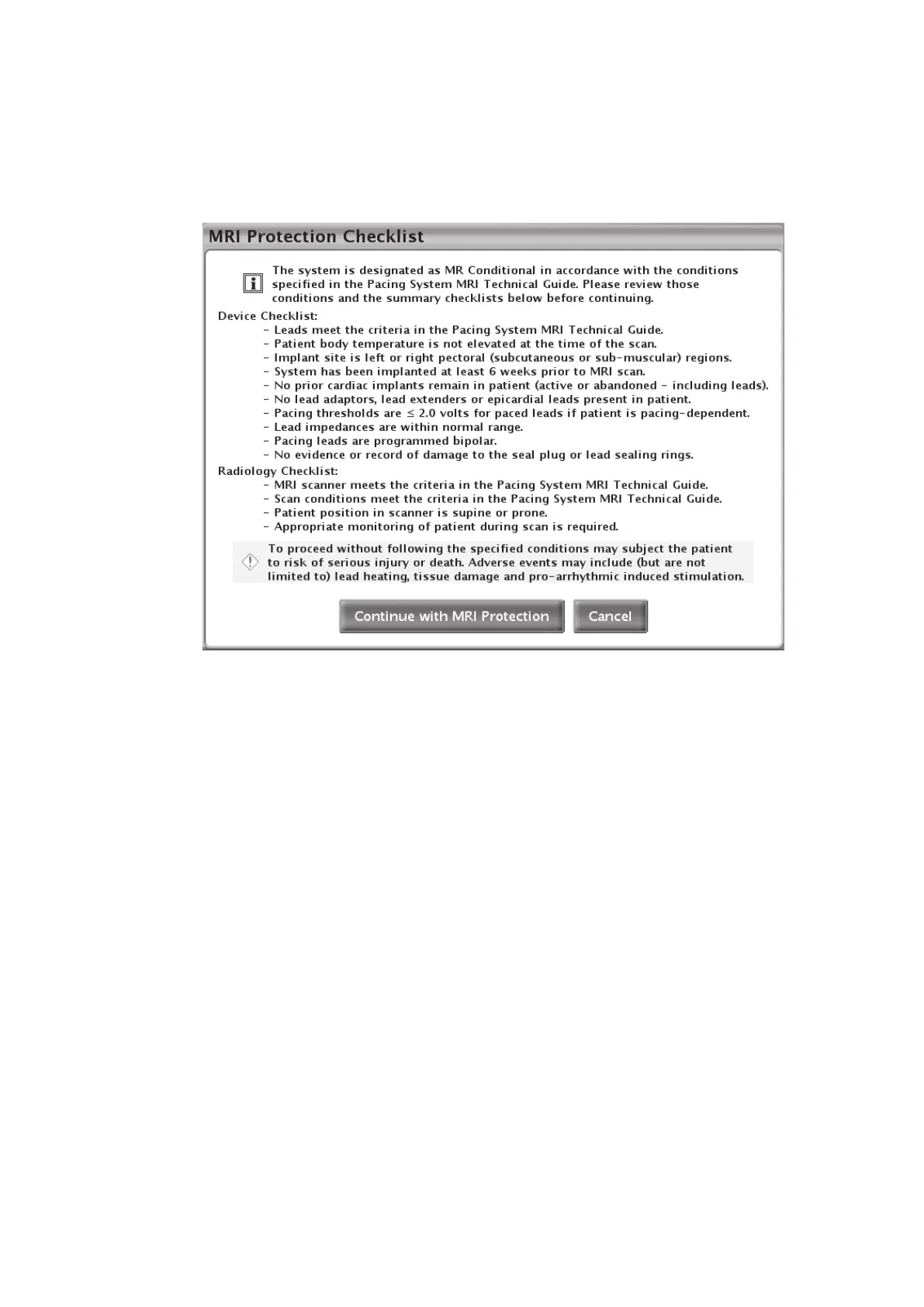
Conditional scan. Re-verification is required before every scan to guard against the possibility
that changes in the system or patient occurred subsequent to the original pulse generator/system
implant. These conditions are described in greater detail in Table 1–4 Cardiology Conditions/
Patient Conditions on page 1-6 and Table 1–5 Radiology Conditions on page 1-8.
Figure 2–4. MRI Protection Checklist
If the Conditions of Use as described in this manual are not met, the Cancel button is selected to
return to normal system operation, and the patient does not undergo an MRI scan.
If the Conditions of Use are met, or if the Conditions of Use are not met, but the user elects to
continue with MRI Protection Mode after reviewing the risks of proceeding (see Table 1–4
Cardiology Conditions/Patient Conditions on page 1-6 and Table 1–5 Radiology Conditions on
page 1-8 for additional information about risks), the Continue with MRI Protection button is
selected. As a result, the Program MRI Protection screen appears (Figure 2–5 Program MRI
Protection dialog on page 2-9).
Use the dialog boxes to set the:
• Pacing mode (DOO, VOO, AOO, Off)
• Lower rate limit (nominally set to 20 min
-1
above normal mode LRL, programmable in normal
increments to a maximum value 100 min
-1
)
NOTE: Because MRI Protection Mode pacing is asynchronous, when setting the lower rate
limit, consider the patient’s intrinsic rate to avoid competitive pacing.
• Atrial amplitude (nominally set to 5.0 V, programmable in normal increments from 2.0 V to 5.0
V)
• Ventricular amplitude (nominally set to 5.0 V, programmable in normal increments from 2.0 V
to 5.0 V)



 To Next Page