35
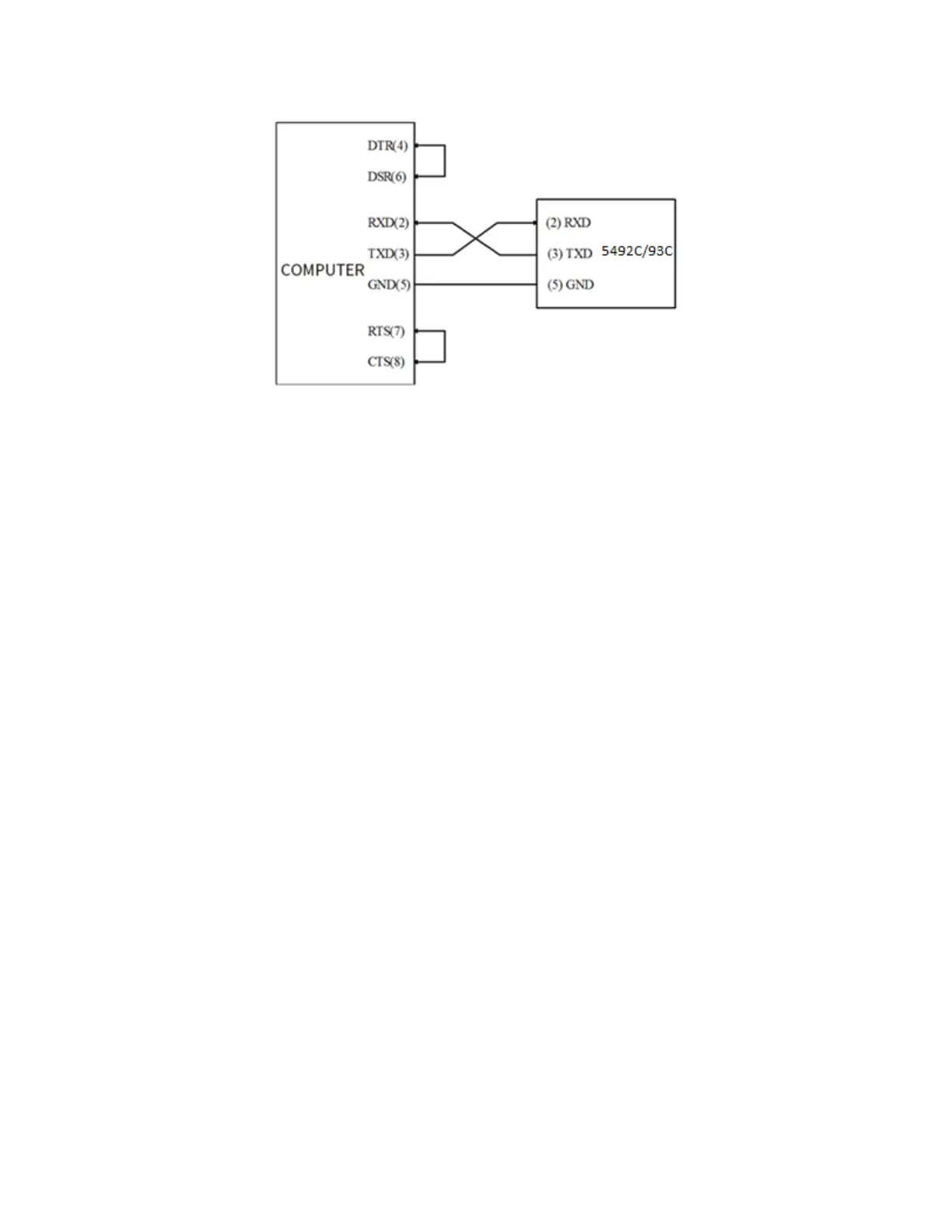
RS232 Connection Diagram
Users can use the double-core shielded cable to make a three-wire connection cable (the length
should be less than 1.5m).
When making the connection cable, pins 4-> 6 and pins 7-> 8 should be shorted at the computer
connector.
(2) Sending and receiving data format
The 5492C/5493C uses full-duplex asynchronous communication transmission mode with a start bit
and stop bit.
The data transmission format of RS232 is:
Data bits: 8
Stop bit: 1
Parity: None
Termination character: <LF> (newline, ASCII code is 10)
(3) Selecting Baud Rate
The baud rate is the rate at which Model 5492C/5493C multimeter and the computer communicate.
Choose one of these available rates:
115200
57600
38400
19200
9600
4800
Note: Factory default baud rate is 9600.
Before you choose a baud rate, make sure the programming terminal that you are connecting to the
5492C/5493C can support the baud rate you selected.


 To Next Page