Operating manual English
11
6 Transmission of titration data to the PC (Instrument Window,
tab Data Logging)
6.1 Transmission of titration volume
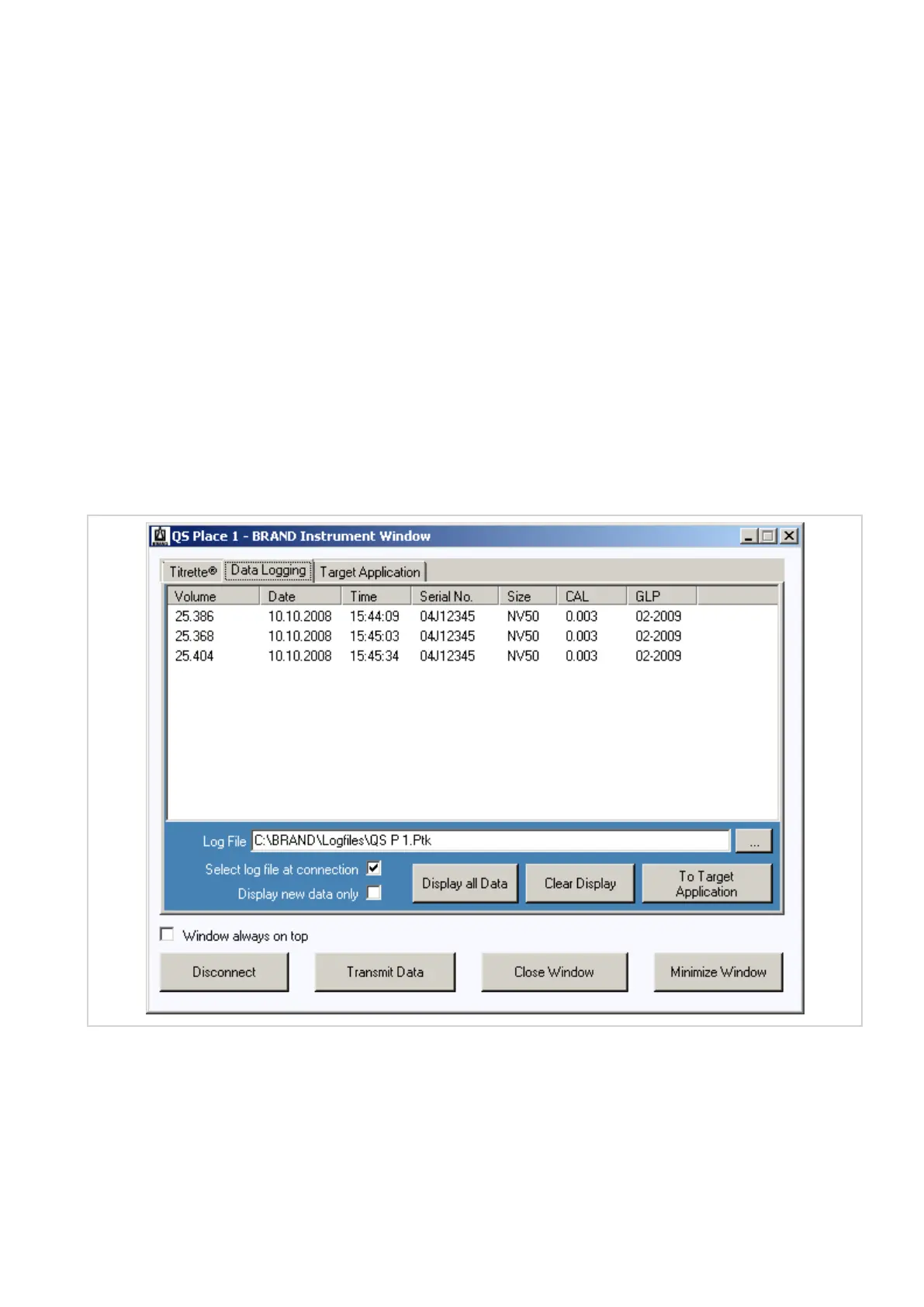
After titration, the displayed titration volume is transmitted into the chosen logging file (example: C:
\BRAND\Logfiles\QS P1.Ptk) by a double-click on the instrument’s CLEAR key.
Note: If the gap between the two clicks is to long, the display will be set to zero at the first key press (the sign
for PC-connection is flashing) and with the second key press the titration value will be restored. The instru-
ment behaves like an instrument without communication interface. No data will be transmitted!
Alternatively instead of double-clicking the instrument’s CLEAR-key, you can click on the button
“Transmit Data“ in the Instrument Window on the desktop of the PC. The instrument’s display is not zeroed
when the button “Transmit Data“ is pushed.
The transmitted data are listed in the tab Data Logging.
6.2 Starting a log file
To start a new file, please click on the small button, right next to the line Log File. The window Log File Selec-
tion opens.


 To Next Page