10
Series 71 – Modulating Controller - Electric Actuator
Installation, Operation and Maintenance Manual
Status Indication
These are all indicators that report key information on the operation and
functional status of the S Servo and actuator
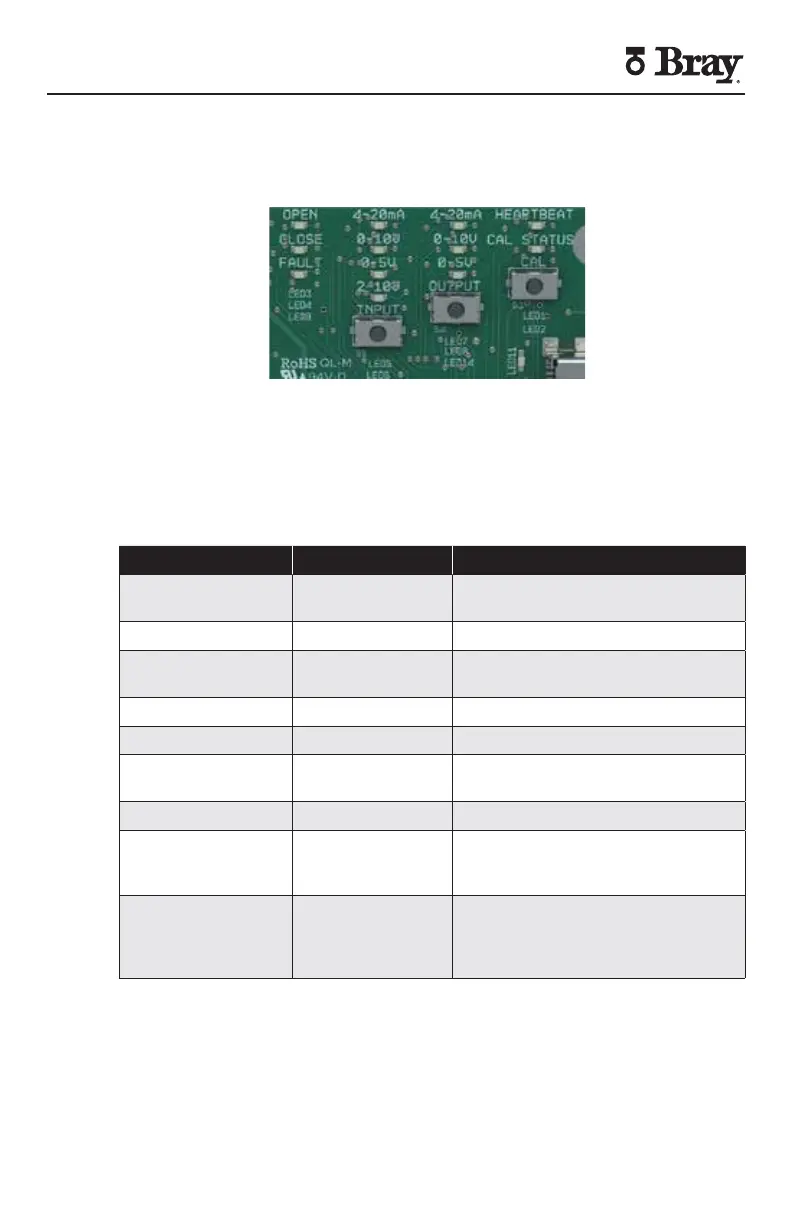
Figure - S Servo Setting Buttons and Status Indication LEDs
Direction Indicators
The Open (green) and Close (red) indicators located at the top left of the
display show the current direction of travel When the actuator is energized
the corresponding indicator will flash to indicate travel The green indicator
will be lit if the open travel limit is reached The red indicator will remain lit if
the close travel limit is reached
OPEN (Green LED) CLOSE (Red LED) DESCRIPTION OF ACTIVITY
OFF OFF No power or actuator is stopped
mid-travel
ON (solid) OFF Stopped at fully open position
ON (solid) ON (flashing) At fully open position moving in
the closed direction
OFF ON (flashing) Moving in the closed direction
OFF ON (solid) Stopped at full closed position
ON (flashing) ON (solid) At full closed position moving in
the open direction
ON (flashing) OFF Moving in the open direction
ON (flashing) ON (flashing) Fault condition where both limit
switches are activated Fault LED
is also ON (flashing)
ON ON Motor Braking – Both LEDs may
momentarily activate during
motor braking The Fault LED will
not turn on during this operation
Figure – Direction Indication LED Status Description


 To Next Page