22 Using the iSleep 20+
iSleep 20+ users manual
Doc. 004270 En-Eu T-3b
5.3 Using the Menu
Overview
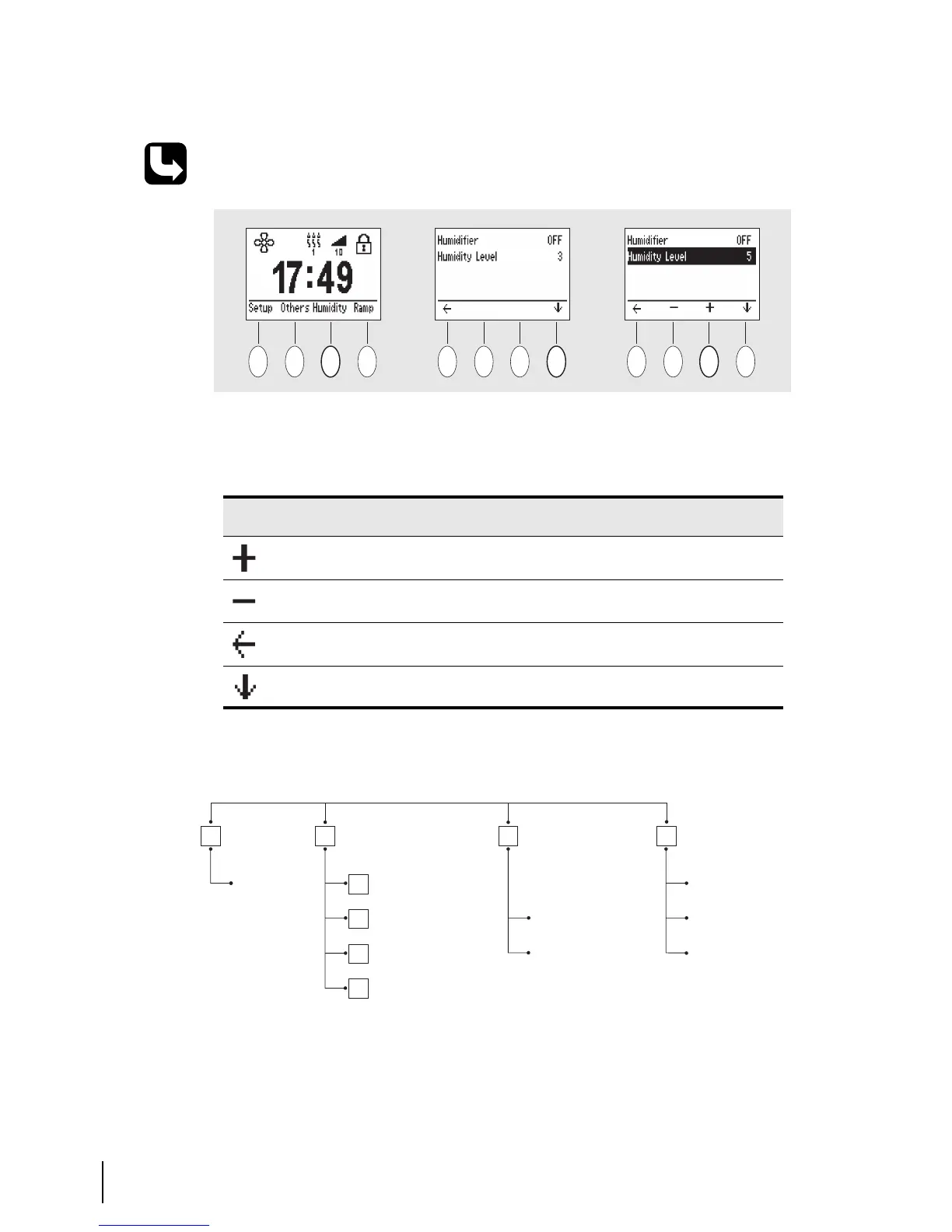
The iSleep 20+ menu has the following layout:
Read chapter “The iSleep 20+'s Front Panel” on page 16 for exact position of the
buttons.
Use the 4 buttons under the display to navigate in the menu. Depending on the
location in the menu, the buttons have different function. The following icons
are used:
ICON EXPLANATION
Increase the selected value or turn a function On.
Decrease the selected value or turn a function Off.
Move up one step in the menu system.
Enter the menu or select the value below.
Memory card
(standby only)
Humidifier
Humidity level
CPAP
(view only)
Device settings
Wakeup alarm,
Time/Date
Ramp
function
Ramp time
Device information
Always start
with ramp
Ramp
Humidity
(if used, active
only)
Others
Setup


 To Next Page