www.bresser.de
3.2.3 Loading
You can use the following six methods to load a model or Gcode file into REXprint:
Method 1: Touch the [Load] icon on the main interface.
Method 2: Then select the object file. Select the file you want to load and drag it
to the main interface of the software.
Method 3: Touch [File]--[Load File]. Then select the object file to be loaded.
Method 4: Touch [File]--[Examples] to load the example files.
Method 5: Touch [File]--[Recent Files] to open the previously loaded files.
Method 6: Select the destination file, touch it and drag it to the REXprint icon.
Note: 3D models can be saved as .STL, .OBJ or .FPP files and processed with
REXPrint.
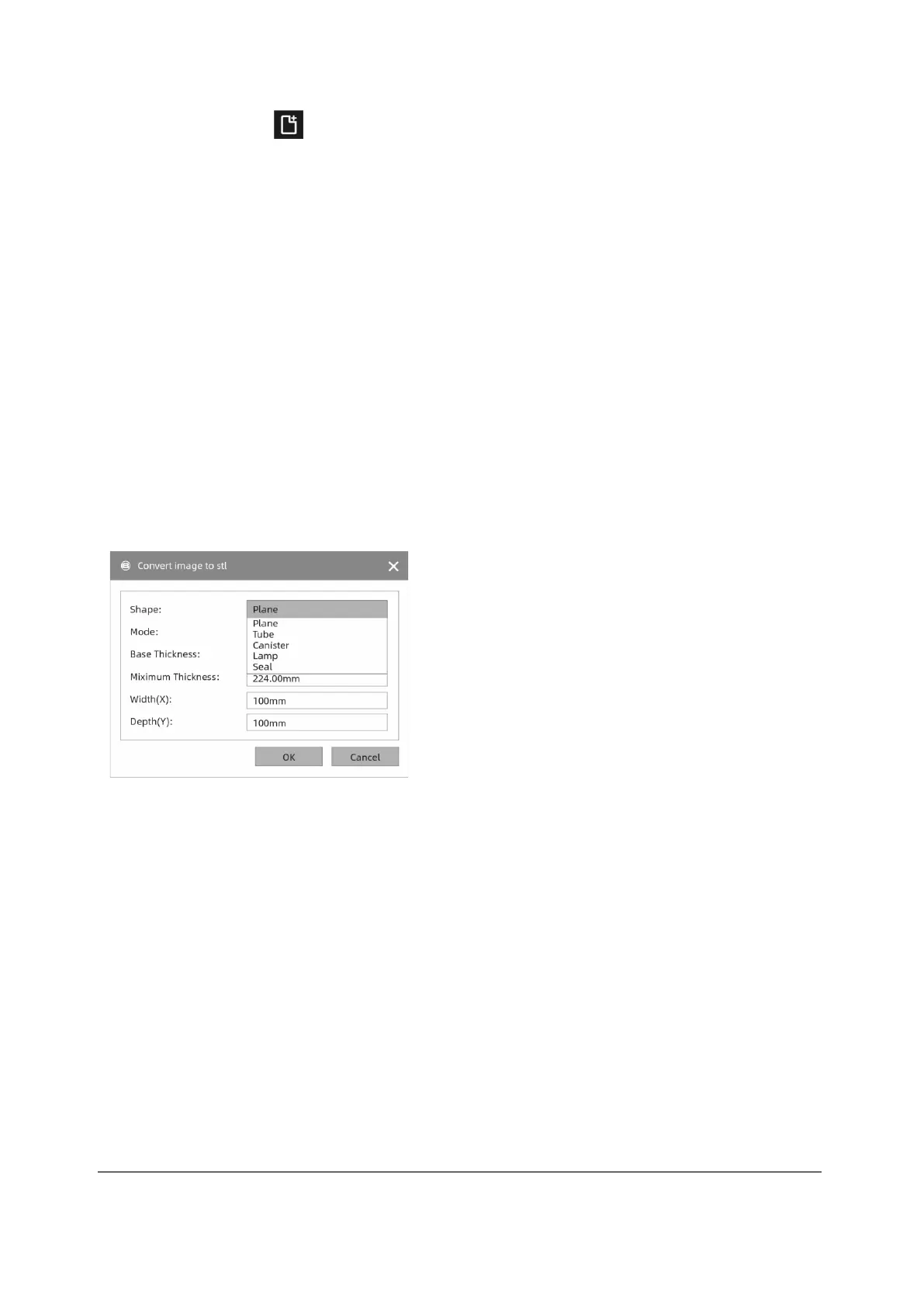
Enhanced: Designing reliefs
Shape: includes the shapes "Plane", "Tube", "Canister" and "Lamp".
Fashion: Includes "darker is higher" and "lighter is higher".
Maximum Thicknes: Z-value of the model
Base Thickness: The minimum raft thickness: Default value 0.5 mm.
Width: X-value of the model
Depth: Y-value of the model
Bottom Thickness: Determination of the base thickness for the "Tube", "Canister",
Seal" and "Lamp" moulds.
Top Diametre: Determination of the upper diametre for the shapes "Tube", Canister"
and "Lamp".



 To Next Page