Brivo ACS Installation Manual ACS5000-E
ENG-WI-001 © 2005 Brivo Systems, LLC. All rights reserved. Page 15
Connect the battery leads to the power supply
WARNING: Backup Battery
DO NOT CONNECT THE BACK-UP BATTERY AT THIS TIME. Premature
connection of the battery terminals may cause damage to the control panel.
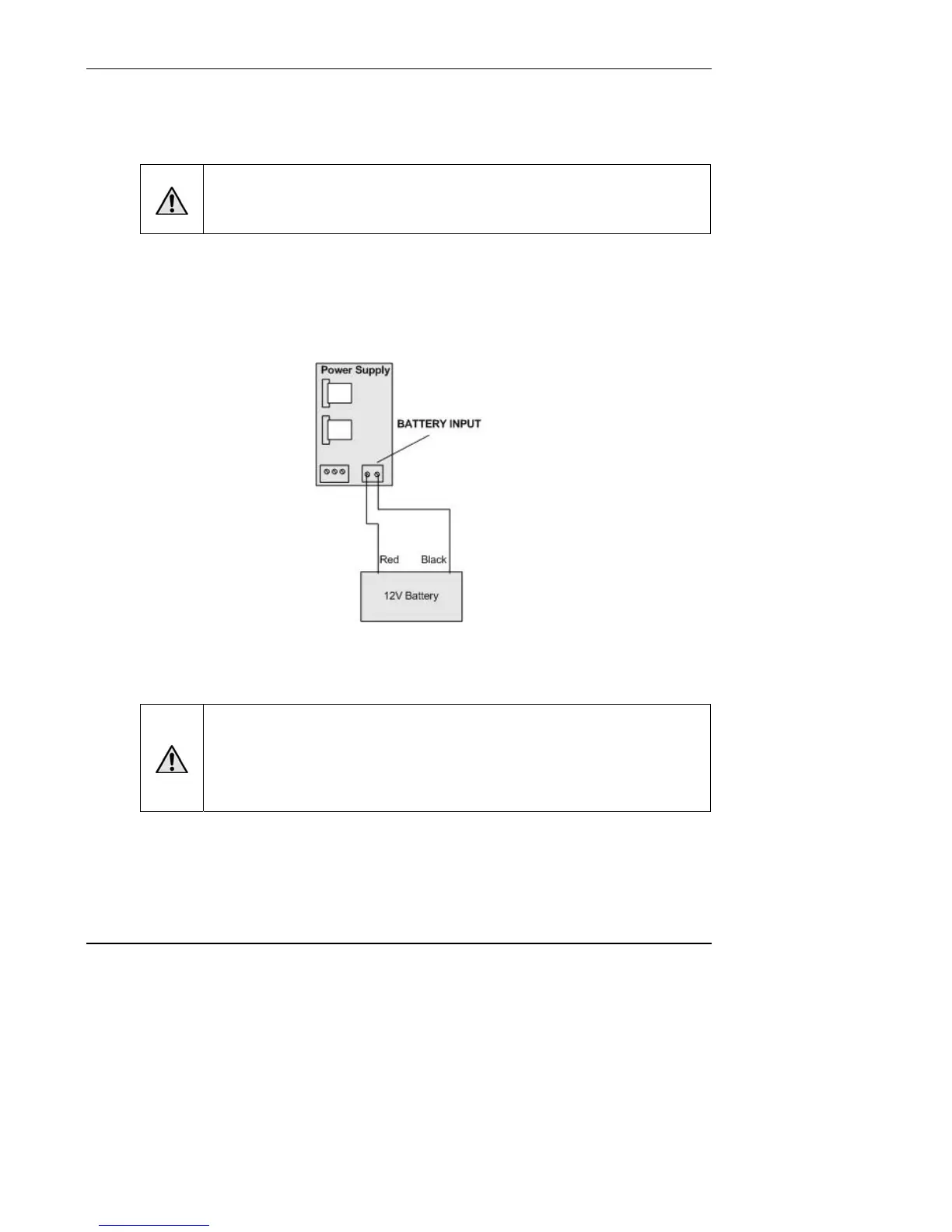
1. Connect the battery wires (#ELC-BAT-W001) that come with each circuit board kit to the
power supply BATTERY INPUT terminal block.
a) Connect the black wire to the ground (GND) terminal.
b) Connect the red wire to the +12V terminal.
Figure 5. Connect Battery Leads to Power Supply
Wire the AC transformer to the power supply
WARNING: Transform Connection
DO NOT CONNECT THE TRANSFORMER TO A SWITCHED OUTLET OR
OTHERWISE CONTROLLED AC OUTLET
.
DO NOT CONNECT THE TRANSFORMER TO THE 120 VAC OUTLET UNTIL ALL
WIRING IS COMPLETED.


 To Next Page