Brivo ACS Installation Manual ACS5000-E
ENG-W
I-001 © 2005 Brivo Systems, LLC. All rights reserved. Page 22
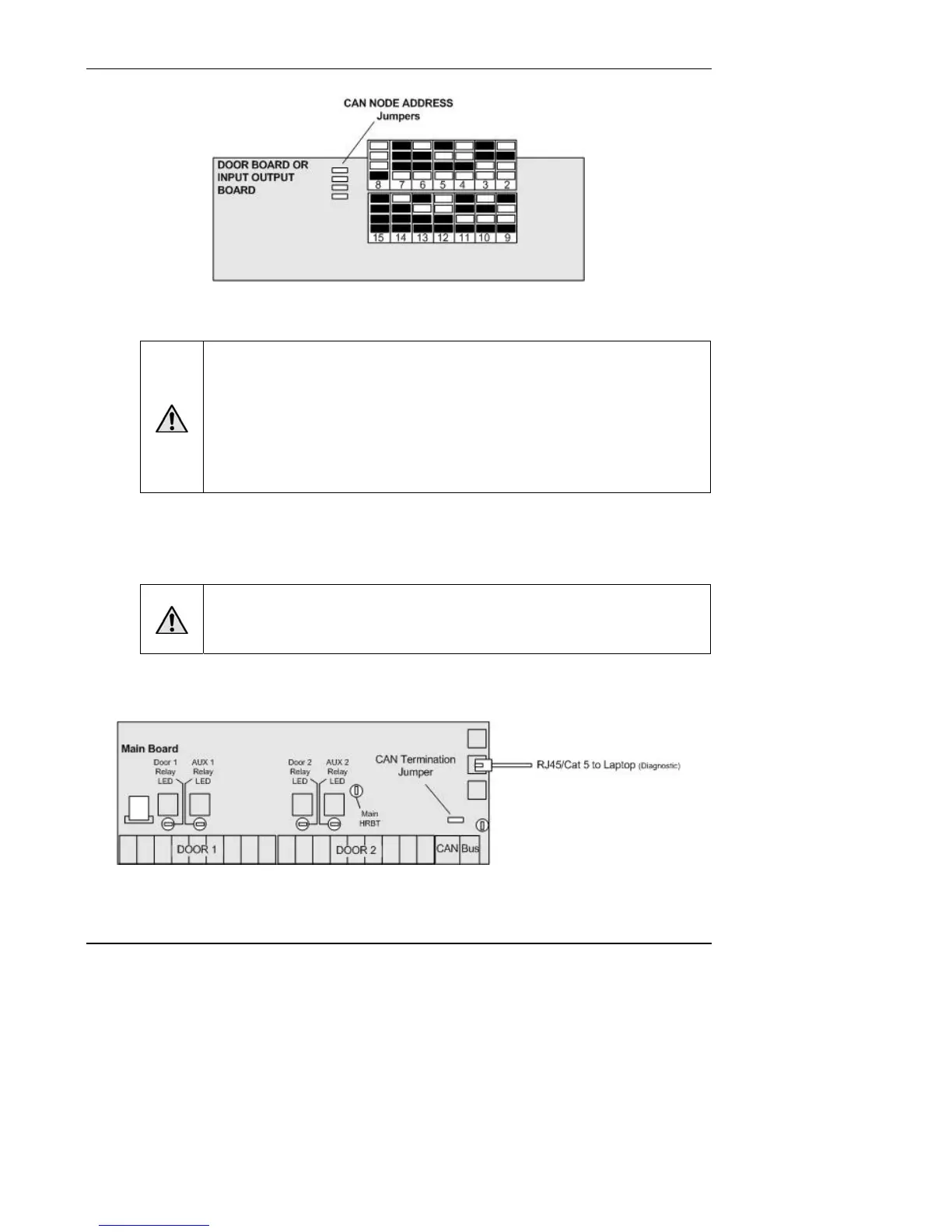
Figure 12. CAN NODE ADDRESS Jumpers
WARNING: CAN BUS Wiring
The CAN NODE ADDRESS jumpers are used to set the address of each board on
the CAN BUS. DO NOT ASSIGN TWO BOARDS THE SAME ADDRESS, OR THE
BUS WILL NOT FUNCTION PROPERLY.
Set these values sequentially, starting with 2 as the first expansion board address;
address 1 is the MAIN BOARD. Record all addresses on the Installation Worksheet.
These jumpers settings will map to board numbers when the control panel is
configures in ACS Online.
Ignore the AEN Port
WARNING: AEN Port
DO NOT CONNECT THE AEN PORT FOR ANY REASON. This will significantly
interfere with the function of the external network.
Connect a laptop to the MAIN BOARD
Figure 13. Connect Laptop to MAIN BOARD
1. Connect a laptop to the ADMIN port on the MAIN BOARD, using a standard Ethernet
cable or a patch cable.


 To Next Page