29
© 2020 Brivo Systems LLC. All rights reserved. P-MAN-PUB-Panel Networking Guide
Panel Networking Guide
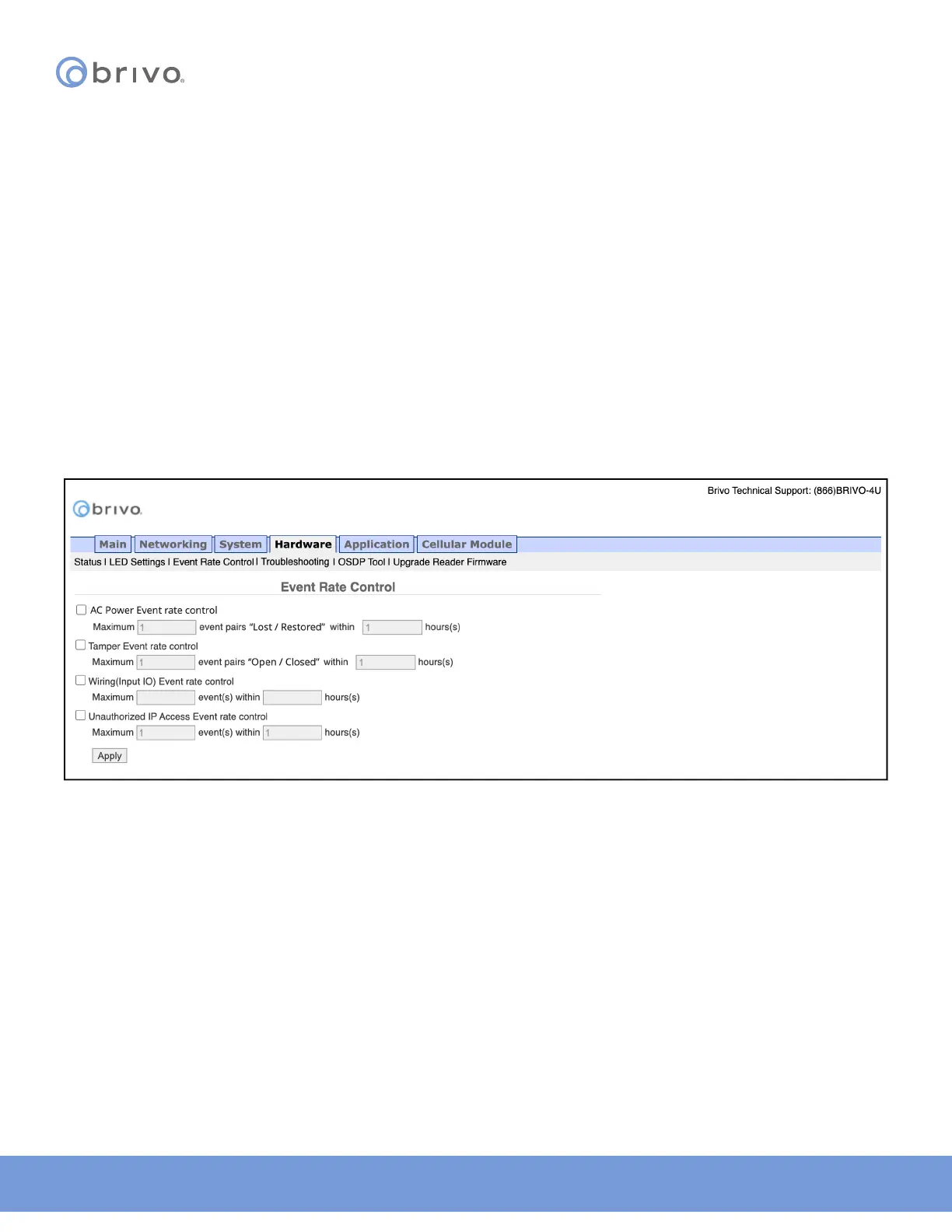
Event Rate Control
The Event Rate Control page allows the administrator to limit the number of notications reported for AC Power
events, Tamper events, Wiring (Input/Output) events, and Unauthorized IP Access Events within a dened period of
time.
1. Click Hardware to access the Hardware menu bar.
2. Click Event Rate Control to access the Event Rate Control page.
3. To limit AC Power event notications, check the AC Power Event rate control checkbox.
4. Enter the maximum number of event pairs (Lost/Restored) and the number of hours (the default for each is
one).
5. To limit Tamper event notications, check the Tamper Event rate control checkbox.
6. Enter the maximum number of event pairs (Open/Closed) and the number of hours (the default for each is
one).
7. To limit Wiring (Input/Output) event notications, check the Wiring (Input IO) Event rate control checkbox.
8. Enter the maximum number of event(s) and the number of hours (the default for each is one).
9. To limit Unauthorized IP Access Event notications, check the Unauthorized IP Access Event rate control
checkbox.
10. Enter the maximum number of event(s) and the number of hours (the default for each is one).
11. Click Apply to complete the process.
Figure 29: Event Rate Control



 To Next Page