Operation & Installation Manual RFS1 V2
MA365 Rev 3
31 of 46
6 Testing
This section describes the procedures to test your RFS1 V2 system to ensure that
the system is fully functional.
Before you commence testing your RFS1 V2 system, it is important to ensure that
you advise any relevant people i.e. tenants or a security / fire monitoring company,
that system testing is occurring, as alarm and defect warnings will be initiated.
6.1 Power Supply
Power supply voltage is pre-set at the factory to 14.5V
DC
(13.8VDC on battery
terminal):
1. Insert the fuse holder (with fuse fitted) in the 3-way mains terminal block to
switch the mains power ON, the power on LED illuminates green. The panel
sounder will sound and the defect LED illuminates yellow until the battery is
fitted.
2. Switch off the AC supply few times to check that the system will not false
alarm.
3. Connect the battery leads to the battery, the panel sounder will stop
sounding and the defect LED distinguishes. Ensure that only the power ON
LED is illuminating.
6.2 Smoke / Heat Alarm Test
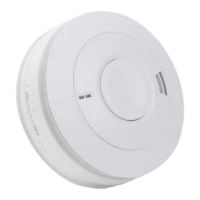
1. Proceed to each Smoke or Heat Alarm, check that the green light on the
Alarm is ‘ON’.
2. Press and hold the test button of a Smoke or Heat Alarm for up to 10
seconds to ensure the sensor chamber, electronics and sounder are
working. A red light on the cover will flash while horn is sounding. The alarm
will stop when the button is released.
3. Ensure all Alarms are sounding within about 5 seconds of the first Alarm
sounding. The red alarm light on the first unit only will flash once a second
and the alarm LED on RFS1 V2 will illuminate.
Pressing the test button simulates the effect of smoke or heat during a real fire and
is the best method to ensure the Alarm is operating correctly.
WARNING: DO NOT TEST WITH FLAME, this will damage both the Alarm and the
house.
Brooks do not recommend testing with smoke or heat as the results can be
misleading unless special equipment is used.
6.2.1 Alarm Output Test
1. Ensure alarm outputs are not isolated
2. Proceed to any smoke or heat alarm and press the test button, the alarm
outputs should activate.
3. Check for the operation of any ancillary devices i.e. strobe, MDH, etc.
connected to the alarm output.
4. Check that the remote indicator (if fitted) illuminates – Red LED
Note: this will only illuminate while the alarm is sounding



 To Next Page