11
— — — — — — — — — — — — — — — — — — — — — — — — — — — — — — — — — — — — — — — — — — — — — — — — — — — —
Operation panel
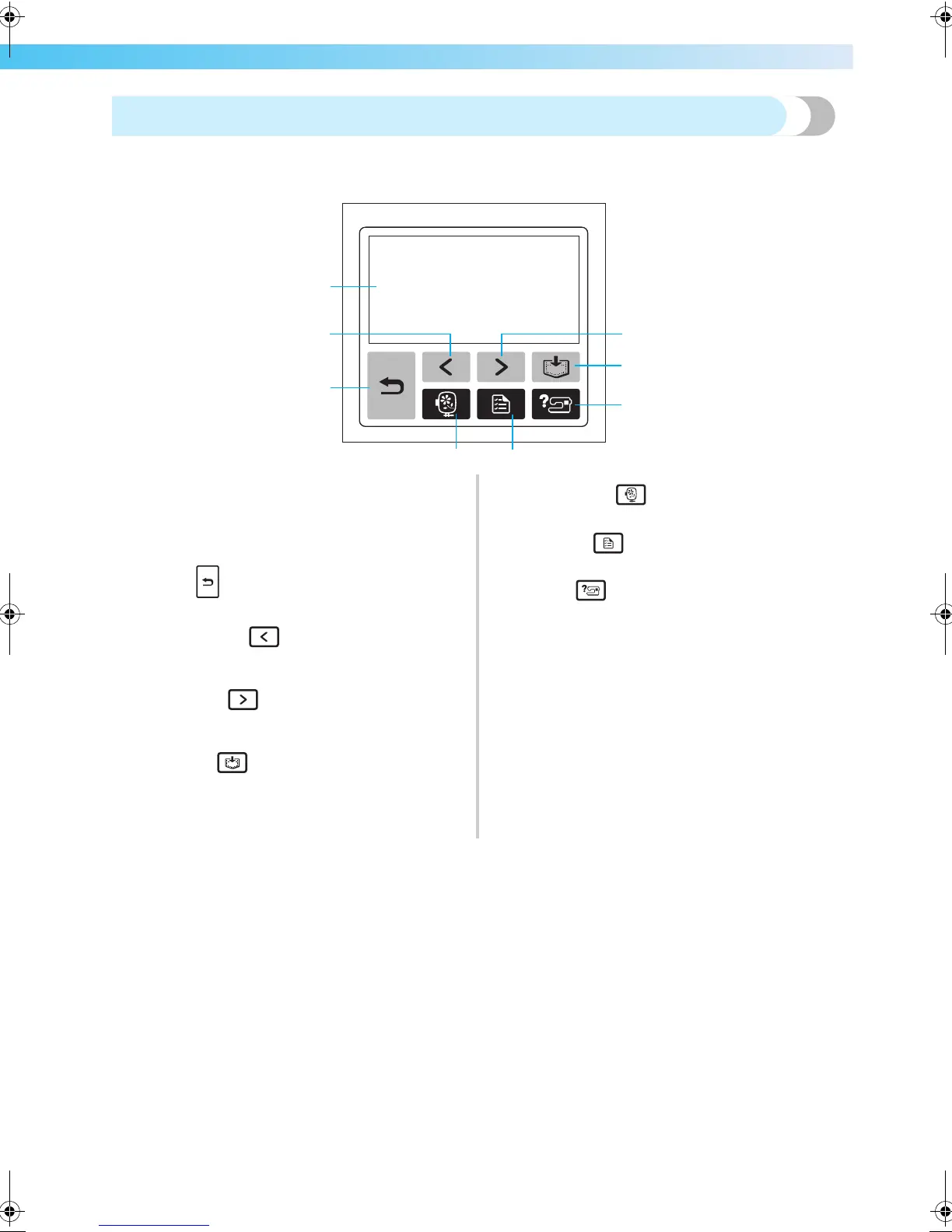
The front operation panel has an LCD (liquid crystal display) and operation keys.
a LCD (liquid crystal display) (touch panel)
Touch the keys displayed on the LCD to perform
operations.
For details, refer to “LCD (Liquid Crystal Display)
Operation” (page 20).
b Back key
Press to return to the previous screen.
c Previous page key
Press to display the previous screen when there are
items that are not displayed on the LCD.
d Next page key
Press to display the next screen when there are items
that are not displayed on the LCD.
e Memory key
Press to store patterns in the machine's memory.
f Embroidery key
Press to display the pattern type selection screen.
g Settings key
Press to display the settings screen.
h Help key
Press to get help on using the machine.
Displays simple explanations of setting upper thread /
bobbin winding / setting bobbin thread / embroidery
unit attachment / embroidery frame attachment / needle
replacement.
a
c
b
fg
d
e
h
F-combo-BrotherE_sgml.book Page 11 Thursday, November 17, 2005 3:39 PM











 To Next Page