GETTING READY — — — — — — — — — — — — — — — — — — — — — — — — — — — — — — — — — — — — — — — — — — — —
36
Replacing the needle
Replace the needle as described below. Use the
screwdriver and a needle that has been determined to
be straight according to the instructions in “Checking
the needle” (page 35).
a
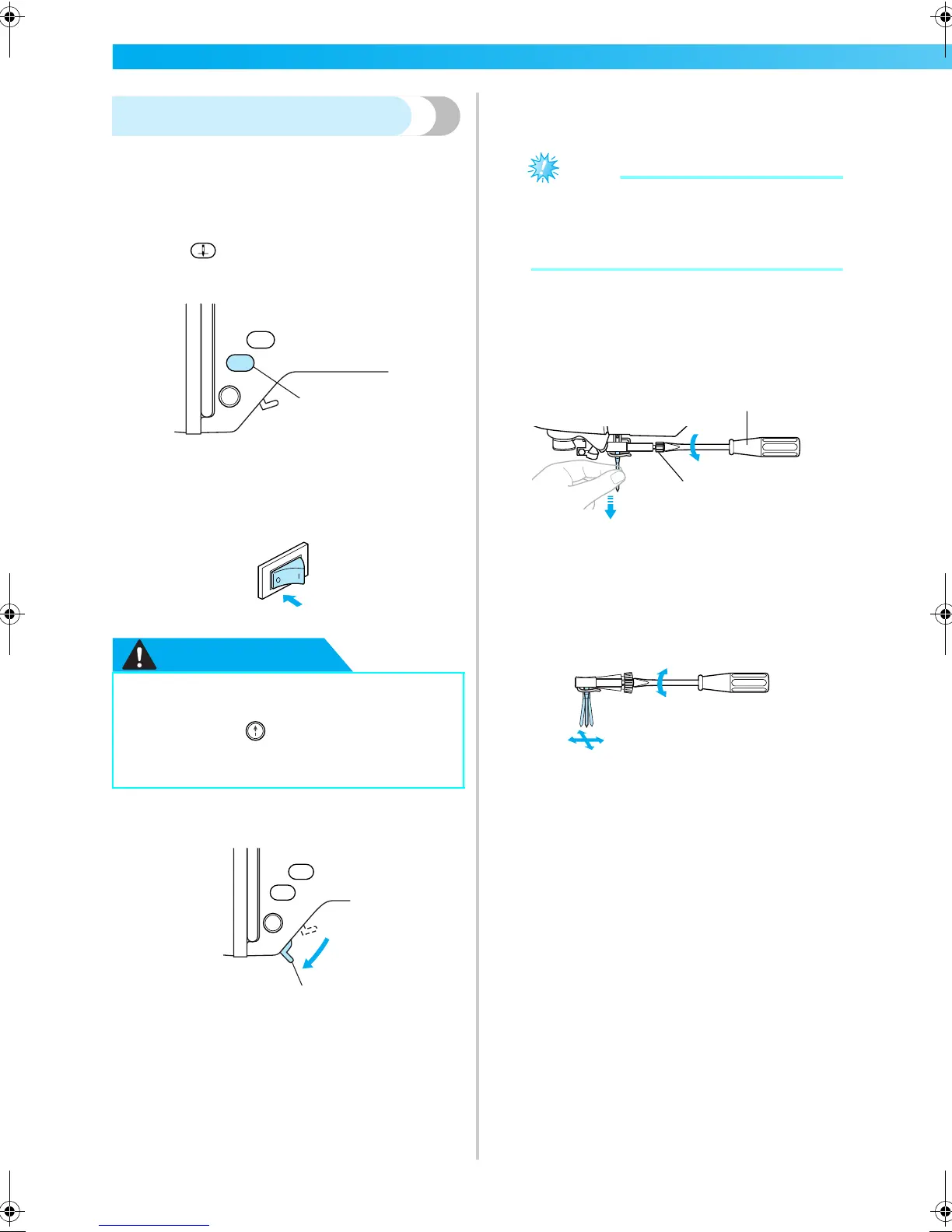
Press (Needle position button) once or
twice to raise the needle.
a Needle position button
b
Turn off the machine.
CAUTION
c
Lower the presser foot lever.
a Presser foot lever
d
Place fabric or paper under the embroidery
foot to cover the hole in the needle plate.
Note
z Before replacing the needle, cover the hole
in the needle plate with fabric or paper to
prevent the needle from falling into the
machine.
e
Hold the needle with your left hand, and then
use a screwdriver to turn the needle clamp
screw toward you (counterclockwise) to
remove the needle.
a Screwdriver
b Needle clamp screw
• Do not apply a strong force when loosening
or tightening the needle clamp screw,
otherwise certain parts of the machine may
be damaged.
● Before replacing the needle, be sure to
turn off the machine, otherwise injuries
may occur if (Start/stop button) is
accidentally pressed and the machine
starts embroidering.
1
1
2
1
F-combo-BrotherE_sgml.book Page 36 Thursday, November 17, 2005 3:39 PM











 To Next Page