70
APPENDIX — — — — — — — — — — — — — — — — — — — — — — — — — — — — — — — — — — — — — — — — — — — — — —
Care and Maintenance
Simple machine maintenance operations are described below.
Cleaning the machine surface
If the surface of the machine is dirty, lightly soak a
cloth in neutral detergent, squeeze it out firmly, and
then wipe the surface of the machine. After cleaning
it once with a damp cloth, wipe it again with a dry
cloth.
CAUTION
Cleaning the race
Embroidery performance will suffer if dust collects in
the bobbin case, therefore, it should be cleaned
periodically.
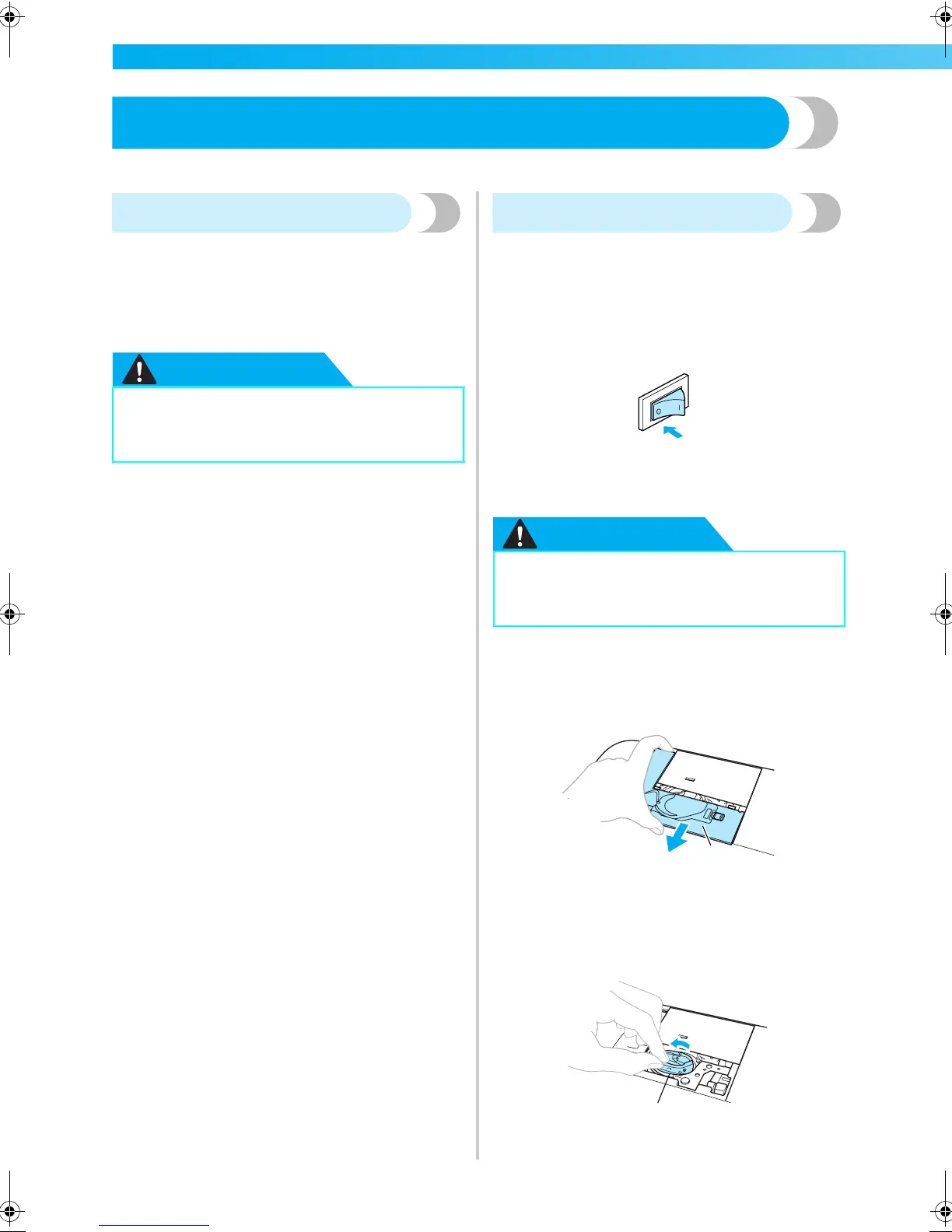
a
Turn off the machine.
b
Unplug the power cord from the power supply
jack on the right side of the machine.
CAUTION
c
Remove the embroidery unit.
d
Grasp both sides of the needle plate cover, and
then slide it toward you.
a Needle plate cover
X The needle plate cover is removed.
e
Remove the bobbin case.
Grasp the bobbin case, and then pull it out.
a Bobbin case
● Unplug the power supply cord before
cleaning the machine, otherwise injuries
or an electric shock may occur.
● Unplug the power supply cord before
cleaning the machine, otherwise injuries
or an electric shock may occur.
a
1
F-combo-BrotherE_sgml.book Page 70 Thursday, November 17, 2005 3:39 PM











 To Next Page