LCD (Liquid Crystal Display) Operation 23
1
— — — — — — — — — — — — — — — — — — — — — — — — — — — — — — — — — — — — — — — — — — — — — — — — — — — —
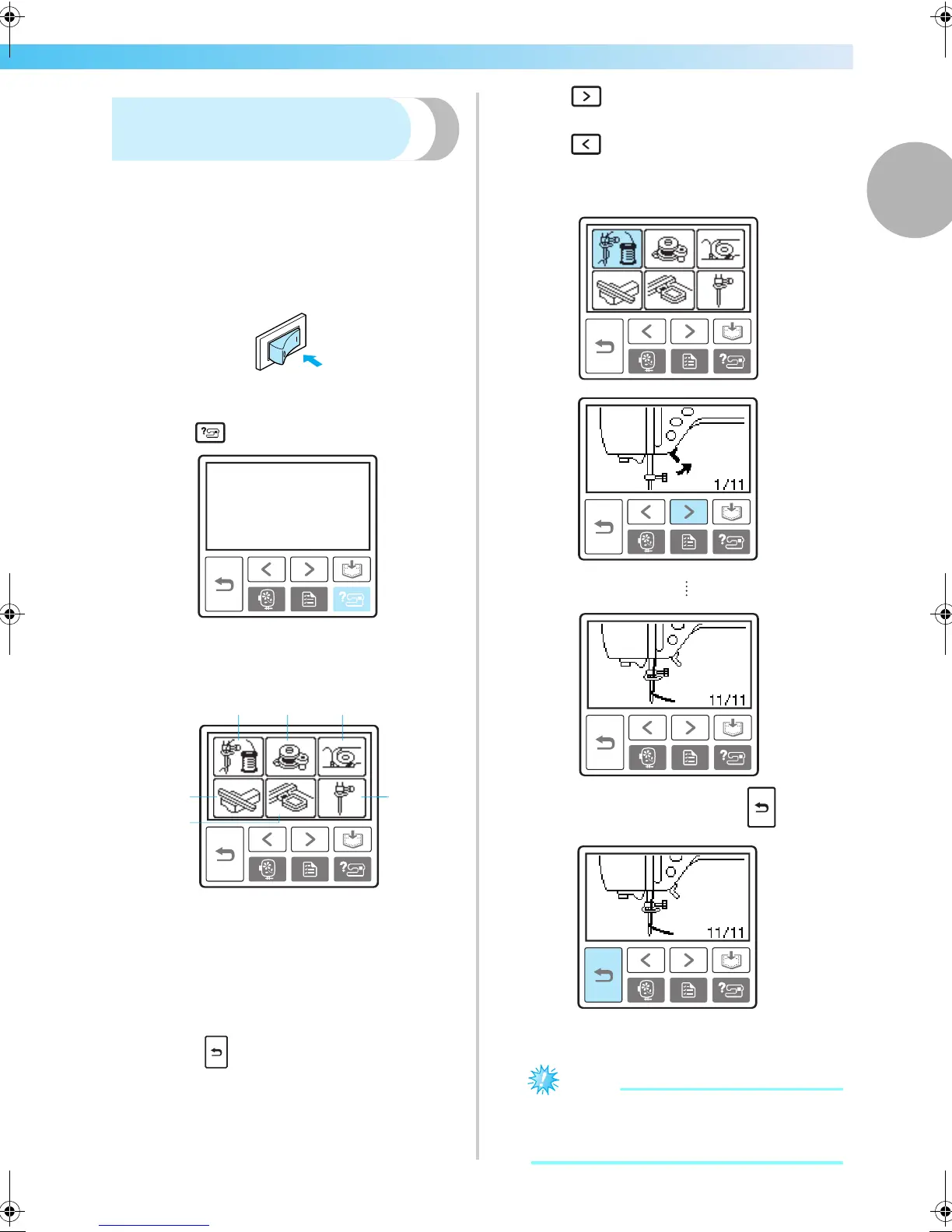
Checking machine operating
procedures
Displays simple explanations of setting upper thread /
bobbin winding / setting bobbin thread / embroidery
unit attachment / embroidery frame attachment /
needle replacement on the LCD.
a
Turn on the machine.
X The LCD comes on.
b
Press (Help key) on the operation panel.
X The help screen appears.
c
Press the item to be displayed.
a Upper threading
b Bobbin winding
c Bobbin installation
d Embroidery unit attachment
e Embroidery frame attachment
f Needle replacement
X The first screen describing the procedure for
the selected topic appears.
• Press (Back key) to return to the item
selection screen.
d
Press (Next page key) to switch to the
next page.
Press (Previous page key) to return to the
previous page.
Example: Upper threading
e
After you finish checking, press (Back
key) two times.
X The initial stitch screen appears again.
Note
z For details on each topic, refer to the
corresponding page in this Operation
Manual.
6
5
1
23
4
F-combo-BrotherE_sgml.book Page 23 Thursday, November 17, 2005 3:39 PM











 To Next Page