44
EMBROIDERY — — — — — — — — — — — — — — — — — — — — — — — — — — — — — — — — — — — — — — — — — — — — —
c
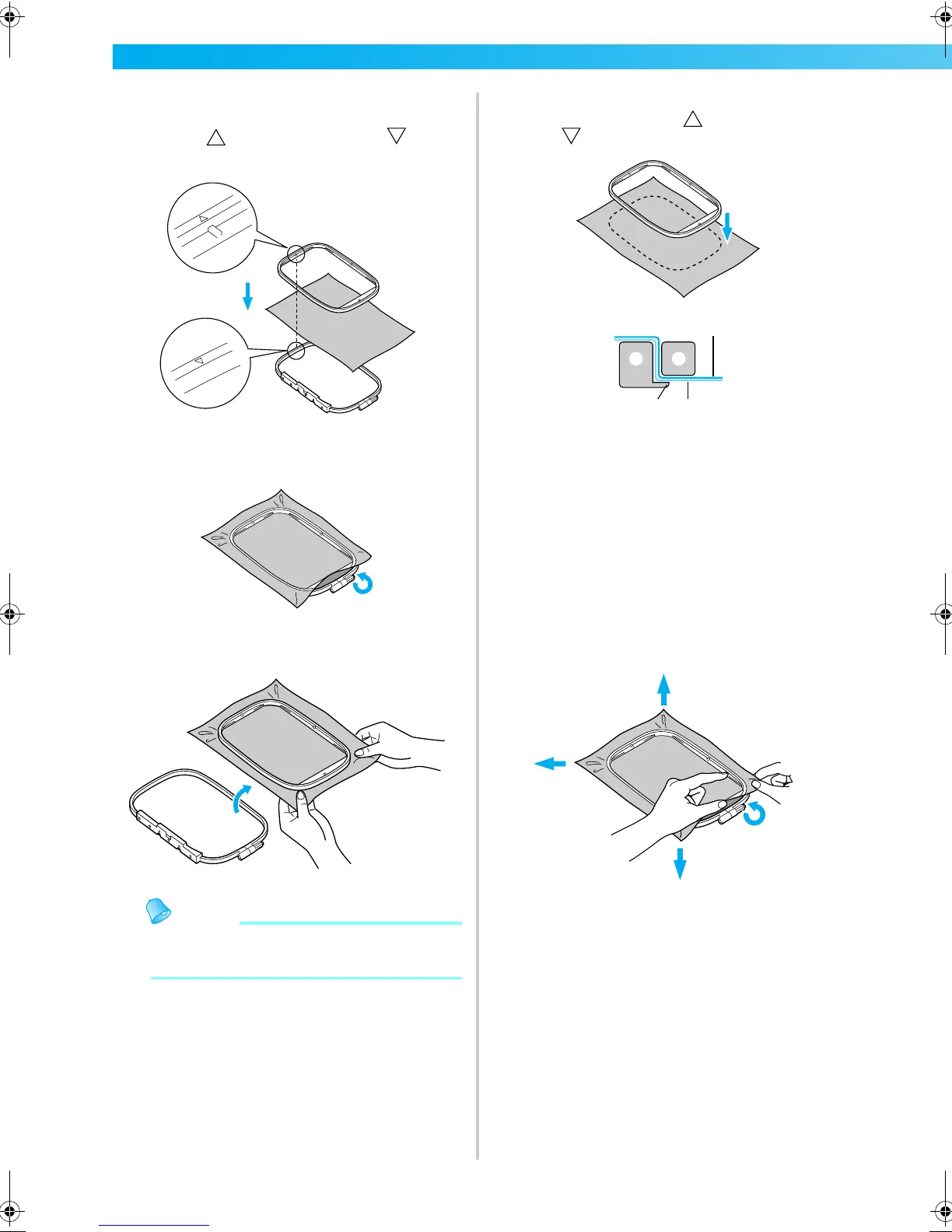
Press the inner frame in from the top of the
fabric.
Line up on the inner frame and on
outer frame.
d
Tighten the adjustment screw by hand just
enough to secure the fabric.
e
Gently remove the fabric from the frame
without loosening the adjustment screw.
Memo
z This precautionary step will help reduce
pattern distortion while embroidering.
f
Press the inner frame in from the top of the
fabric again, lining up on the inner frame
and on outer frame.
a Outer frame
b Inner frame
c Fabric (right
side)
d Stabilizer material
e Ledge of outer frame
• Press down firmly until the inner frame is
securely pressed against the ledge of the
outer frame.
g
Tighten the adjustment screw while removing
any slack in the fabric by hand. The goal is to
have a drum-like sound when the stretched
fabric is struck lightly.
3
45
21
F-combo-BrotherE_sgml.book Page 44 Thursday, November 17, 2005 3:39 PM











 To Next Page