General Information
5
1
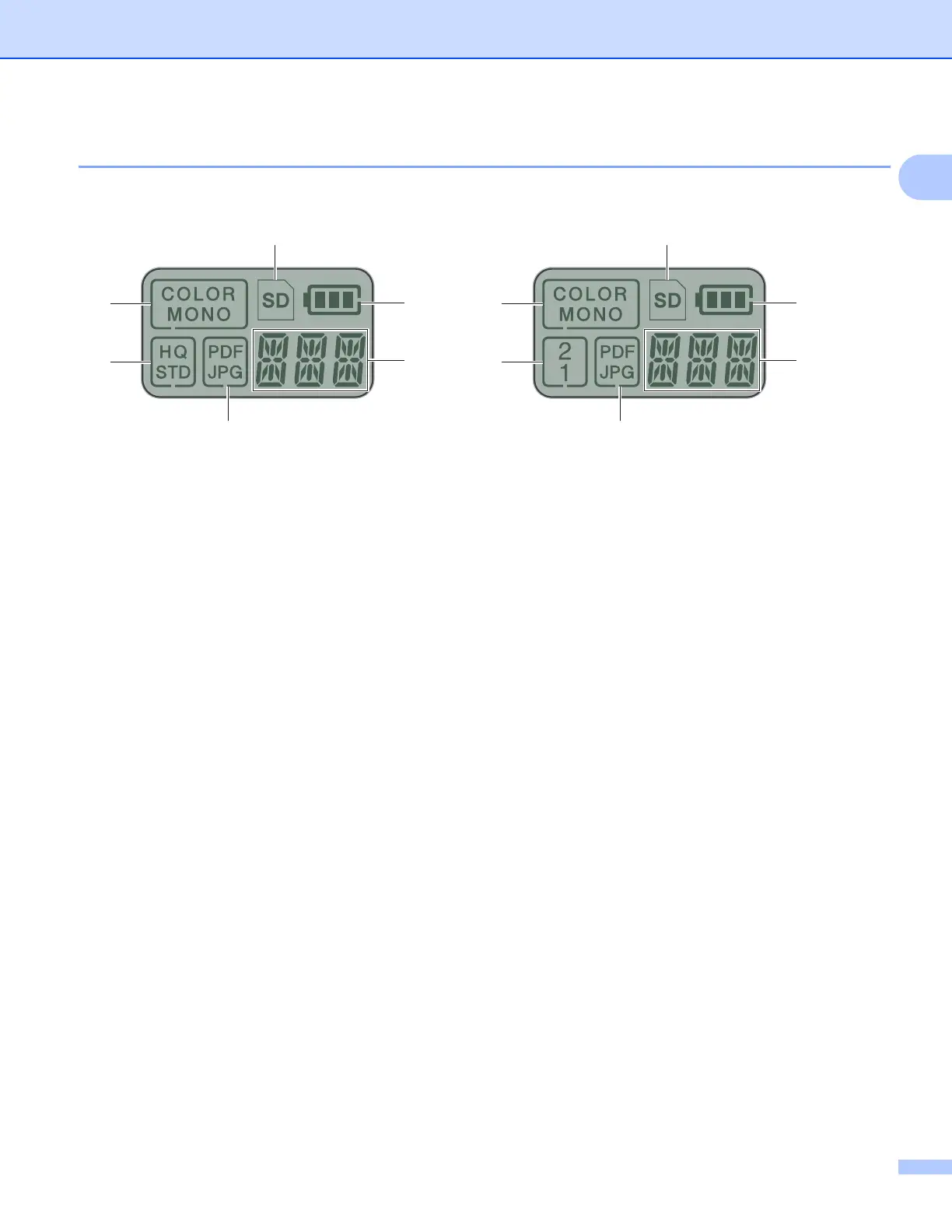
Items displayed on the LCD
1 SD
Appears when the SD card is inserted into the scanner’s SD card slot.
2 Remaining battery power
3 The selected menu or the current status appears here.
For more information about the messages displayed on the LCD, see LCD messages on page 6.
4 PDF / JPG
Displays the scanning file format (PDF or JPEG).
5 HQ / STD (DS-820W only)
Press to change the resolution. HQ is 600 dpi and STD is 300 dpi.
6 COLOR / MONO
Displays the scan mode (color or mono [black and white]).
7 2 / 1 (DS-920DW only)
Displays the scan mode (2 side (double-sided) scan or 1 side (single-side) scan).
6
5
2
1
4
3
6
7
2
1
4
3
DS-820W DS-920DW







 To Next Page