20
Ch. 2 Getting Started
Getting Started
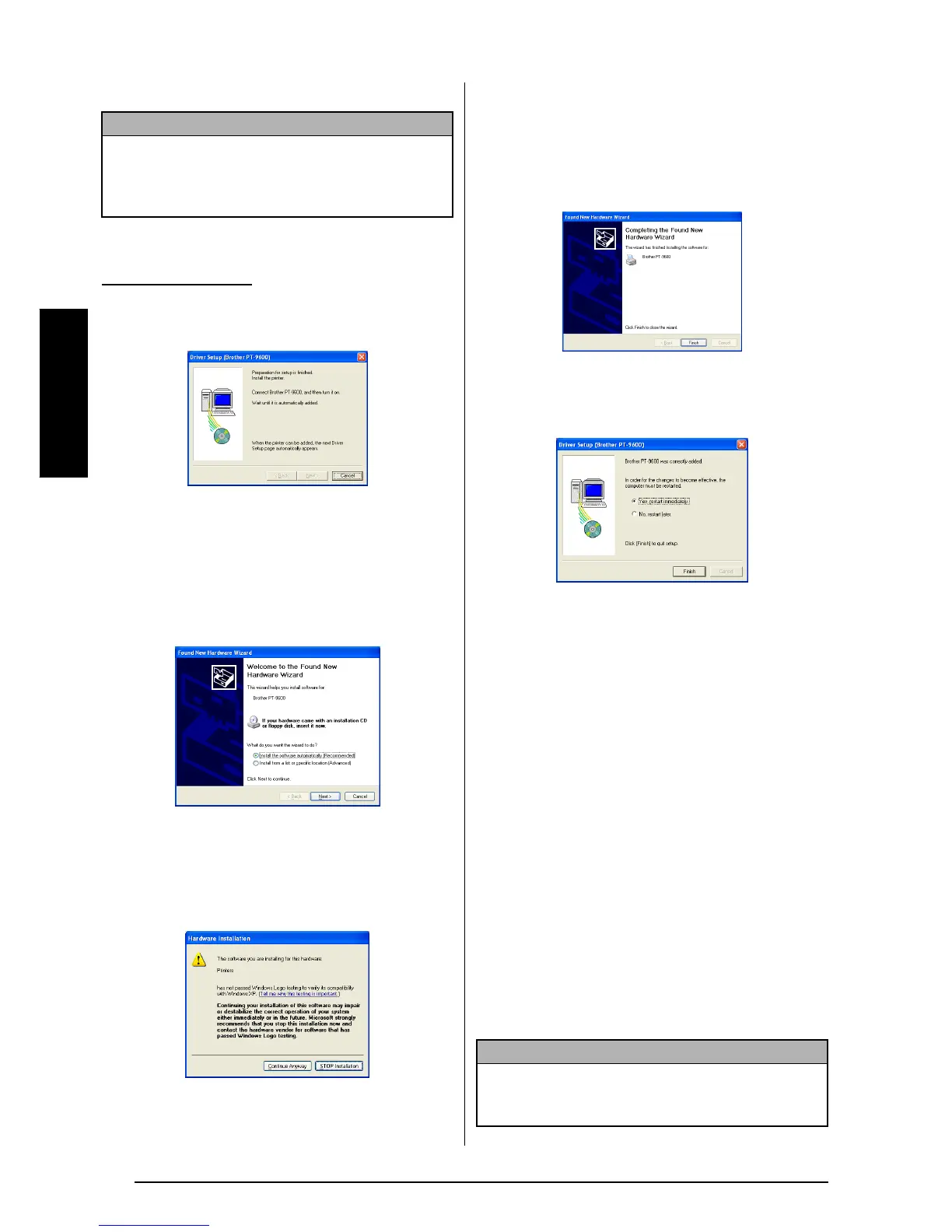
7 Click the Finish button.
5 A dialog box appears, instructing you to
connect the P-touch to the computer.
6 Connect the P-touch to the computer using
the enclosed USB interface cable as
described on page 9, and then turn on the
P-touch. A dialog box appears, indicating
that the printer driver has been installed.
The first Found New Hardware Wizard dia-
log box appears.
7 Select “Install the software automatically
(Recommended)”, and then click the Next
button. A dialog box appears, warning that
the software has not passed Windows
®
Logo testing.
8 Click the Continue Anyway button to con-
tinue with the installation. A Found New
Hardware Wizard dialog box appears, indi-
cating that the Found New Hardware Wiz-
ard has finished installing the software for
the PT-9600/3600.
9 Click the Finish button. A Driver Setup dia-
log box appears, indicating that the printer
driver has been installed.
0 Select “Yes, restart immediately”, click the
Finish button to restart the computer, and
then remove the CD-ROM from the com-
puter.
On a Macintosh Computer
The Mac version of the software is for a Macin-
tosh with an English operating system. If the
software is installed on a Macintosh with an
operating system in a different language, the
software may not run properly.
Before installation
Check that your system configuration meets the
following requirements.
Computer:
Macintosh with Power PC processor
Operating system: Mac OS 8.6 to 9.X or OS X
10.1 to 10.2.3
Hard disk free space: At least 20 MB (100 MB
for a full installation)
NOTE
If a dialog box appears, explaining that the com-
puter should be restarted, select the option for
restarting the computer, and then click the Finish
button.
With Windows
®
XP:
NOTE
Up to 100 MB of hard disk free space may be
needed when printing long labels or large amounts
of data.



 To Next Page
 Loading...










