48
Combining the separated character patterns
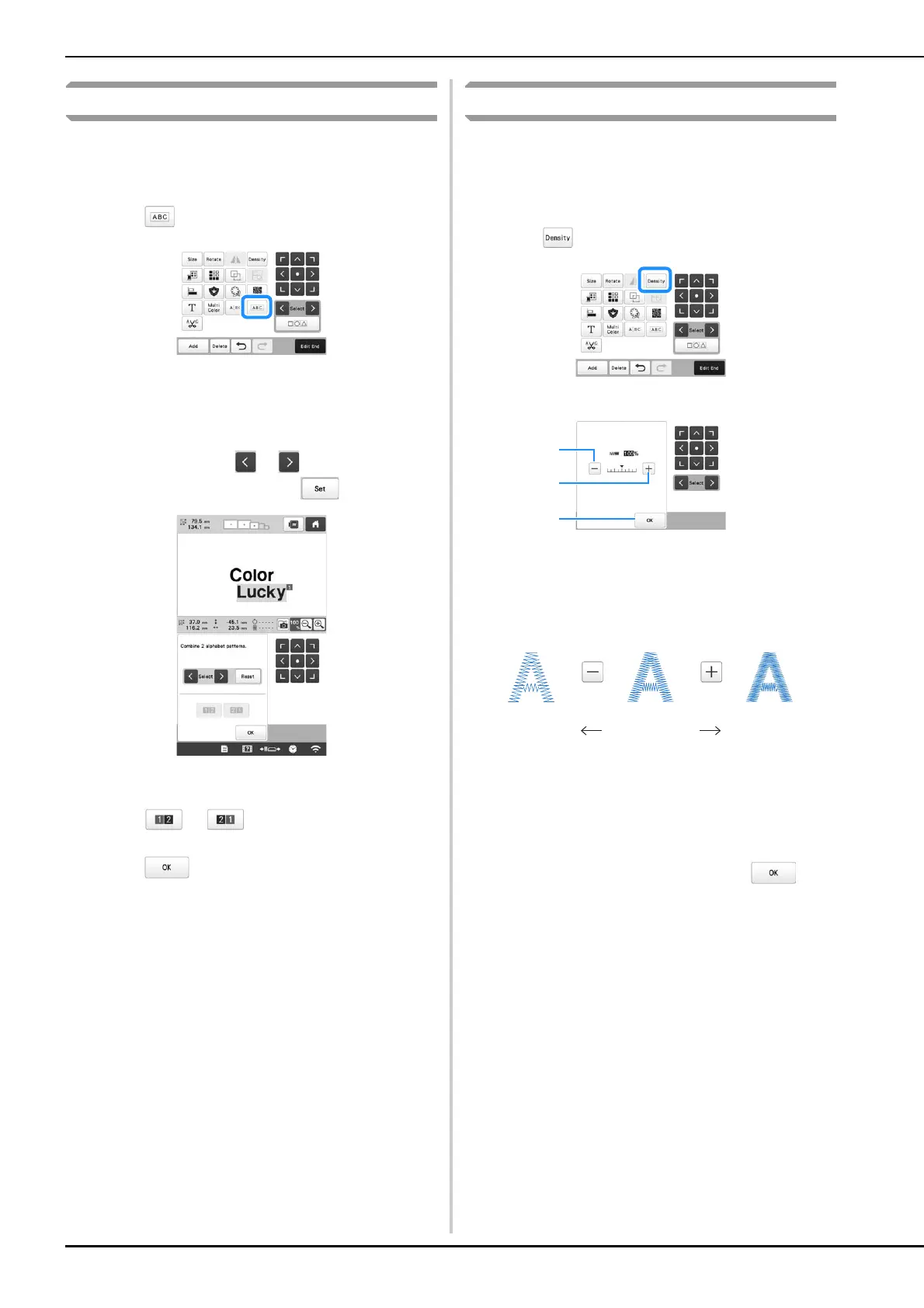
Two separated lines of character patterns can be combined.
The characters can be aligned to the specified order. You
cannot combine the lines of character patterns if the text
contains a line feed using the Line Feed function.
a
Touch .
b
Select the group of character patterns that you want to
combine.
• The selected character is assigned as Number [1].
• You can select the patterns by touching them on the
screen, or touching or to check the patterns
to be selected, and then touch .
Numbers [1] and [2] are assigned temporarily to the
patterns.
c
Touch or to choose the order of the 2
patterns.
d
Touch to return to the previous screen.
Changing the thread density
The thread density for some character and frame patterns can
be changed. Other patterns' density can be adjusted in the
stitch recalculator mode. (page 47)
A setting between 80% and 120% in 5% increments can be
specified.
a
Touch .
The screen shown below appears.
1 Make the pattern less dense.
2 Make the pattern more dense.
3 Close this screen.
■ Selects a less/more thread density
a
Touch the keys to select the desired thread density.
Each touch of a key slightly increases or decreases the
thread density.
• To return to the original thread density (standard),
select [100%].
b
After making the desired changes, touch .
Less Standard More





 To Next Page