BASIC EMBROIDERY
71
2
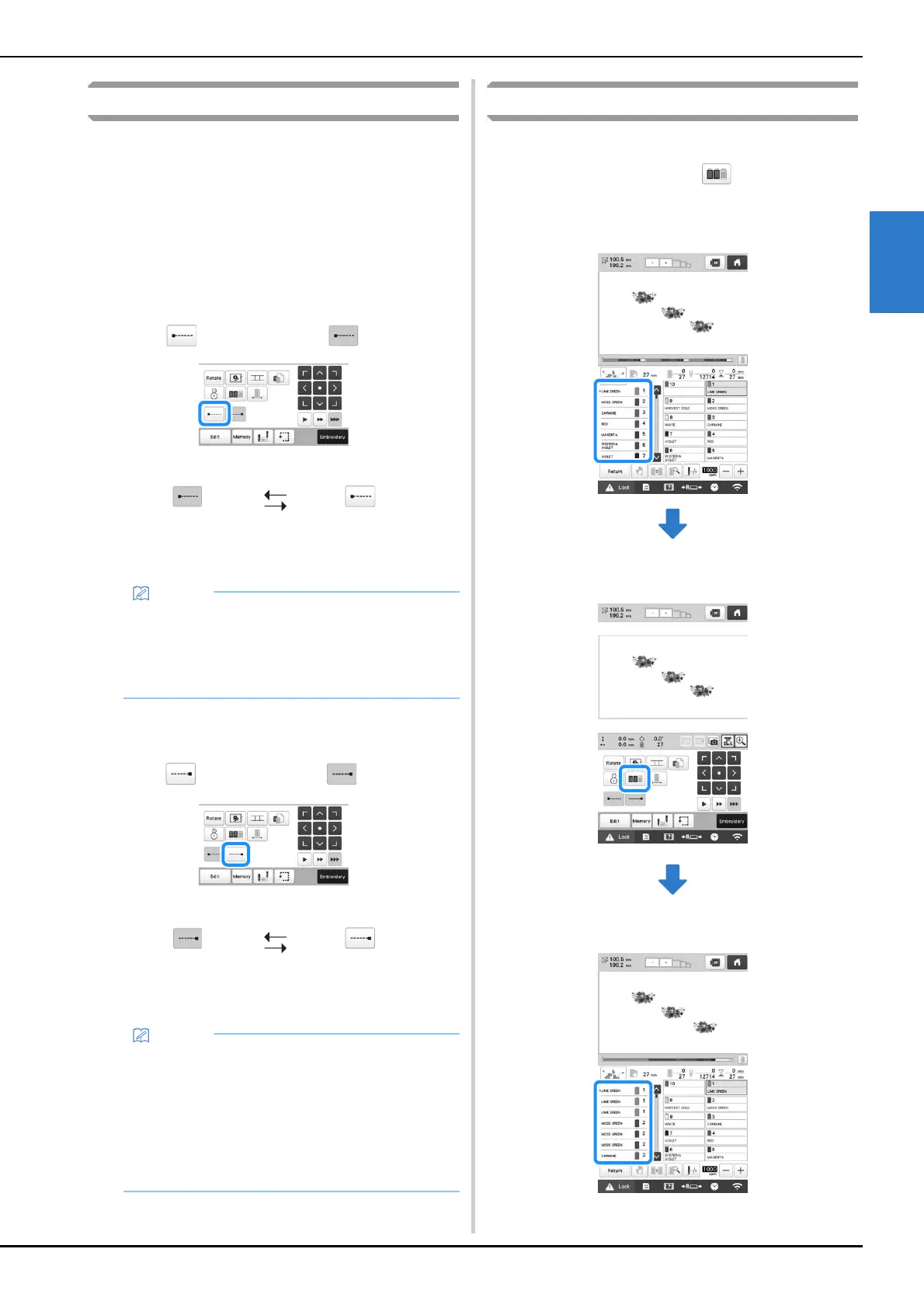
Automatic lock stitch setting
When the machine is purchased, it is set to automatically
embroider lock stitches at the beginning of the pattern, before
embroidering after each thread color change, and before
trimming the thread.
■ To change the lock stitches being embroidered
at the beginning of the pattern, at the
beginning of embroidering each thread color
change and at the beginning of embroidering
after the thread trim.
a
Touch so that it changes to .
• Each touch of the key turns the setting either on or off.
■ To change the lock stitches being embroidered
before the thread is trimmed.
a
Touch so that it changes to .
• Each touch of the key turns the setting either on or off.
Thread color sorting
You can embroider while replacing the thread spool a
minimal number of times.
Before starting to embroider, touch in the embroidering
settings screen to rearrange the embroidering order and sort it
by thread colors.
Embroidery screen
Embroidering settings screen
Embroidery screen
Automatic lock
stitch setting turned
on
Automatic lock
stitch setting turned
off
• If the first stitch length is less than 0.8 mm (1/32
inch), the lock stitch won’t be inserted.
• If [Thread Trimming] is set [OFF] in the settings
screen, the lock stitch won’t be inserted.
(page 123)
Automatic lock
stitch setting turned
on
Automatic lock
stitch setting turned
off
• The automatic lock stitch setting stays the same
until the key is touched to turn it off. The setting
specified before the machine is turned off remains
selected the next time that the machine is turned
on.
• If [Thread Trimming] is set [OFF] in the settings
screen, the lock stitch won’t be inserted.
(page 123)















 To Next Page