SP3 PREAMP / PROCESSOR
SP3 PREAMP / PROCESSOR
SP3 IDLE SCREEN EXPLANATIONS Page 3 of 3
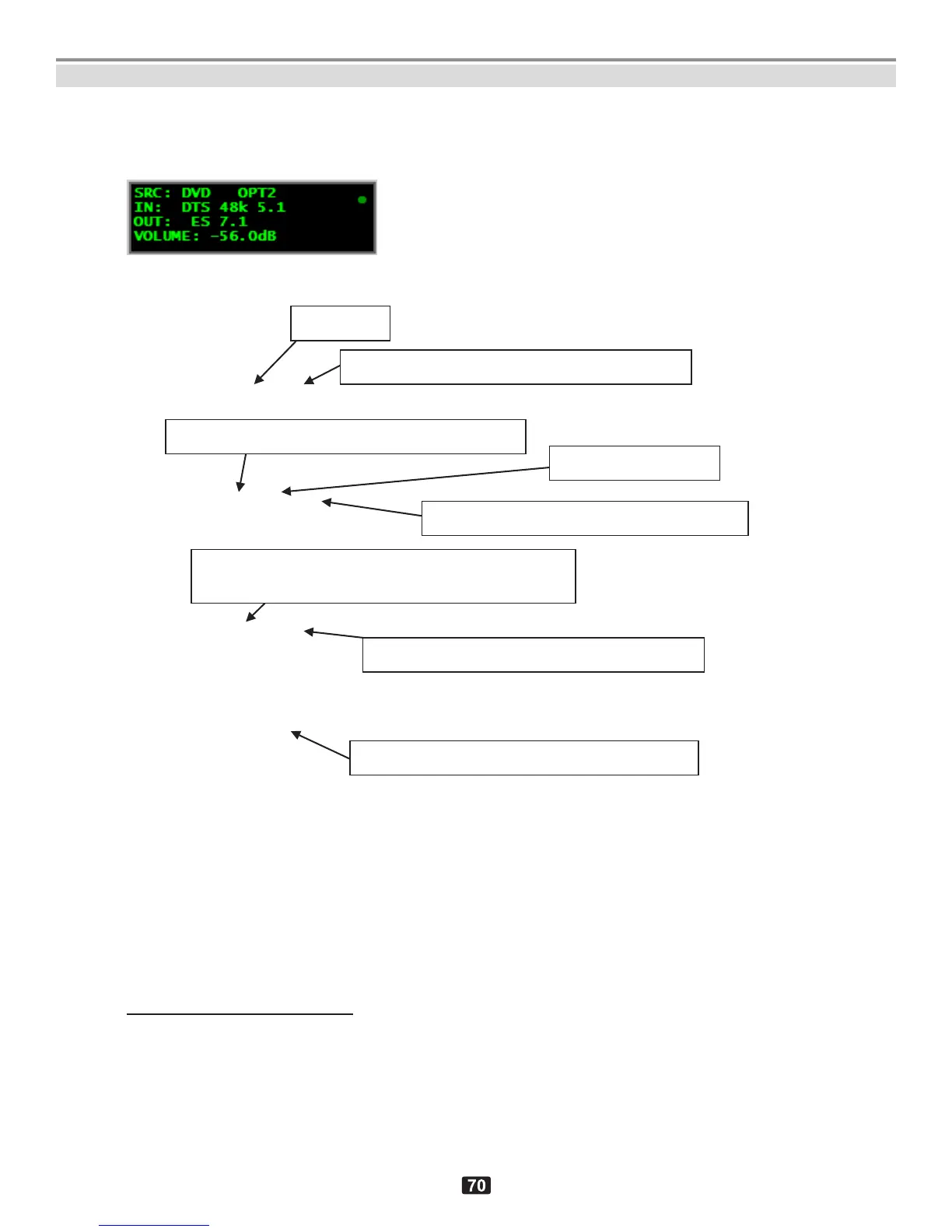
3. Default screen, playing HDMI input, DTS-encoded multi-channel stream,
example 3
Line1: SRC: DVD OPT2
Line2: IN: DTS 48k 5.1
Line3: OUT: ES
5
7.1
Line4: VOLUME: -56.0dB
5
Indicates DTS ES algorithm for back channels re-creation. Capital “ES” lettering indicates that the back
channel re-creation is being forced upon any DTS 5.1 channel source even in the absence of the DTS back
channel enabling . This forcing feature is governmed by SOURCE SETUPDTSES APPLY=FORCE.
Note: ES APPLY=AUTO would reproduce back speakers only when a DTS back speaker enabling flag is
present in the source stream., in such a case lower case “es” would be displayed.
Input type: Optical (Toslink), socket #2
Program encoding: Digital Theatre System
Program format (numspeakers.lfe)
Back channel re-creation 5.17.1 using
DTS ES mode (NEO:6 Matrix)
Listening format (numspeakers.subwoof)
Output volume control (level in dB)
APPENDIX M: SP3 IDLE SCREEN EXPLANATIONS continued



 To Next Page