Logamatic EMS RC35 programming unit - Subject to technical modifications
33
Operation with the user menu
5
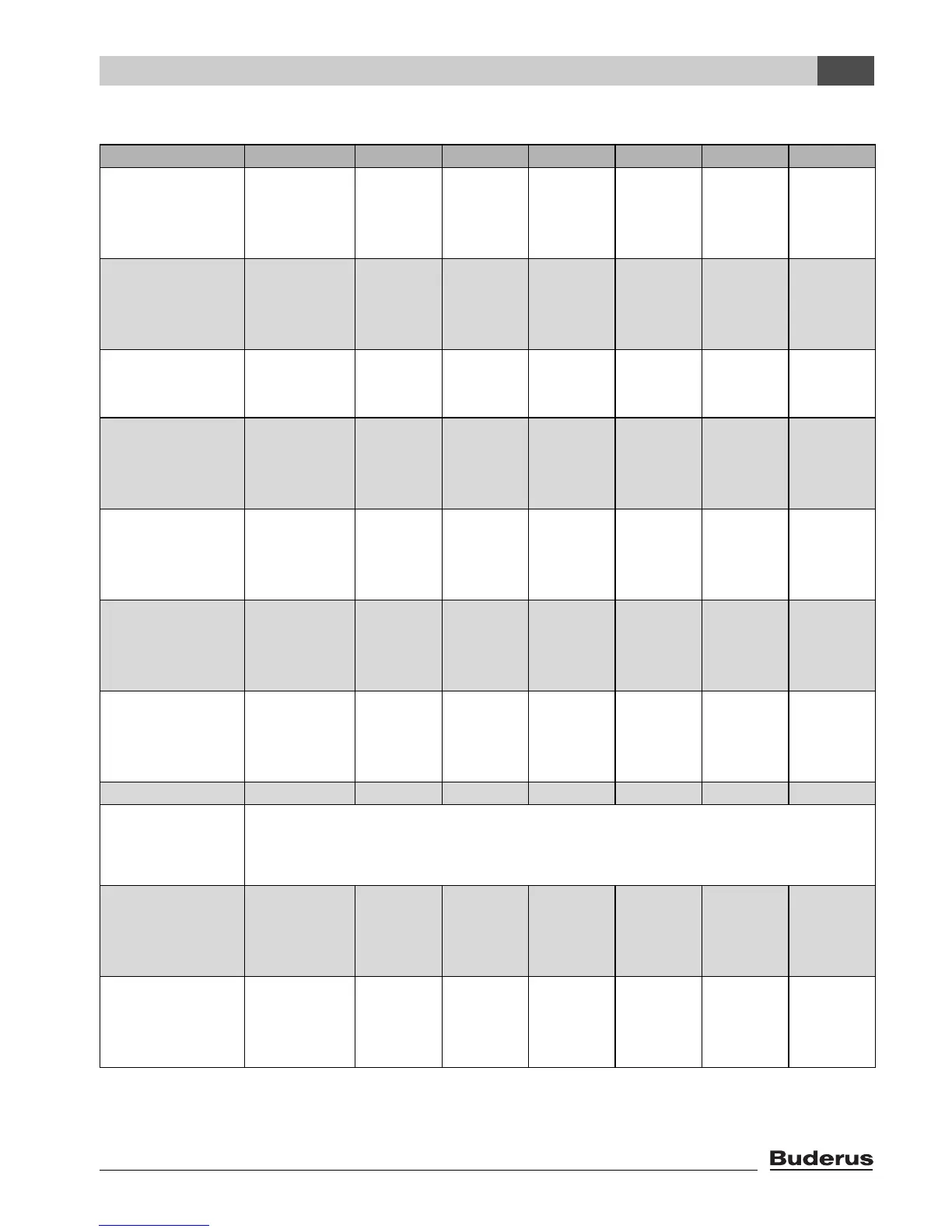
Start and stop points in the standard programs
Program Day ON OFF ON OFF ON OFF
family
(factory setting)
Mon–Thu
Fri
Sat
Sun
5:30
5:30
6:30
7:00
22:00
23:00
23:30
22:00
early morning
(early shift work)
Mon–Thu
Fri
Sat
Sun
4:30
4:30
6:30
7:00
22:00
23:00
23:30
22:00
evening
(late shift work)
Mon–Fri
Sat
Sun
6:30
6:30
7:00
23:00
23:30
23:00
morning
(part-time work,
mornings only)
Mon–Thu
Fri
Sat
Sun
5:30
5:30
6:30
7:00
8:30
8:30
23:30
22:00
12:00
12:00
22:00
23:00
afternoon
(part-time work in the
afternoon)
Mon–Thu
Fri
Sat
Sun
6:00
6:00
6:30
7:00
11:30
11:30
23:30
22:00
16:00
15:00
22:00
23:00
midday
(at home at midday)
Mon–Thu
Fri
Sat
Sun
6:00
6:00
6:00
7:00
8:00
8:00
23:00
22:00
11:30
11:30
13:00
23:00
17:00 22:00
single person Mon–Thu
Fri
Sat
Sun
6:00
6:00
7:00
8:00
8:00
8:00
23:30
22:00
16:00
15:00
22:00
23:00
senior citizens Mon–Sun 5:30 22:00
new program If you select new programme, you can use the enter switch point option to create a new program.
You can save and later select two new or modified switching programs as user defined 1 or user
defined 2.
user defined 1 Mon–Thu
Fri
Sat
Sun
user defined 2 Mon–Thu
Fri
Sat
Sun
Tab. 12 Standard programs (ON = day mode, OFF = night mode)







 To Next Page