Chapter2 Using your LinkStation
LinkStation Setup Manual
3535
1
2
3
4
You can restrict the access to the shared folder by the user name selected.
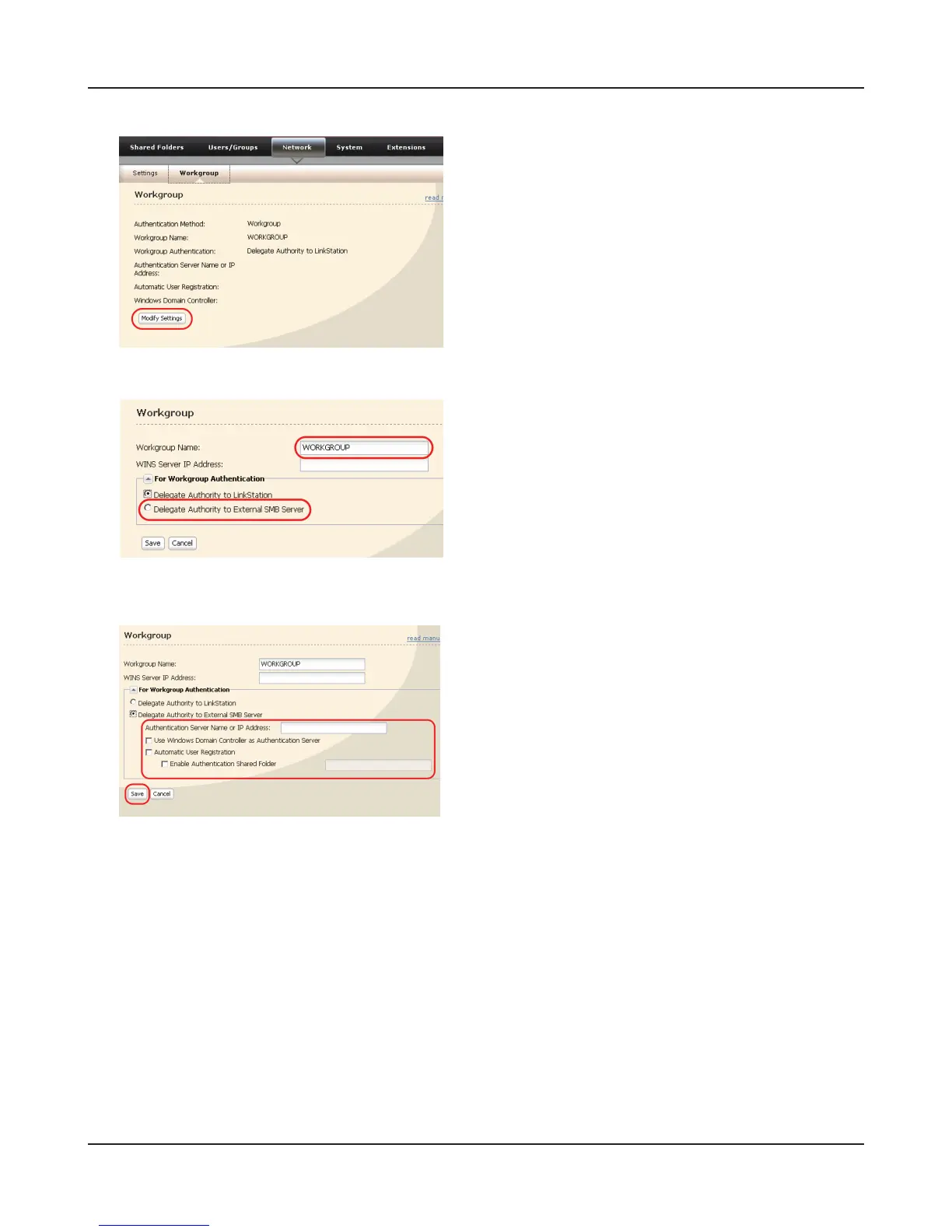
1 Enter the workgroup name.
Note: – If you specify the Windows Domain Con-
troller as an external SMB authentication
server, you need to match the workgroup
of this unit to the Windows Domain Con-
troller name.
2 Select [Delegate Authority to External SMB
Server].
1 Enter the name or IP address of an authentica-
tion server.
Note: – When connecting using AFP and FTP, al-
ways use an IP address. It may not be au-
thenticated if a server name is used.
2 Click [Use Windows Domain Controller as Au-
thentication Server] and [Automatic User Reg-
istration] to insert check marks.
3 Click [Enable Authentication Shared Folder]
to insert the check mark, and enter the shared
folder name for the authentication test.
4 Click [Save].
1 Click [Network] - [Workgroup] on the LinkSta-
tion conguration screen.
2 Click [Modify Settings].















 To Next Page