40417 GT PLATINUM
41
INSTALLING THE TUNE (TOYOTA VEHICLES)
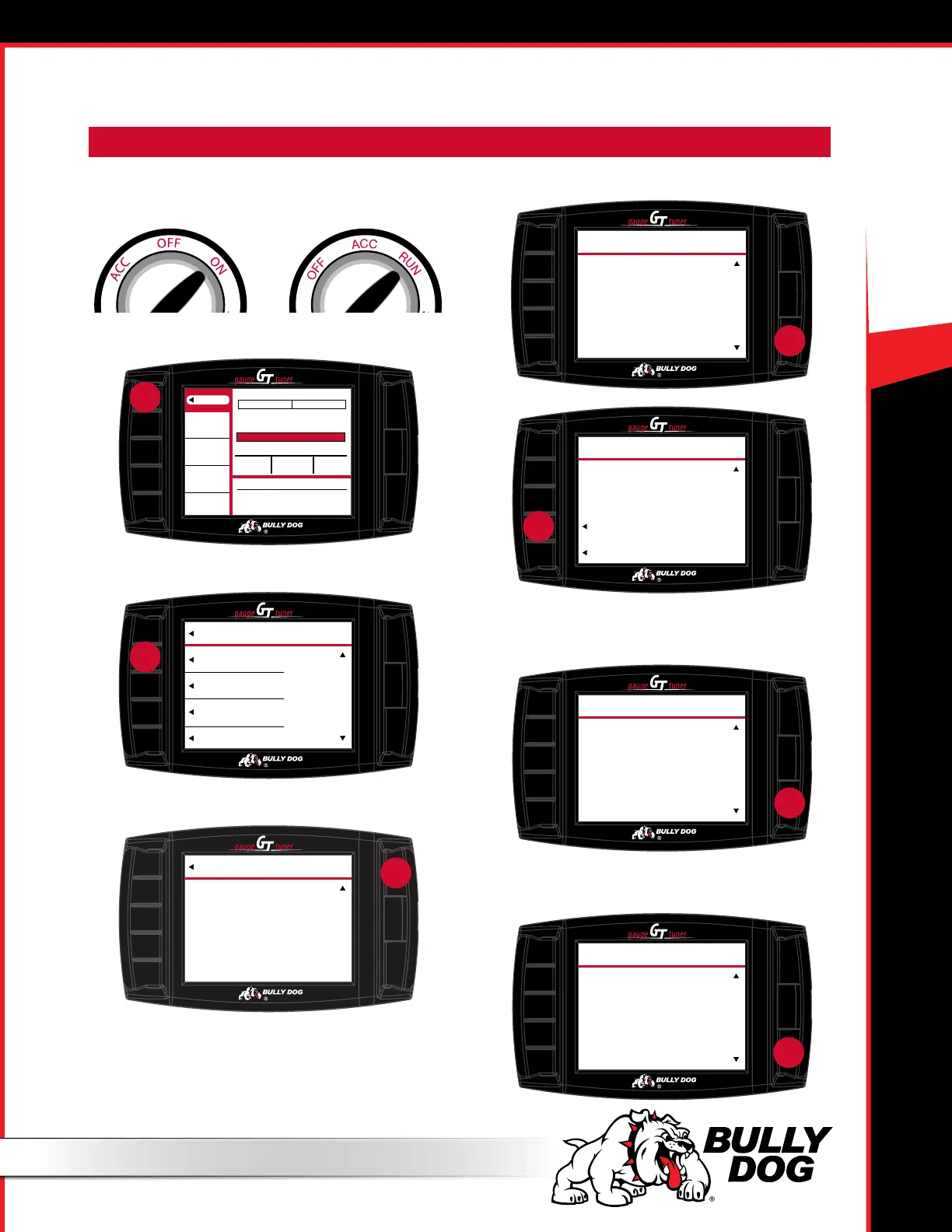
1. Turn the key to the “on” (or “run”) position.
a. Do NOT start the engine.
2. Go to the Menu (top left button).
3. Choose Install Download.
4. Verify the vehicle type and press YES (top right button).
5. Read the disclaimer and press AGREE.
6. Read the download requirements, press MORE and press
CONTINUE.
7. Read the entire Key Cycle disclaimer, pressing MORE to
scroll and pressing CONTINUE to accept.
IMPORTANT NOTE: Steps 1-9 must be completed with/inside the vehicle.
Menu
RPM
RPM
Speed
MPH
Load
%
Coolant
°F
0
0
0
0
Wasted Energy:
Driving Eciency:
Decel 0 Accel
Low High
Average MPG Gallons Grade
_ _
0.0
ECON TIP: Econ Goal
Set a more achievable
fuel economy goal.
press
TOP
MORE
Are you the owner of this
vehicle? Have you read the
disclaimer, and do you agree
to all of its terms and conditions?
WARRANTY AND END USER
AGREEMENT TERMS AND
CONDITIONS
DISCLAIMER
hold
TOP
AGREE
DISAGREE
To download this agreement
go to:
www.bullydog.com/warranty.php
This is the nal opportunity
to exit the download
procedure by pressing disagree.
DISCLAIMER
press
DOWNLOAD REQUIREMENTS
– Computer With Internet
– Battery Charger.
– Download only during Bully
Dog Business Hours (8AM -
5PM MST).
– Do Not Download on the Side
of the Road, Parking Lot, or
TOP
MORE
PRESS
TWICE
press
TOP
MORE
IMPORTANT!!!
YOU MUST READ THIS TEXT!!!
In all Toyota applications, it is very
important that you do not turn the
key during the install process. If the
screen does not say to cycle the
key, DO NOT CYCLE THE KEY,
TRY TO START THE TRUCK OR TURN
THE KEY TO THE OFF POSITION
until you have called Tech Support.
KEY CYCLES DISCLAIMER
press
MAIN MENU
Go Back
to General Disp
Install Download
Gauge Setup
Set User Options
Performance Testing
press
CAUTION
Go Back
to Main Menu
Please verify vehicle type.
Installing on a
(your vehicle make and model)
If this is correct press Y to continue.
If not, restart and select the correct
vehicle.
YES
press



 To Next Page