40417 GT PLATINUM
42
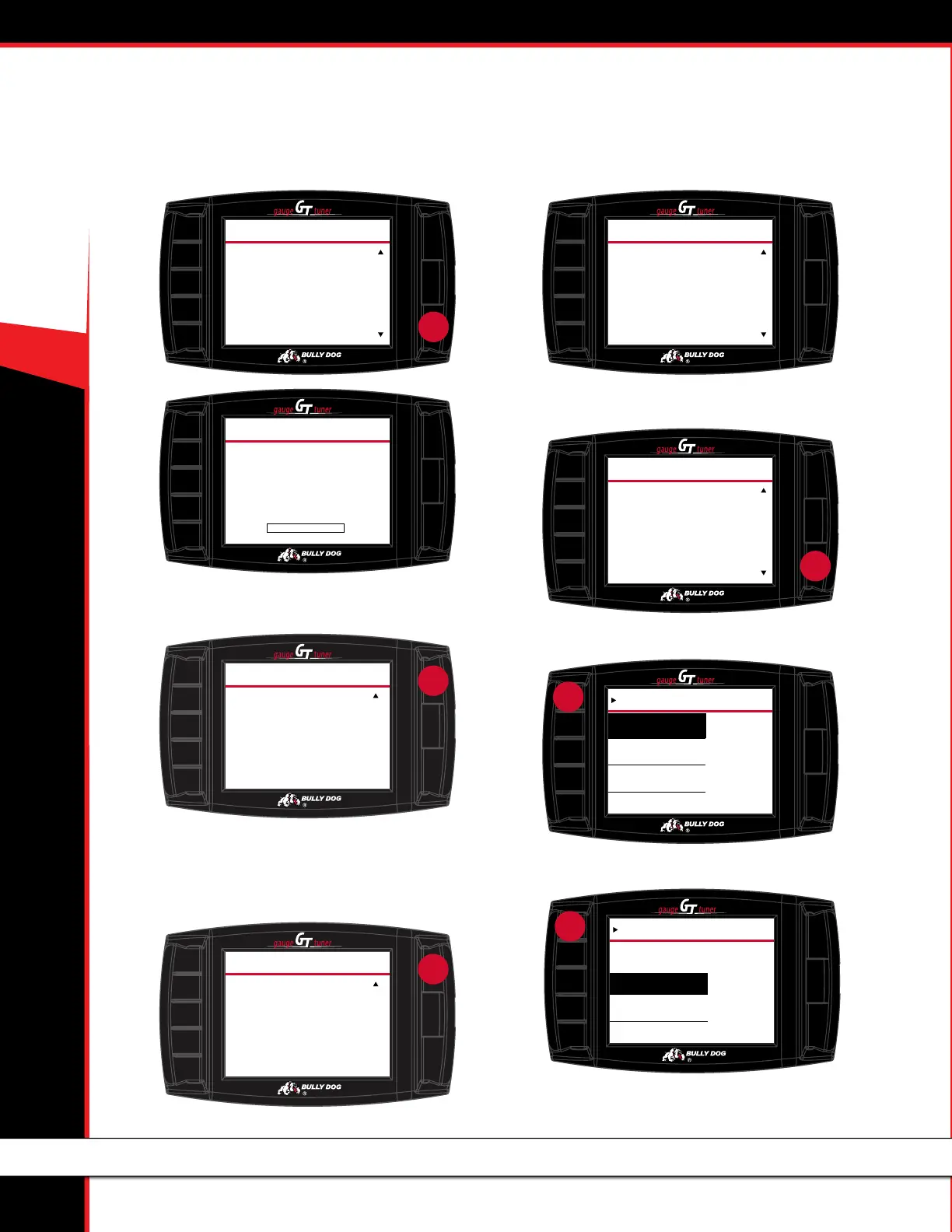
8. Read the battery charger screen, press MORE and press CON-
NECTED when the charger is connected.
9. Ensure key is in the RUN or ON position and press CONTINUE
Check battery and connect charger if needed. If output is ≤12V,
installation will not continue until at least 12.1V is available.
10. Once data is retrieved, turn the key to OFF and press
CONTINUE.
11. If the tuning screen below appears, skip to 22. Otherwise
continue to 12.
12. Read the Tune Selection screen and press CONTINUE.
13. Select tune.
(This screen is displayed for only certain vehicles.)
BATTERY CHARGER
Please make sure you connect
a battery charger with at
least 10 Amp Supply.
Failure to do so may render
your vehicle unusable.
Is there a battery charger
connected?
TOP
MORE
PRESS
TWICE
press
You Have Already Selected
Do You Want To Select
Another Tune?
X of 3
Tune X has been Set.
S
TUNING
YES
NO
TOP
MORE
Now you will be able to select
up to 3 dierent tunes, plus
a Stock tune. Please select a
power level then press ENTER.
Do the same for the speed
limiter selection. You will
have to do this for each
tune you select.
After you have selected
the settings for up to 3
TUNE SELECTION
press
POWER LEVEL
Premium
Regular
Select
Power
Level
Tow
Stock
press
ENTER
SHIFT POINTS
Premium
Performance
Select Shift Points
Stock
press
ENTER
Loading File from SD card.
Please Wait...
Do Not Unplug GT!
0 50 100
LOADING INSTRUCTIONS FILE
0
%
CONTINUE
press
TURN KEY TO THE
RUN
POSITION
PRESS CONTINUE
WITHOUT TURNING COUNTERCLOCKWISE
KEY RUN
CONTINUE
press
TURN KEY TO THE
RUN
POSITION
PRESS CONTINUE
WITHOUT TURNING COUNTERCLOCKWISE
KEY RUN
INSTALL THE TUNE (TOYOTA VEHICLES)



 To Next Page