EasyManua.ls Logo

Burmester 102 - THE REMOTE CONTROL; Remote: Power and Display Functions; Remote: Playback and Navigation; Remote: Input and Source Selection

Burmester 102
24 pages
Print Icon
To Next Page IconTo Next Page
To Previous Page IconTo Previous Page
Loading...
6
THE REMOTE CONTROL
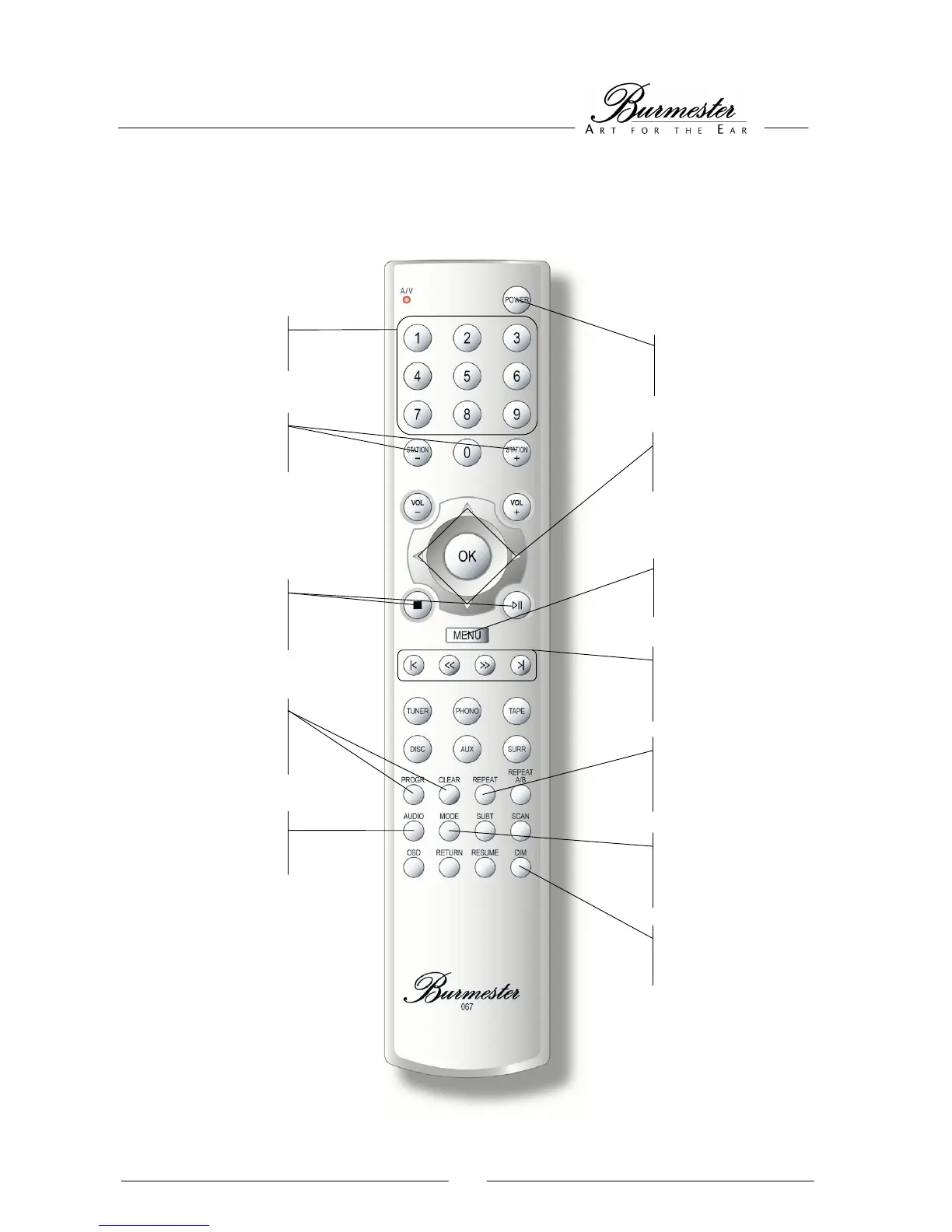
All functions of the 102 may be controlled by remote. Just point the remote directly at the IR sensor (6) and press
the according buttons.
* If this function has been activated in the menu
POWER button
switches the
CD Player on or off
STATION buttons
advance through the
inputs sequentially *
REPEAT button
repeats the running
track or the whole CD
DIM button
changes the front panel
illumination
NUMERICAL buttons
for a direct choice of
tracks
AUDIO button
changes the sampling
rate
Navigation
buttons guide you
through the menu
MENU button
activates menu
PLAY & STOP
buttons
starts, pauses and
stops the playback
PROG. & CLEAR
buttons
crea
own personal playlist
MODE button
switches the time
display
Skip buttons
fast-forward and
rewind, skip tracks
back and forth

Related product manuals