GB
Page 24 of 62
INSTRUCTION, USE AND
MAINTENANCE MANUAL
IN THE CASE OF PNEUMATIC
MODELS, ON STARTING, THE
PNEUMATIC MANDREL IS AL-
WAYS OPENED. ALWAYS KEEP
YOUR HANDS AND OTHER PARTS
OF THE BODY AWAY FROM THE
MOVING MANDREL. ALSO TAKE
CARE IF A WHEEL IS ALREADY
FITTED ON THE MANDREL, AS
THIS COULD BE FORCED OFF THE
SHAFT DURING THE OPENING OF
THE MANDREL ITSELF.
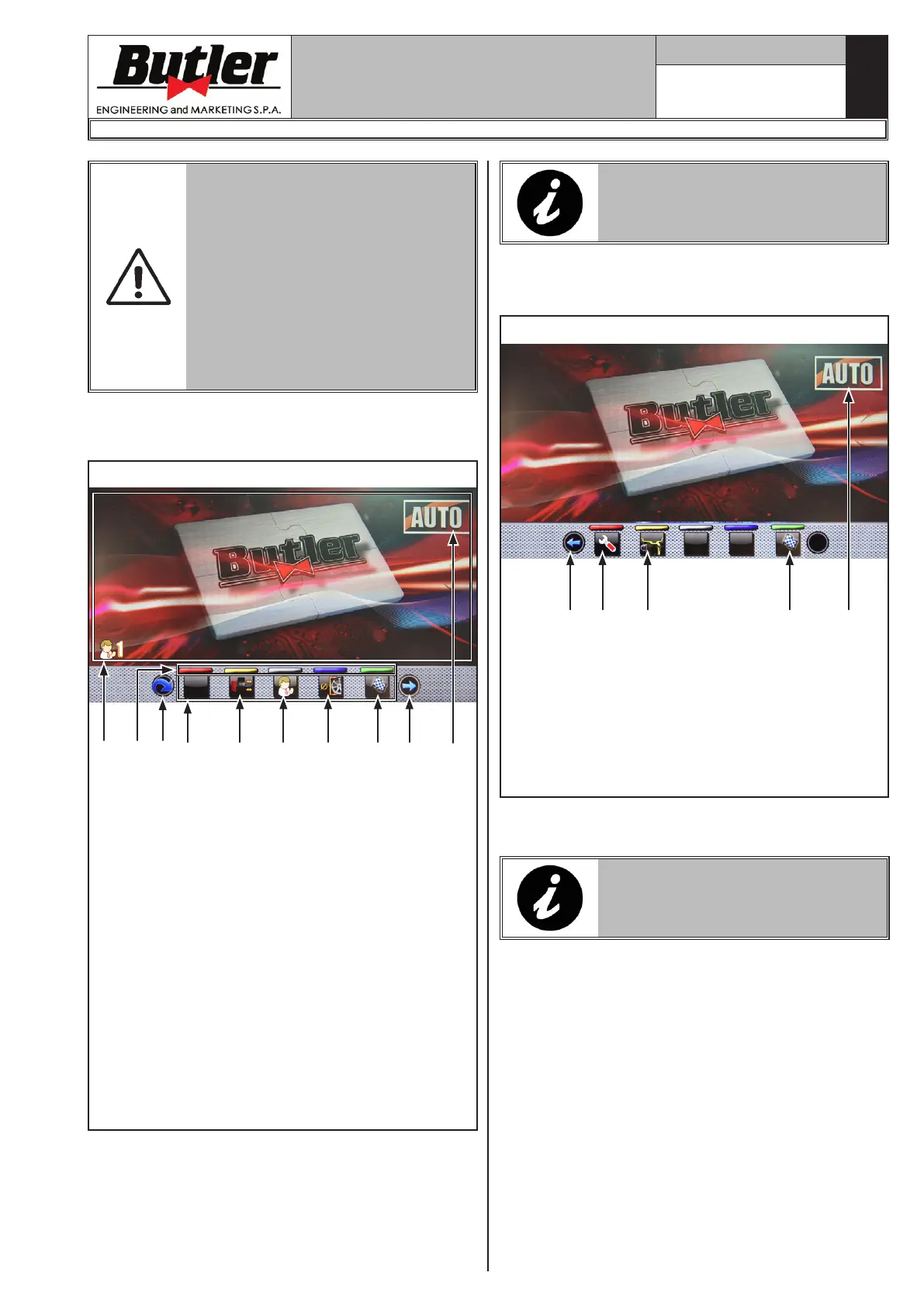
Wait a few seconds until the complete loading of the op-
erational program. The equipment is ready to operate
when the main screen "Home" appears on the monitor..
1 2 34 5
A
C
Fig. 31
6
6
KEY
A – Area displaying operations information/selection/
setting and modification
B – Colour identification buttons to use (only for
keyboard panel)
C – Function icons
1 – Programs and measurements acquisition but-
tons
2 – Wheel spin push-button
3 – Go to next page
4 – Pneumatic mandrel opening/closing (only for
LIBRAK380P.3DTEC - LIBRAK430P.3DTEC
models)
(generally used in case of emergency)
5 – User management (if enabled) (user management
is not enabled by default)
6 – Automatic scanning program setting/display
push-button (AUTO/ALU-S/DYN)
B
ALL THE PUSH-BUTTONS ON THE
LOWER BAR (B) CAN BE SELECT-
ED BY TOUCH (ONLY FOR TOUCH
CONTROL PANELS).
Press the button (Fig. 31 ref. 3) to display a second
page where you can access "User/Technical assistance"
and "Run-out" menu (see Fig. 32).
Fig. 32
KEY
1 – User menu/assistance menu
2 – Run-out menu
3 – Return to previous page
4 – Wheel spin push-button
5 – Automatic scanning program setting/display
push-button (AUTO/ALU-S/DYN)
1 23 4 5
In order to turn off the machine, simply press the "OFF"
switch (Fig. 17 ref. 1).
WHEN THE EQUIPMENT IS TURNED
OFF LOSES ALL THE MEASURE-
MENTS AND THE STORED DATA
(SIZE, SPINS, USERS, ETC ...).
LIBRAK380.3DTEC - LIBRAK380P.3DTEC - LIBRAK430.3DTEC - LIBRAK430P.3DTEC
1297-M021-1_B


 To Next Page