INSTRUCTION, USE AND
MAINTENANCE MANUAL
GB
Page 33 of 62
- Press the arrows or to modify the fit-
ting of the adhesive weight on the wheel outer side
(movement of the laser pointer) (blue-highlighted-
values). Once the wished position is reached press
. When the push-button is pressed,
the blue highlighted values are updated with the new
set position.
DURING THE MODIFICATION OF
THE WEIGHTS FITTING POINT
(LASER POINTER MOVEMENT)
THE BLUE-HIGHLIGHTED-VALUES
ARE NOT UPDATED UNTIL THE
BUTTON IS PRESSED
.
- Press the
push-button to perform the recal-
culation of the value of the weight to be fitted in the
new set position. The screen page in (Fig. 42) is
displayed again with the updated values.
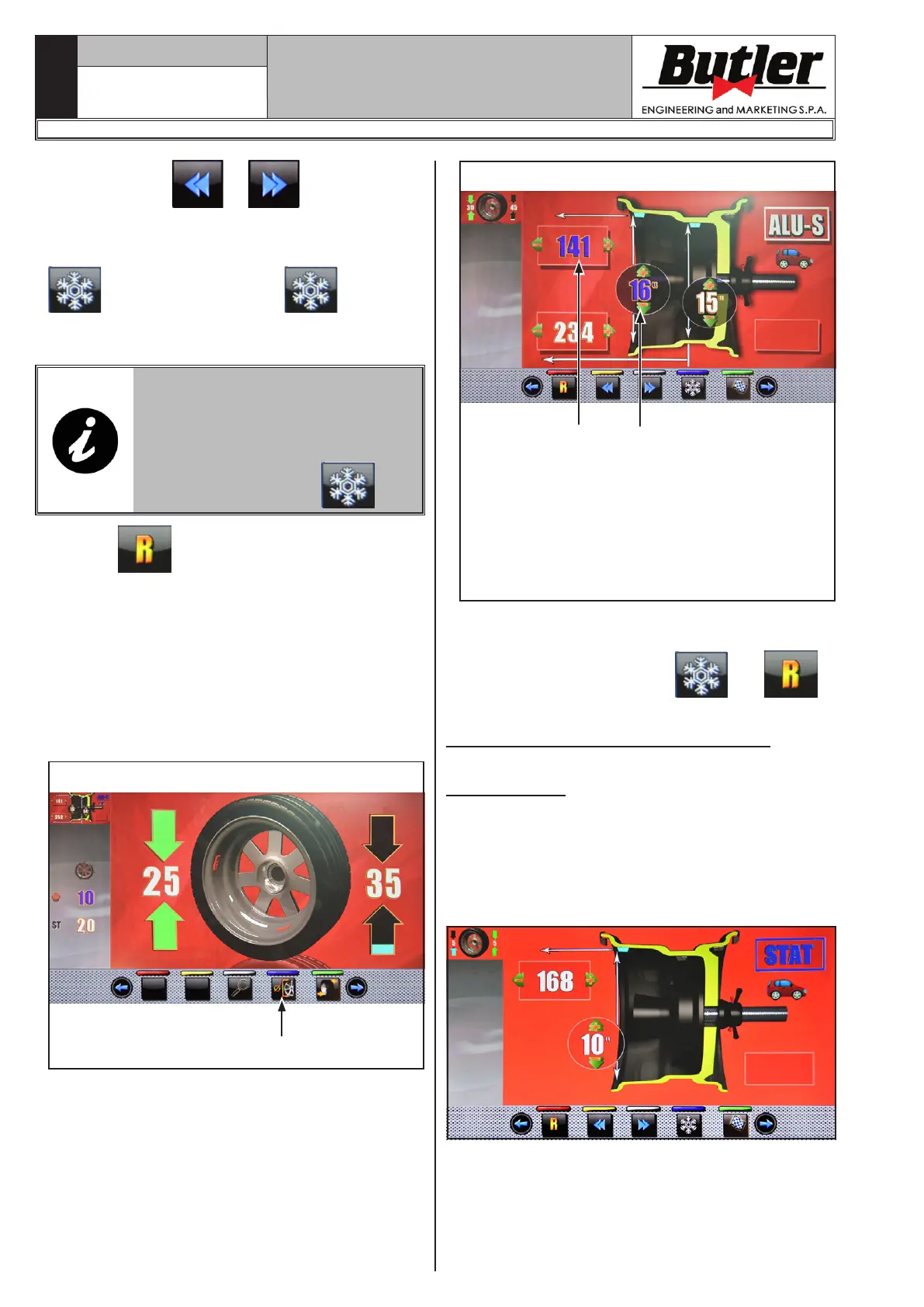
- In case the operator wants to modify the weight fit-
ting point “wheel outer side”, simply press the push-
button (Fig. 42 ref. 2). The wheel, the laser and the
screen page are pre-arranged for the application of
such weight.
The following screen page is displayed:
1
Fig. 43
- Press the “programs and measurements acquisition”
button (Fig. 43 ref. 1). The following screen page
is displayed:
Fig. 44
21
KEY
1 – Distance of the point where fitting the adhesive
weight on the inside of the wheel (modifiable
field coloured in blue)
2 – Rim diameter of the point where fitting the
adhesive weight on the inside of the wheel
(modifiable field coloured in blue)
- Proceed as described before for the modification of
the weight fitting point “wheel outer side”.
- At the end press push button
and .
14.6 Standard balancing programs
14.6.1 Static
The STATIC program permits balancing wheels by
fitting adhesive weights on the outer and inner sides
of the rim. Enter the measurements (see Par. 14.2.1)
and proceed as described in Par. 14.5.
At the end of the procedure, the wheel balancing condi-
tions can be checked by performing a trial spin.
The procedure has now been completed.
1297-M021-1_B
LIBRAK380.3DTEC - LIBRAK380P.3DTEC - LIBRAK430.3DTEC - LIBRAK430P.3DTEC


 To Next Page