GB
Page 30 of 62
INSTRUCTION, USE AND
MAINTENANCE MANUAL
14.3 Indicative display of points where to
detect measures/to fit weight
Depending on the type of program selected,the machine
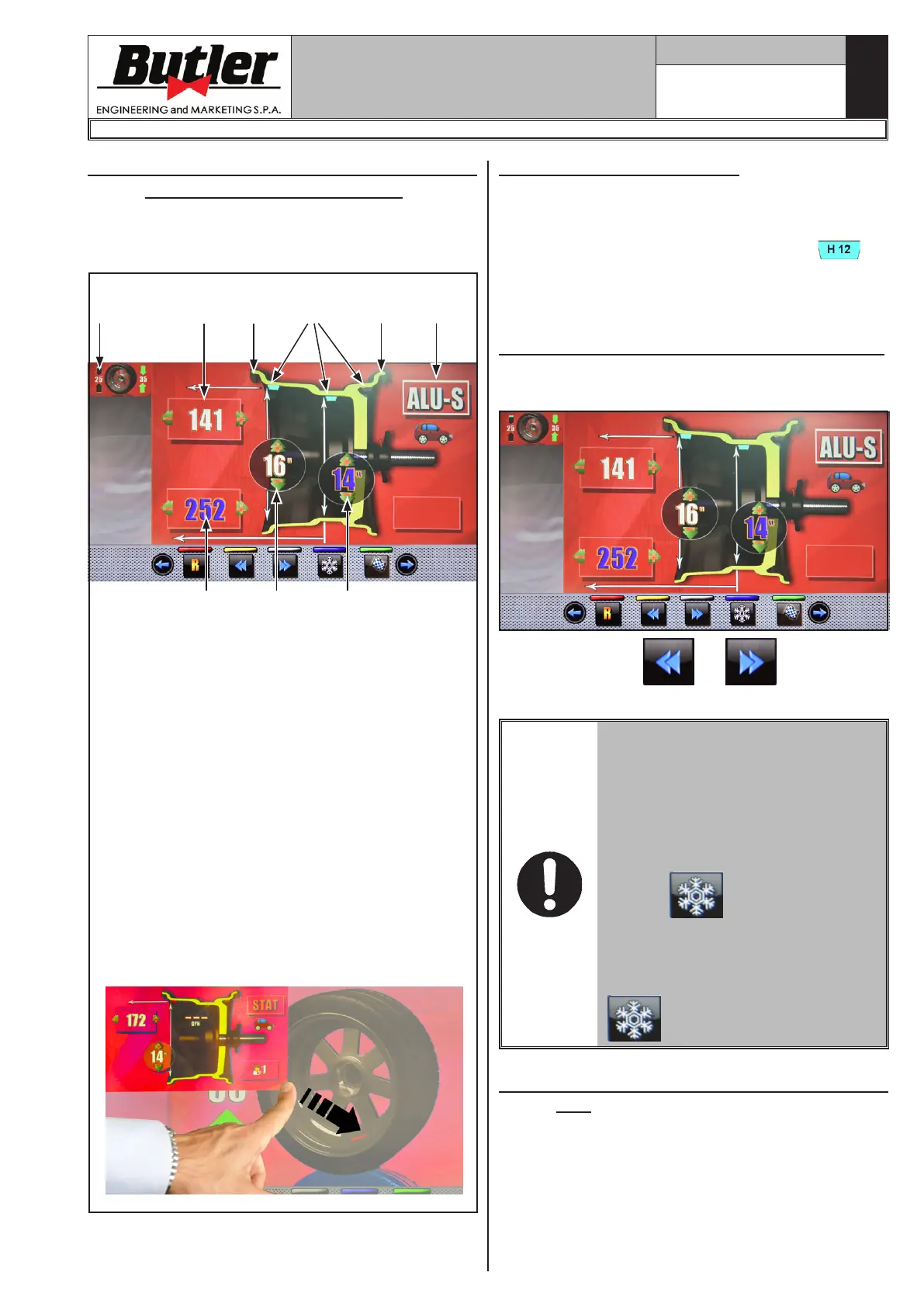
shows on the monitor the guideline points where to
apply weights (Fig. 39 ref. 4-5).
Fig. 39
2
5
7
6 5 34
KEY
1 – Distance of the point where fitting the adhe-
sive weight on the outside of the wheel
2 – Rim diameter in the point where fitting the
adhesive weight on the outside of the wheel
3 – Balancing mode
4 – Point at which to fit the adhesive weight
5 – Point at which to fit the clip weight
6 – Last unbalance detected by the machine (*)
7 – Distance of the point where fitting the adhe-
sive weight on the inside of the wheel
8 – Rim diameter in the point where fitting the
adhesive weight on the inside of the wheel
(*) By sliding your finger from the panel (ref. 6)
towards the bottom right corner of the display,
you get temporary enlargement of the panel
(ref. 6), as shown in the illustration below
(only with touch screen).
81
14.3.1 Weights positioning
The monitor displays when it is absolutely necessary
that the weight is applied at "12 o'clock" position. Pay
particular attention to the content of the weights iden-
tification icons since if the following words are
displayed, then the icon corresponding weight has to
be applied at "12 o'clock" position (typical of ALU-S1,
ALU-S2 programs).
14.4 Displaying the active/modifiable field
In case of manual measures modifications, the active
field turns blue.
Press the buttons or to modify the
weight fitting point highlighted in blue on the screen.
WHEN THE ABOVE MENTIONED
PUSH-BUTTONS ARE PRESSED,
THE BLUE HIGHLIGHTED VALUES
REMAIN THE SAME WHILE THE
LASER POINTER MARKS IN REAL
TIME THE NEW WEIGHT FITTING
POINT.
AT THE END OF THE OPERATION
PRESS
. THE BLUE HIGH-
LIGHTED VALUES ARE UPDATED
TO THE REAL VALUE WHICH IS
STORED THROUGH THE PRES-
SIGN OF THE PUSH-BUTTON
.
14.5 Wheel balancing screen page descrip-
tion
After executing the spin of the wheel, the monitor dis-
plays a series of important information that helps the
operator in his operations and subsequent choices.
LIBRAK380.3DTEC - LIBRAK380P.3DTEC - LIBRAK430.3DTEC - LIBRAK430P.3DTEC
1297-M021-1_B


 To Next Page