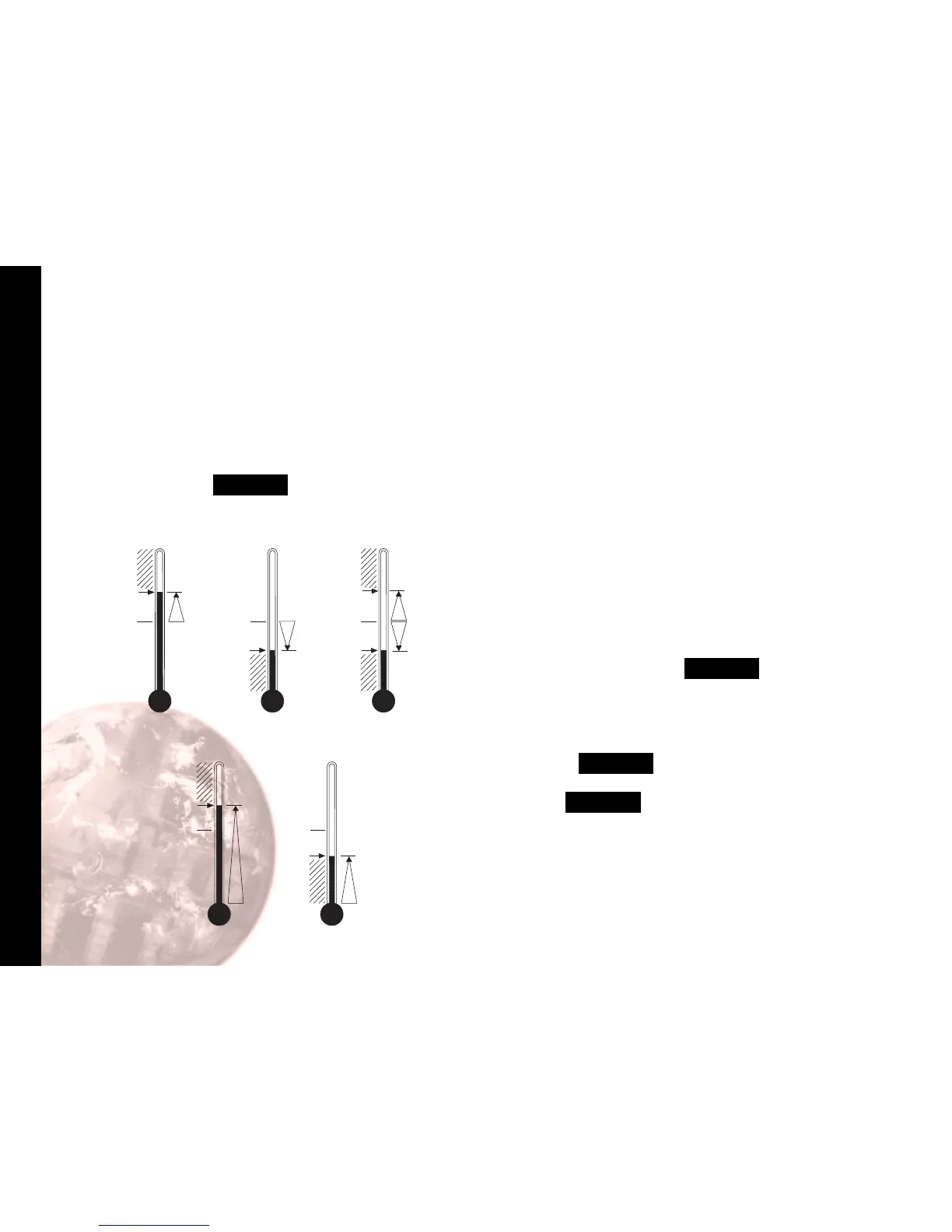
The second setpoint SP2 can be used to trigger an alarm
or as a proportional control output.
TO CONFIGURE SP2 AS AN ALARM
Enter program mode.
Select level 2 then SP2.A , followed by the required
option below:
dV.hi
sets off alarm signal when temperature rises above
a pre-set temperature above the setpoint.
dV.Lo
sets off alarm signal when temperature falls below
a pre-set temperature below the setpoint.
bAnd
sets off alarm signal when temperature rises above
or falls below a pre-set temperature above or
below the setpoint.
FS.hi
sets off alarm signal when the temperature rises
above setpoint to a pre-set temperature above
scale minimum.
FS.Lo
sets off alarm signal when the temperature falls
below setpoint to a pre-set temperature above
scale minimum.
Select level 1 and select SET.2 and set the required
setpoint value (y°).
If the factory set hysteresis 2.0°C/3.6°F is unsuitable:
Index to BND.2 and adjust the setting.
Check CYC.2 is set to
on.oF
(for alarm).
Exit program mode. SP2 is now operational as an alarm.
CooL
see heat-cool configuration, page 23.
Second Setpoint
SECOND SETPOINT (SP2)


 To Next Page