Mechanical Installation
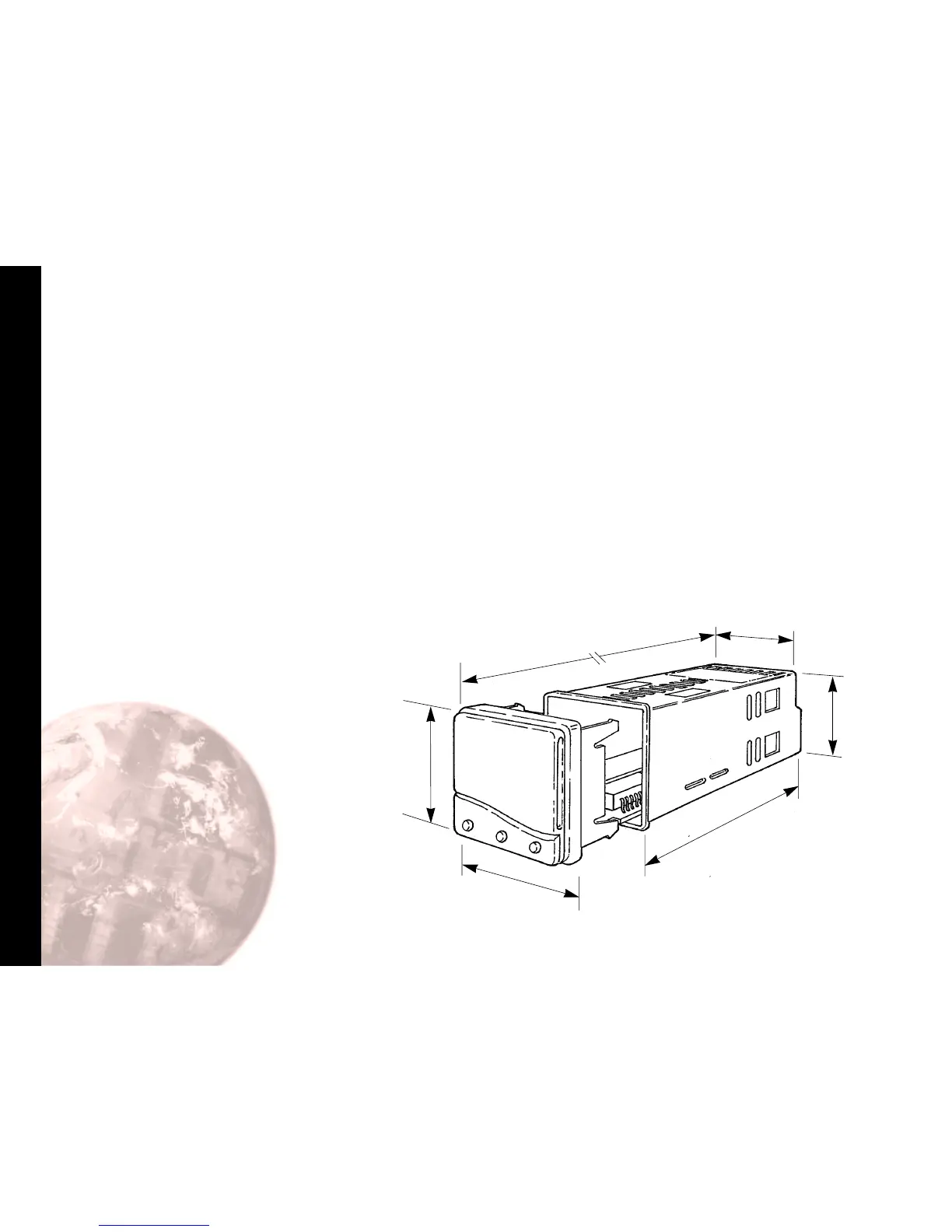
MOUNTING
To mount a Controller proceed as follows:
1 Check that the controller is correctly orientated and
then slide the unit into the cutout.
2 Slide the panel clamp over the controller sleeve
pressing it firmly against the panel until the controller is
held firmly.
3 The controller front bezel and circuit board assembly
can be unplugged from the sleeve. Grasp the bezel
firmly by the recesses on each side and pull. A
screwdriver can be used as a lever if required.
4 When refitting the bezel assembly it is important to
press it firmly into the sleeve until the latch clicks in
order to compress the gasket and seal to NEMA4X/IP66.
Cleaning
Wipe down with damp cloth (water only)
28
44.8
(1.76)
44.8
(1.76)
106.7 (4.2)
with gasket fitted
51.0 (2.0)
includes gasket
51.0
(2.0)
includes
gasket
116.2
(4.57)
Model 9300
Dimensions in mm (inches)
Note: The controller should be isolated
before removing or refitting it in the sleeve,
and electrostatic precautions should be
observed when handling the controller
outside the sleeve.


 To Next Page