44
OPERATING INSTRUCTIONS FOR GENEVA
TM
, NIAGARA
®
, TAHITIAN
®
,
ELATION
®
, ASPIRE
®
, MOOREA
TM
, MARTINIQUE
®
, AND KAUAI
®
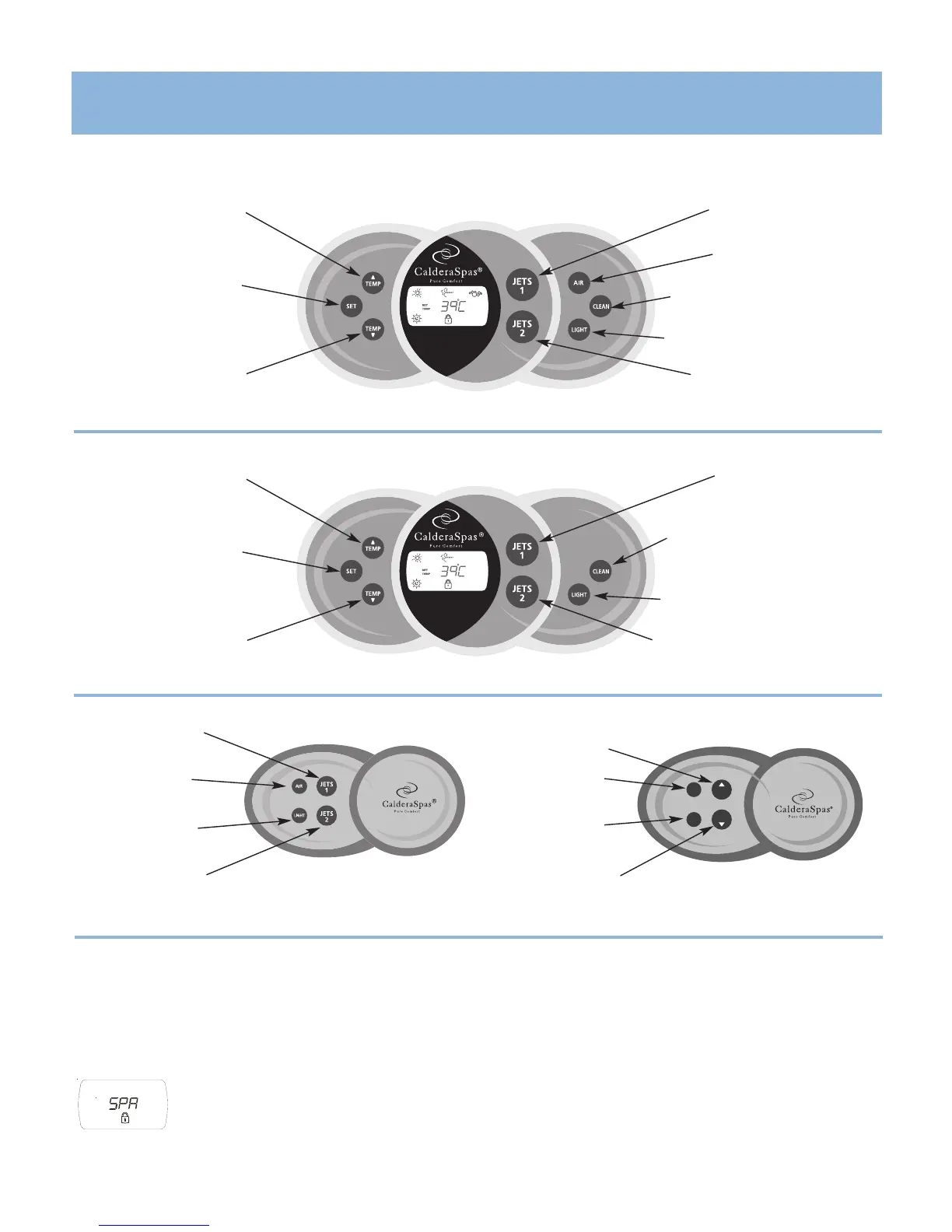
TEMP (up) button
Increases the temperature
JETS 1 button
Operates jet pump 1
AIR button
Operates the air jets
CLEAN button
Operates a ten-minute clean-up cycle
LIGHT button
Operates the interior & exterior lighting
JETS 2 button
Operates jet pump 2 & spas with
Waterfall
JETS 1 button
Operates jet pump 1
AIR button
Operates the air jets
LIGHT button
Operates the interior &
exterior lighting
JETS 2 button
Operates jets pump 2
& Waterfall
SET button
Used to initiate advanced
panel features.
TEMP (down) button
Decreases the temperature
Auxiliary Panel
LOCKING FEATURES
The locking features, TEMPERATURE LOCK and SPA LOCK, are enabled from the control panel by a specific combination of buttons. Once enabled, a lock will remain
active until the specific button combination is applied to disable the lock. Even if power is disconnected from the spa and soon thereafter reapplied (such as a power
outage), the lock will remain in place.
The “SET” button is used to initiate advanced panel features such as the spa panel lock, temperature lock, display inversion, and color wheel mode.
SPA LOCK
The Spa Lock feature deactivates all of the functions of the control panel. It is generally used to prevent unwanted use of the spa.
To activate the Spa Lock, press “SET” button + “TEMP ▼” button and hold for three seconds until the SPA and lock symbol are illuminated.
To deactivate the Spa Lock, press “SET” button + “TEMP ▼” button and hold for three seconds until the SPA and lock symbol are no longer
illuminated.
Main Control Panel
Geneva • Niagara • Tahitian • Moorea • Hawaiian
Geneva • Niagara • Tahitian
®
TEMP (up) button
Increases the temperature
JETS 1 button
Operates jet pump 1
CLEAN button
Operates a ten-minute clean-up cycle
LIGHT button
Operates the interior & exterior lighting
JETS 2 button
(
Elation, Aspire
&
Martinique
only)
Operates jet pump 2 & spas with
Waterfall
SET button
Used to initiate advanced
panel features.
TEMP (down) button
Decreases the temperature
Elation • Aspire • Martinique • Kauai
Main Control Panel
CONTROL PANELS



 To Next Page